SYMPTOM:
After upgraded from Strategy 10.4 version to Strategy 10.9 version, user is unable to connect to the Oracle Essbase 11.1.2.4 cubes. An error is returned as below:
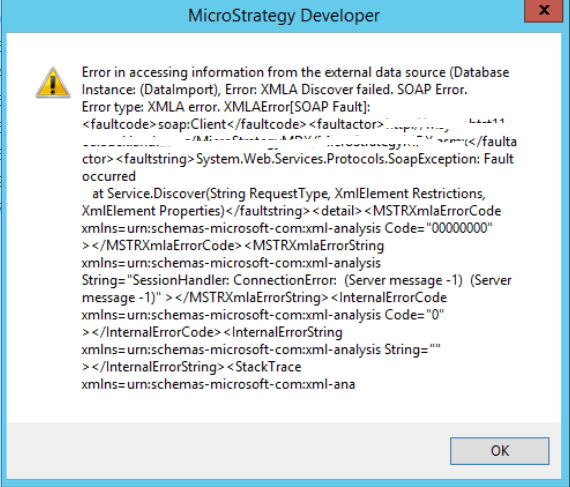
[Error] Failed to connect to data source. Error message: XMLA Discover failed. SOAP Error.
Error type: XMLA error. XMLAError[SOAP Fault]: <faultcode>soap:Client</faultcode><faultactor>http://xxxx</faultactor><faultstring>System.Web.Services.Protocols.SoapException: Fault occurred
at Service.Discover(String RequestType, XmlElement Restrictions, XmlElement Properties)</faultstring><detail><MSTRXmlaErrorCode xmlns=urn:schemas-microsoft-com:xml-analysis Code="00000000" ></MSTRXmlaErrorCode><MSTRXmlaErrorString xmlns=urn:schemas-microsoft-com:xml-analysis String="SessionHandler: ConnectionError: (Server message -1) (Server message -1)" ></MSTRXmlaErrorString><InternalErrorCode xmlns=urn:schemas-microsoft-com:xml-analysis Code="0" ></InternalErrorCode><InternalErrorString xmlns=urn:schemas-microsoft-com:xml-analysis String="" ></InternalErrorString><StackTrace xmlns=urn:schemas-microsoft-com:xml-analysis String=" at XMLA.OCI.DiscoverHandler.getSchemaInfo(String iSchemaType, StringBuilder sbRowXml, XmlElement RestrictionList, XmlElement PropertyList, XmlElement connectionInfo, String iUserID, String iPwd, String iUsePool)
at Service.Discover(String RequestType, XmlElement Restrictions, XmlElement Properties)" ></StackTrace></detail>. The embedded SOAP error is: m:xml-analysis" /><MSTRXmlaErrorString MSTRXmla:String="SessionHandler: ConnectionError: (Server message -1) (Server message -1)" xmlns:MSTRXmla="urn:schemas-microsoft-com:xml-analysis" xmlns="urn:schemas-microsoft-com:xml-analysis" /><InternalErrorCode MSTRXmla:Code="0" xmlns:MSTRXmla="urn:schemas-microsoft-com:xml-analysis" xmlns="urn:schemas-microsoft-com:xml-analysis" /><InternalErrorString MSTRXmla:String="" xmlns:MSTRXmla="urn:schemas-microsoft-com:xml-analysis" xmlns="urn:schemas-microsoft-com:xml-analysis" /><StackTrace MSTRXmla:String=" at XMLA.OCI.DiscoverHandler.getSchemaInfo(String iSchemaType, StringBuilder sbRowXml, XmlElement RestrictionList, XmlElement PropertyList, XmlElement connectionInfo, String iUserID, String iPwd, String iUsePool)
at Service.Discover(String RequestType, XmlElement Restrictions, XmlElement Properties)" xmlns:MSTRXmla="urn:schemas-microsoft-com:xml-analysis" xmlns="urn:schemas-microsoft-com:xml-analysis" /></detail></soap:Fault></soap:Body></soap:Envelope>. Connection String: xxxx. SQL Statement:xxx.
CAUSE:
In this case, user upgraded from Strategy 10.4 version to Strategy 10.9 version. In 10.4 version, due to the known defect in KB322001, the 11.1.2.2 Oracle Essbase Client uses 11.1.2.4 Oracle Essbase Server. After upgraded to 10.9 version, the 11.1.2.2 Oracle Essbase Client is still used. However, in version 10.9, the project which MDX Cube provider depends on is compiled from the files of Essbase 11.1.2.4 client, so the Essbase 11.1.2.4 client should be used.
ACTION:
Issue fixed after using the 11.1.2.4 Oracle Essbase Client.
KB439216
