INTRODUCTION
After migrating to database-based history list storage, users may notice that document and dashboard history list results (.strm files) are created on disk in the Intelligence Server folder of the Strategy installation as seen below:
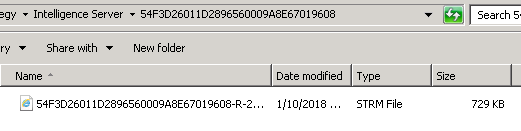
The expectation is that document results will instead be stored in the history list database instead of on disk after migrating to database-based history list.
CAUSE
This behavior occurs because by default there is a period in the "External central storage directory for Database-based History List" field under Strategy Intelligence Server Configuration->History Settings->General.
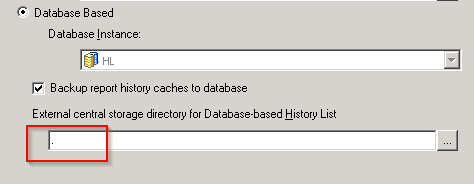
This causes document and dashboard results to be created in the working directory of the Intelligence Server which is the "Intelligence Server" folder of the installation. Inside the "Intelligence Server" folder there will be sub-folders created whose names will be the GUIDs of the various Strategy users. These sub-folders will contain the document and dashboard results.
As a result, the behavior that is observed is that of hybrid history list storage instead of true database-based history list storage.
For a comparison of database-based and hybrid history list storage refer to the following knowledge base article: KB44171
ACTION
In order to store document and dashboard results in the history list database delete the period so that the "External central storage directory for Database-based History List" field is blank. This will ensure that true database-based history list storage is used instead of hybrid history list storage.
NOTE
Users should be aware that there are advantages to using hybrid history list storage over true database-based history list storage. KB44171: What is Hybrid History List repository in Strategy Intelligence Server 9.3.0 and later discusses some of the advantages of using hybrid history list storage. KB439471
