SUMMARY:
This technical article explains an enhancement to populating data for level metrics for correct subtotals. Starting in Strategy 10.9, the parent attribute of a level metric will be added to the final pass of SQL. This enhancement has been added to the product to ensure correct subtotals and optimal handling when multiple level metrics are placed on a report.
SYMPTOM:
Users may notice performance overhead during report execution. In addition, subtotal values for certain level metrics may not display as desired.
STEPS TO REPRODUCE:
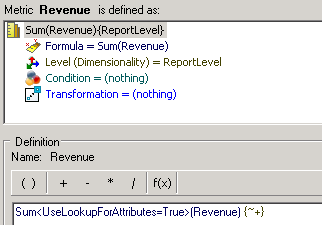
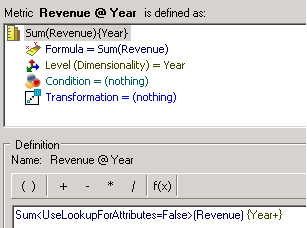
Metric Definitions:
Revenue = Sum<UseLookupForAttributes=True>(Revenue) {~+}
Revenue @ Year = Sum<UseLookupForAttributes=False>(Revenue) {Year+}
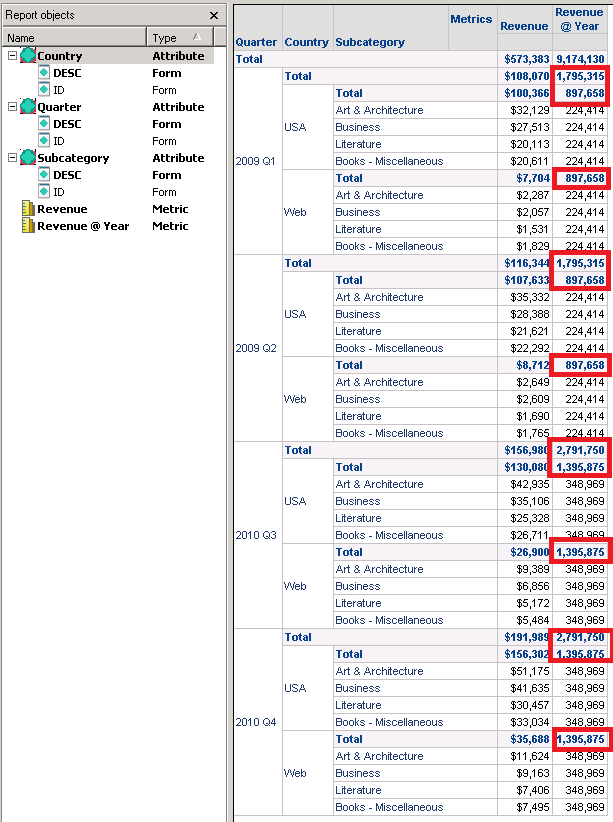
Report Definition:
SQL:
create table TPTMHEBHEMD000 nologging as
select a11.SUBCAT_ID SUBCAT_ID_INT,
a13.QUARTER_ID QUARTER_ID_2,
a12.COUNTRY_ID COUNTRY_ID,
sum(a11.TOT_DOLLAR_SALES) Revenue
from SUBCATEG_MNTH_CTR_SLS a11
join LU_CALL_CTR a12
on (a11.CALL_CTR_ID = a12.CALL_CTR_ID)
join LU_MONTH a13
on (a11.MONTH_ID = a13.MONTH_ID)
where (a11.SUBCAT_ID in (11, 12, 13, 14)
and a13.QUARTER_ID in (20091, 20092, 20104, 20103))
group by a11.SUBCAT_ID,
a13.QUARTER_ID,
a12.COUNTRY_ID
create table TUYPET5JMMD001 nologging as
select a12.YEAR_ID YEAR_ID_2,
sum(a11.TOT_DOLLAR_SALES) REVENUEYEAR
from ITEM_MNTH_SLS a11
join LU_MONTH a12
on (a11.MONTH_ID = a12.MONTH_ID)
join LU_ITEM a13
on (a11.ITEM_ID = a13.ITEM_ID)
where (a13.SUBCAT_ID in (11, 12, 13, 14)
and a12.QUARTER_ID in (20091, 20092, 20104, 20103))
group by a12.YEAR_ID
select pa11.QUARTER_ID_2 QUARTER_ID_2,
a12.QUARTER_DESC QUARTER_DESC,
pa11.COUNTRY_ID COUNTRY_ID,
a14.COUNTRY_NAME CUST_COUNTRY_DESC,
pa11.SUBCAT_ID_INT SUBCAT_ID_INT,
a15.SUBCAT_DESC SUBCAT_DESC,
pa11.Revenue Revenue,
pa13.REVENUEYEAR REVENUEYEAR
from TPTMHEBHEMD000 pa11
join LU_QUARTER a12
on (pa11.QUARTER_ID_2 = a12.QUARTER_ID)
join TUYPET5JMMD001 pa13
on (a12.YEAR_ID = pa13.YEAR_ID_2)
join LU_COUNTRY a14
on (pa11.COUNTRY_ID = a14.COUNTRY_ID)
join LU_SUBCATEG a15
on (pa11.SUBCAT_ID_INT = a15.SUBCAT_ID)
Note that Year is not part of the final pass above (in red above) and hence the subtotals at year level cannot be calculated correctly.
CAUSE:
Year is not included in the report and hence Year and hence the subtotal calculations for year metric is incorrect.
ACTION:
This enhancement is added to Strategy 10.9 and above.
If you are upgrading to Strategy 11.0 or above, to pick up the fix, enable project level setting "Data Engine Version" to 11. This property can only be enabled through Workstation. For more details on enabling the setting, refer to Change Data Engine Version.
If you are upgrading to Strategy 10.9 / 10.10 / 10.11: To pick up the fix, enable the Feature Flag "Defect fixes that may impact Data, SQL, MDX, CSI" within the Web Preferences -> Project Defaults. For more details on enabling Feature Flags refer to What are the Feature Flag options and what do they accomplish in MicroStrategy Web 10.8 and up . Starting Strategy 11.0, this Feature Flag is removed and replaced with project level setting called "Data Engine Version".
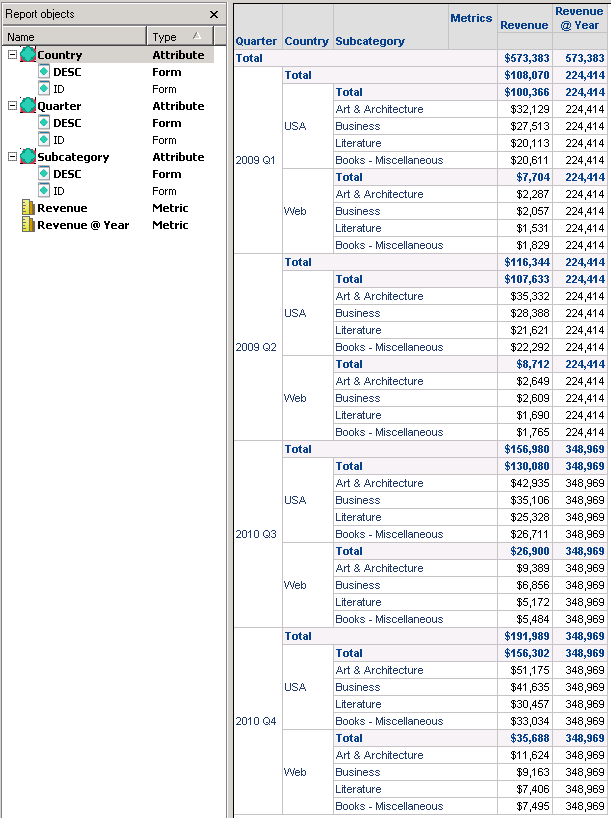
SQL:
create table TY7NT5EOIMD000 nologging as
select a11.SUBCAT_ID SUBCAT_ID_INT,
a13.QUARTER_ID QUARTER_ID_2,
a12.COUNTRY_ID COUNTRY_ID,
sum(a11.TOT_DOLLAR_SALES) Revenue
from SUBCATEG_MNTH_CTR_SLS a11
join LU_CALL_CTR a12
on (a11.CALL_CTR_ID = a12.CALL_CTR_ID)
join LU_MONTH a13
on (a11.MONTH_ID = a13.MONTH_ID)
where (a11.SUBCAT_ID in (11, 12, 13, 14)
and a13.QUARTER_ID in (20091, 20092, 20104, 20103))
group by a11.SUBCAT_ID,
a13.QUARTER_ID,
a12.COUNTRY_ID
create table TZNQLC8N6MD001 nologging as
select a12.YEAR_ID YEAR_ID_2,
sum(a11.TOT_DOLLAR_SALES) REVENUEYEAR
from ITEM_MNTH_SLS a11
join LU_MONTH a12
on (a11.MONTH_ID = a12.MONTH_ID)
join LU_ITEM a13
on (a11.ITEM_ID = a13.ITEM_ID)
where (a13.SUBCAT_ID in (11, 12, 13, 14)
and a12.QUARTER_ID in (20091, 20092, 20104, 20103))
group by a12.YEAR_ID
select pa11.QUARTER_ID_2 QUARTER_ID_2,
a12.QUARTER_DESC QUARTER_DESC,
pa11.COUNTRY_ID COUNTRY_ID,
a14.COUNTRY_NAME CUST_COUNTRY_DESC,
pa11.SUBCAT_ID_INT SUBCAT_ID_INT,
a15.SUBCAT_DESC SUBCAT_DESC,
pa13.YEAR_ID_2 YEAR_ID_2,
pa11.Revenue Revenue,
pa13.REVENUEYEAR REVENUEYEAR
from TY7NT5EOIMD000 pa11
join LU_QUARTER a12
on (pa11.QUARTER_ID_2 = a12.QUARTER_ID)
join TZNQLC8N6MD001 pa13
on (a12.YEAR_ID = pa13.YEAR_ID_2)
join LU_COUNTRY a14
on (pa11.COUNTRY_ID = a14.COUNTRY_ID)
join LU_SUBCATEG a15
on (pa11.SUBCAT_ID_INT = a15.SUBCAT_ID)
Year was added to the final pass of SQL (in blue above)) in this instance allowing better calculation of subtotal.
In Strategy 2019 Update 3, the Engine was improved on its logic when it comes to more complex cases involving subset report , in which the template contains a subset of report objects.
In this case, we create a similar but more complex report compared to the one above.
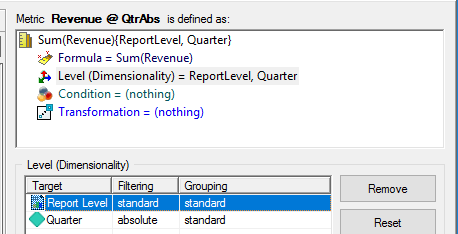
1. Create Metric Revenue @ QtrAbs =
Sum(Revenue) {~,Quarter} Sum(Revenue)as Formula and set Quarter to Level with absolute filter
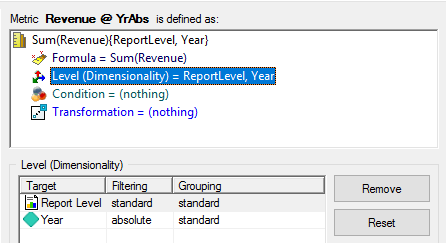
2. Create Metric Revenue @ YrAbs =
Sum(Revenue) {~, Year} Sum(Revenue)as Formula and set Year to Level with absolute filter
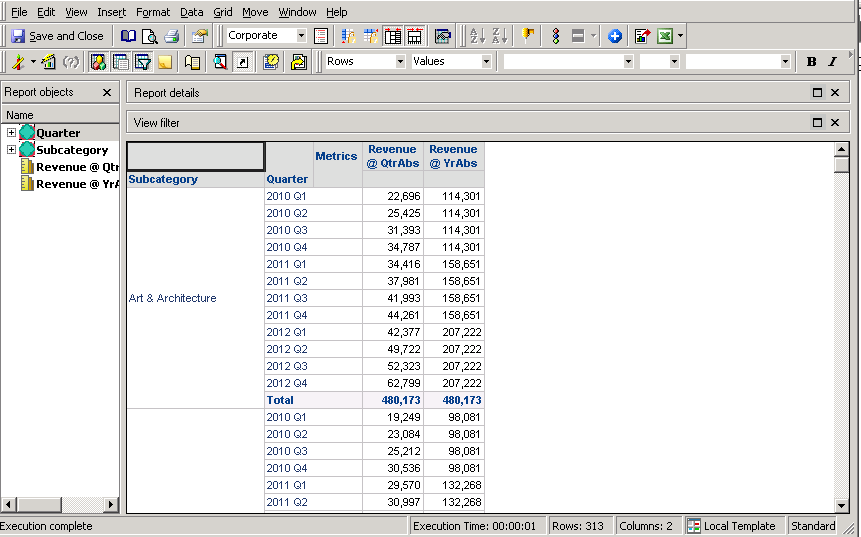
3. Create a Report with Subcategory, Quarter, Revenue @ QtrAbs and Revenue @ YrAbs
4. Enable Subtotals, and the 2 Revenue metrics are having the same Totals
5. Add Category to the Report, but remove it from the Grid
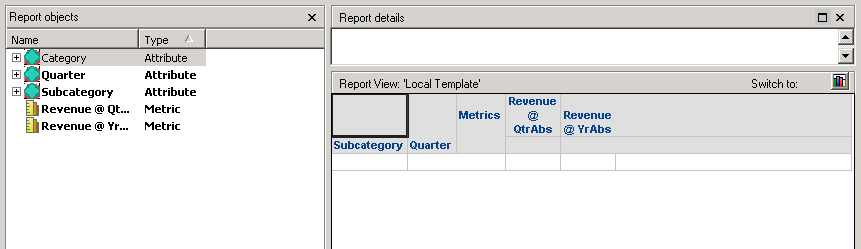
6. Execute the Report again. Although we expect the Totals stays the same on the Grid, considering there is no change on the template, in Strategy 2019 the Total for Revenue @ YrAbs is changed.
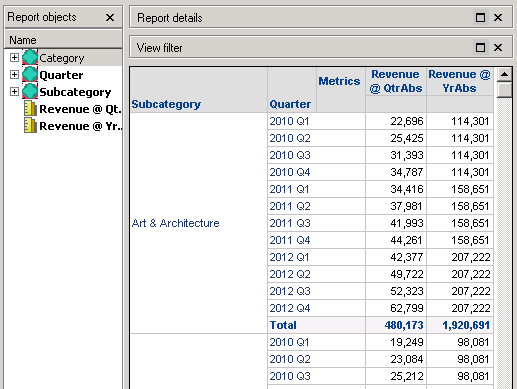
7. Change to SQL View and the user can see that Year attribute is not selected in the Analytical engine calculation steps #1, perform dynamic aggregation over <Category>
    select    [Quarter]@[QUARTER_ID],
        [Quarter]@[QUARTER_DESC],
        [Subcategory]@[SUBCAT_ID],
        [Subcategory]@[SUBCAT_DESC],
        [Revenue @ QtrAbs],
        [Revenue @ YrAbs]
    from    Report
This enhancement is added to Strategy 2019 Update 3 and above. To pick up this fix, enable project level setting "Data Engine Version" to m2019 or above.
After this fix, the Totals are consistent and Analytical engine calculation will include Year attribute.
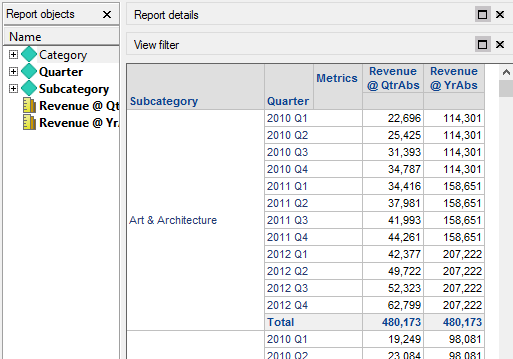
	select	[Quarter]@[QUARTER_ID],
		[Quarter]@[QUARTER_DESC],
		[Subcategory]@[SUBCAT_ID],
		[Subcategory]@[SUBCAT_DESC],
		[Year]@[YEAR_ID],
		[Revenue @ QtrAbs],
		[Revenue @ YrAbs]
	from	Report
