EducationSoftwareStrategy.com
StrategyCommunity

Knowledge Base

Product

Community

Knowledge Base

TopicsBrowse ArticlesDeveloper Zone

Product

Download SoftwareProduct DocumentationSecurity Hub

Education

Tutorial VideosSolution GalleryEducation courses

Community

GuidelinesGrandmastersEvents
x_social-icon_white.svglinkedin_social-icon_white.svg
Strategy logoCommunity

© Strategy Inc. All Rights Reserved.

LegalTerms of UsePrivacy Policy
  1. Home
  2. Topics

KB44088: How to pass multiple attribute selector values to a target document with the same attribute selectors using URL API in MicroStrategy Web


Community Admin

• Strategy


In Strategy Web, it is possible to use URL API to pass multiple selector values from a source document to a target document that contains the same or less selectors. The following parameters are required:


Main.aspx?
Server=ServerName
&Project=ProjectName
&Port=PortNumber
&evt=2048001
&objectID=
&originMessageID=
&promptAnswerMode=0
&selectorMode=

 
The following parameters will remain constant for any document in the same project:

Main.aspx?
Server=ServerName
&Project=ProjectName
&Port=PortNumber
&evt=2048001
&promptAnswerMode=0

Note: The parameter &promptAnswerMode=0 is not needed in Strategy Web 9.4.1 or higher versions. Earlier versions need this parameter to be in the URL even if no prompts are present in the target document.
 
Change the following parameters to match the document's ID:
 

&objectID=C3D010FB41B8432D3ACFE5BFA30B91AC
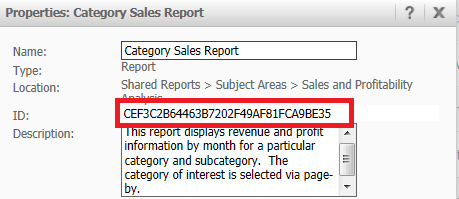
 
This parameter is equivalent to the &documentID of the target document and can be found by right clicking the target document and selecting Properties:

ka04W000000uG9tQAE_0EM4400000026cQ.png

 
Refer to KB15534: Where to find the originmessageID when creating URL parameters using MicroStrategy Web 9.x  to find the following parameter (&originMessageID) in the source document:


&originMessageID=311DF6C640C0F71C1C8A03B1F04C95E7

 
Note: This parameter can be assigned on run time by using the dynamic text: {&DOCUMENTMESSAGEID}
An example is shown below:

&originMessageID={&DOCUMENTMESSAGEID}

 
The parameter "&selectorMode" will define how the selectors are matched according to the following:

  • Match Selectors by Atribute ID:


    &selectorMode=1


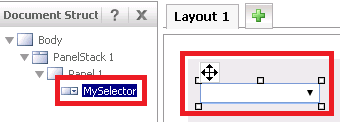
  • Match Selectors by Control Name:


    &selectorMode=2


    Use the document structure to find the control name of a selector as shown below:
ka04W000000uG9tQAE_0EM4400000026cH.png

Refer to KB15534: Where to find the originmessageID when creating URL parameters using MicroStrategy Web 9.4.1 and above.  to find the equivalent of this URL API using Edit Links
KB44088


Comment

0 comments

Details

Knowledge Article

Published:

March 29, 2017

Last Updated:

July 11, 2018