SYMPTOM:
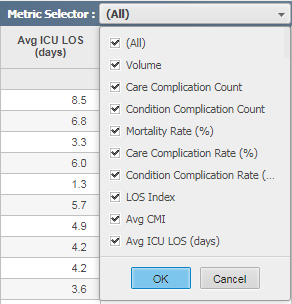
In Strategy 10.x, when creating a Multi Select Drop Down, there is a known issue where element values will be cut off or truncated.
STEPS TO REPRODUCE:
If you follow the steps in this KB article:
https://community.strategy.com/article/How-to-create-a-multi-select-drop-down-selector
and create a multi-select drop down selector, when you view in presentation mode, If you have values that are too long for the window's width then the text values will be cut off or truncated as shown in this example.
CAUSE:
This is a known limitation of the multi-select drop down in Strategy Web 10.x.
ACTION:
This issue is being addressed by Strategy. Please contact Strategy Technical Support for an update on this issue.
KB441003
