EducationSoftwareStrategy.com
StrategyCommunity

Knowledge Base

Product

Community

Knowledge Base

TopicsBrowse ArticlesDeveloper Zone

Product

Download SoftwareProduct DocumentationSecurity Hub

Education

Tutorial VideosSolution GalleryEducation courses

Community

GuidelinesGrandmastersEvents
x_social-icon_white.svglinkedin_social-icon_white.svg
Strategy logoCommunity

© Strategy Inc. All Rights Reserved.

LegalTerms of UsePrivacy Policy
  1. Home
  2. Topics

KB441108: MicroStrategy Intelligence Server running on Windows Server 2012 R2 cannot be started with error "Faulting module name: SHSMP64.dll, version: xxxx" after installing Windows Update KB4284863 or later


Mari Sugimura

Senior Cloud Support Engineer III • MicroStrategy


This article explains what is causing the error,"Faulting module name: SHSMP64.dll, version: 9.0.2.256" and suggests a workaround.

NOTE:  This Article has been superseded by
MicroStrategy Intelligence Server 10.5-10.10 running on Windows Servers fail to start with error "Faulting module name: SHSMP64.dll, version: xxxx" after installing Windows Update KB4284863 or KB4338815
SYMPTOM
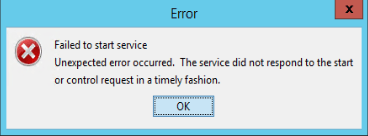
Strategy Intelligence Server installed on Windows 2012 R2 cannot be started with an error as shown below after installing Windows Update KB4284863:
ka04W000001IqveQAC_0EM44000000WUNS.png


Failed to start service
Unexpected error occurred. The service did not respond to the start or control request in a timely fashion.
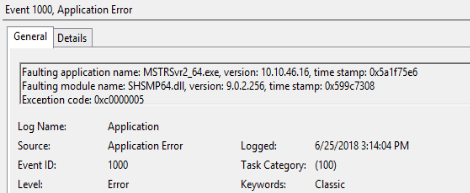
Windows Event Viewer log shows the following error. The version of the DLL could be different based on the specific Strategy version. The following error is seen with Strategy version 10.10

ka04W000001IqveQAC_0EM44000000WUNX.png


Event 1000, Application Error
Faulting application name: MSTRSvr2_64.exe, version: 10.10.46.16, time stamp: xxx
Faulting module name: SHSMP64.dll, version: 9.0.2.256, time stamp; xxx
Exception code: 0xc0000005
CAUSE
This issue is caused due to a conflict with the Windows Update the detail of which can be found from the link below:
https://support.microsoft.com/en-us/help/4284863/windows-81-update-kb4284863
ACTION
This issue has been fixed in Strategy version 10.11. Upgrade to this version to take advantage of the fix. 
WORKAROUND
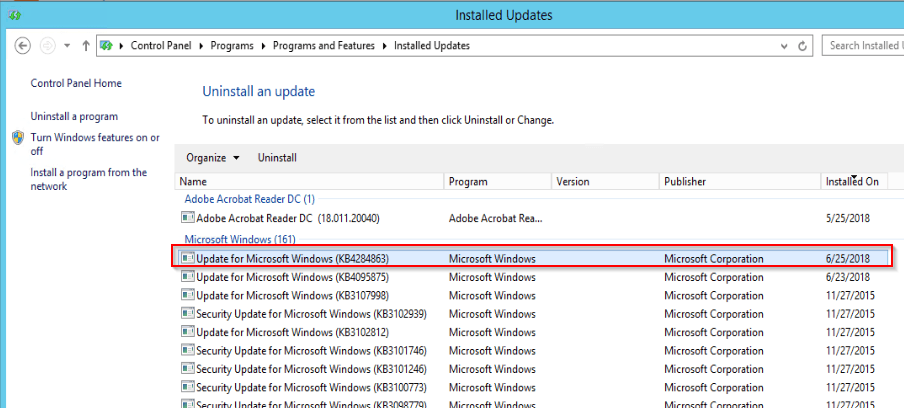
Go to Control Panel > Programs > Programs and Features > Installed Updates, and roll back the Windows Update KB4284863, as highlighted below:

ka04W000001IqveQAC_0EM44000000WUNc.png

  KB441108


Comment

0 comments

Details

Knowledge Article

Published:

June 25, 2018

Last Updated:

December 26, 2018