Starting with the release of Strategy ONE (March 2024), dossiers are also known as dashboards.
SYMPTOM
Following article:
KB36956: How to Enable or Disable Match Case for Prompts using Strategy Web 9.x and above
It is possible to control whether Match Case option is enabled or disabled by default for all prompts by setting the following preference in Strategy Web :
Preferences > Project Defaults > Prompts > Case sensitivity: Match case sensitivity by default
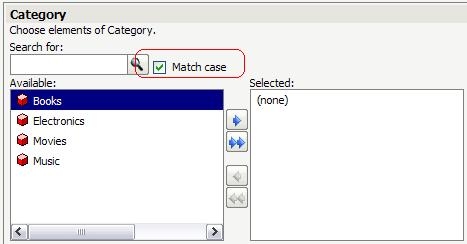
But this option does not work for prompted dossiers.
CAUSE
This is expected. Strategy Web and Strategy Library are different applications. Preferences in Web won't affect Library behavior.
ACTION
To configure this setting in Library,
1. Go to: C:\Program Files (x86)\Common Files\Strategy\Tomcat\apache-tomcat-8.0.30\webapps\StrategyLibrary\WEB-INF\xml (default library installation path)
2. Modify sys_definitions.xml
des="This option controls the initial value that users will see on the prompts page for any prompts that have a search field with a 'match case' check box."
desc_id="mstrWeb.2716" n="promptsMatchCaseSensitivity" scp="user_project"
v="0" dt="boolean" />
Make sure the value is changed to 0.
3. Restart Tomcat.
Next time when you log in to Library, you will see the checkbox unchecked.
KB441614
