The following example uses Strategy Tutorial attributes and metrics. In a document composed of two metrics and attributes from 2 separate reports (refer to them as R1 and R2), one metric M06 is missing data.
The missing data is due to an absolute filter for Region on M06 conflicting with other filters:
In other words, the Region level filter on the metric leads to it being filtered again after the other filters have already been applied in calculation.
M06 metric definition:
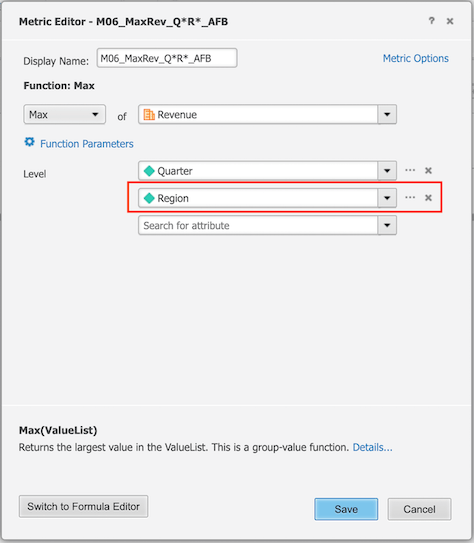
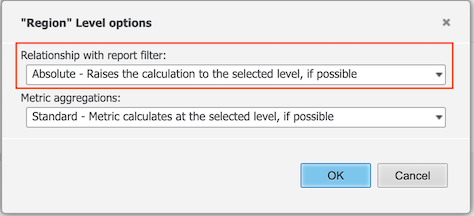
R1 report filter, attributes, metrics:
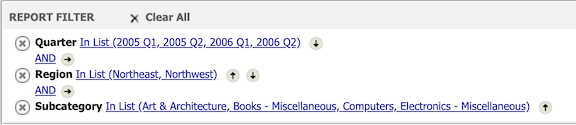
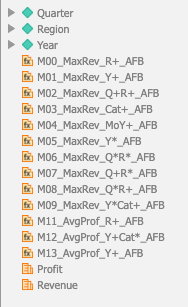
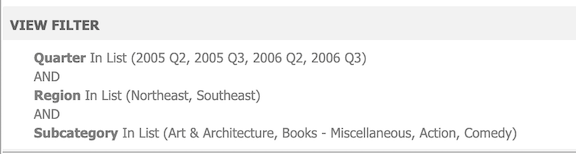
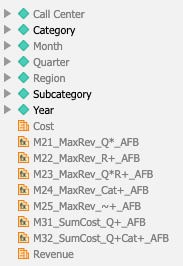
R2 view filter, attributes, metrics:
Grid results & query details (CSI):
Before

After

Current CSI
 select      [Call Center]@[CALL_CTR_ID],
             [Call Center]@[CENTER_NAME],
             [Quarter]@[QUARTER_ID],
             [Quarter]@[QUARTER_DESC],
             [Region]@[REGION_ID],
             [Region]@[REGION_NAME],
             max([Revenue])@{[Quarter],[Region]} as [M06_MaxRev_Q*R*_AFB]
 from        Ex0_tempcube17
 where       ([Region]@[REGION_ID] in (Set of [Region]@[REGION_ID] where [Call  Center]@[CALL_CTR_ID] in (7, 11) )
             and [Quarter]@[QUARTER_ID] in (Set of [Quarter]@[QUARTER_ID] where [Month]@[MONTH_ID] in (200504,                 200505, 200507, 200508, 200606, 200609) ))
 display having    ([Call Center]@[CALL_CTR_ID] in (7, 11)
                           and [Month]@[MONTH_ID] in (200504, 200505, 200507, 200508, 200606, 200609))
 to          Ex0_tempcube18
 select [Call Center]@[CALL_CTR_ID],
        [Call Center]@[CENTER_NAME],
        [Quarter]@[QUARTER_ID],
        [Quarter]@[QUARTER_DESC],
        [Region]@[REGION_ID],
        [Region]@[REGION_NAME], max([Revenue])@{[Quarter],[Region]} as [M06_MaxRev_Q*R*_AFB]
 from   Ex0_tempcube11
 (filtering step removed as it's already done at the report level)
 to     Ex0_tempcube12
This is a known defect in Strategy 11.0 with Data Engine set to 11. When an attribute filter is applied, incorrect logic sometimes reapplies the filter again after the metric has already been calculated, resulting in missing data.
This is NOT applicable when Data Engine is set to 10, therefore user may have missing data when changing the Data Engine setting from 10 to 11 or see previously not shown data when upgrading from Strategy 11.0.
In the new fix, filters are only applied once when calculating metrics, and so do not create cases of missing data.
