Troubleshooting
The option to add a new card is grayed out in Strategy Workstation 2019
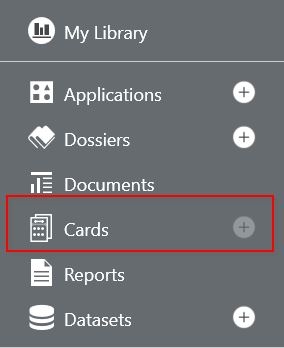
Within Strategy 2019, some of our users have been experiencing a grayed out "+" icon when attempting to add a new HyperIntelligence card in Workstation. Once a connection to an environment has been established in Strategy Workstation 2019, the option to add a new card appears to be grayed out as shown below:
Steps to reproduce
Why is this happening?
The cards feature is part of MicroStrategy Hyperintelligence, which is a new feature in Strategy 2019. One of the possible causes of this issue is that Strategy Workstation 2019 is connecting to an older version of Strategy Library. To determine the version of Strategy Library, run the following URL:
http://<ServerName>:8080/MicroStrategyLibrary/api/status
{
    "upSince": 1546016963519,
    "upTime": 598234966,
    "upTimeText": "166 Hours 10 Minutes 34 seconds",
    "webVersion": "11.0.0.20481J",
    "baseUri": "http://<ServerName>:8080/MicroStrategyLibrary/api/",
    "iServerVersion": "11.1.0000.25274"
}