EducationSoftwareStrategy.com
StrategyCommunity

Knowledge Base

Product

Community

Knowledge Base

TopicsBrowse ArticlesDeveloper Zone

Product

Download SoftwareProduct DocumentationSecurity Hub

Education

Tutorial VideosSolution GalleryEducation courses

Community

GuidelinesGrandmastersEvents
x_social-icon_white.svglinkedin_social-icon_white.svg
Strategy logoCommunity

© Strategy Inc. All Rights Reserved.

LegalTerms of UsePrivacy Policy
  1. Home
  2. Topics

KB44660: "Analytical Engine calculation error: calculation event evaluation failed" error message when using Derived Metrics in MicroStrategy 9.3.x and higher


Stefan Zepeda

Salesforce Solutions Architect • Strategy


This technical note provides a description of the error "Analytical Engine calculation error: calculation event evaluation failed"

SUMMARY:
The error message "Analytical Engine calculation error: calculation event evaluation failed" is an indication that the Evaluation Order of nested derived metrics failed to generate a result. By default, Strategy does not assign a specific evaluation order to derived metrics. In scenarios where derived metrics require to be resolved in a specific order, such as nested derived metrics, developers must choose a non-default evaluation order.
  
SYMPTOM:
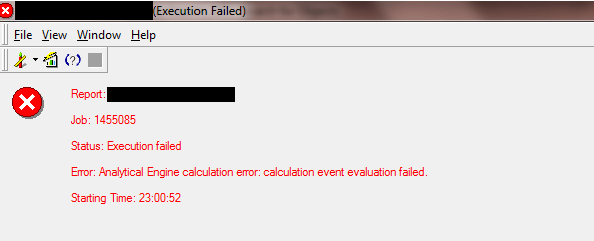
When executing a report with multiple derived metrics, or nested derived metrics, the following error message is generated:
 

ka04W000001IrHZQA0_0EM440000002C4n.png


Analytical Engine calculation error: calculation event evaluation failed

 
 CAUSE:
This issue is caused by an improper or undefined Evaluation Order for the View. In some scenarios, a derived metric can be defined with two children derived metrics. If the parent metric is calculated before the children have been evaluated, this error occurs. Example:
 

Sum((
/)) {Category} 


ACTION:
 
In Strategy Developer 9.3.x and higher, open the Dataset/Report object in Design Mode.

  1. Open the toolbar "Data"
  2. Click on "Report Data Options"
  3. Expand "Calculations"
  4. Select "Evaluation Order"
  5. Uncheck "Use Defauly Evaluation Order"
  6. Reorder the derived metrics so that the parent derived metric is the last one to be evaluated. This can be changed by clicking the box next to the metric, then selecting the number rank that you wish to order the calculations.


ka04W000001IrHZQA0_0EM440000002C4o.png


LEARN MORE:
KB31910: What are the Data Set and View evaluation orders in the Report Data Options Evaluation Order panel in MicroStrategy Developer?
 
KB42679: Derived elements do not show up in Evaluation order of a document or dashboard in Microstrategy Desktop 9.x


Comment

0 comments

Details

Knowledge Article

Published:

June 12, 2017

Last Updated:

June 12, 2017