SUMMARY
This article is an overview of the Memory Contract Manager (MCM) mechanism. It presents an explanation of its settings and assist in determining appropriate governing values. The scope of this article is only for the Windows OS based interface.
WHAT IS MEMORY CONTRACT MANAGER
The Memory Contract Manager is a preventive memory management component which forces the Strategy Intelligence Server to stop taking new requests from clients until the memory usage by the Strategy Intelligence Server process goes back down to the preset limits.
CHANGING MEMORY CONTRACT MANAGER SETTINGS
To change Memory Contract Manager settings please refer follow the steps:
1. Open Strategy Developer.
2. Right-click on the desired project source and select "Configure Strategy Intelligence Server".
3. Go to Governing -> Memory Settings.
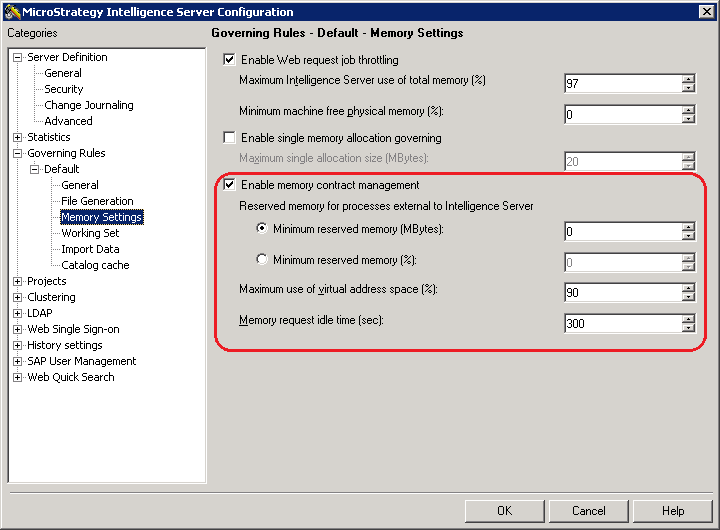
4. MCM settings are marked at the screenshot below:
WHAT ARE SUGGESTED VALUES FOR MCM GOVERNORS
To calculate the appropriate values for MCM to govern the Intelligence Server usage of system memory users must consider the two cases of memory depletion that MCM attempts to guard against:
a. Prevent the Intelligence Server committing memory in excess of the system commit limit.
b. Prevent the Intelligence Server process from exceeding the User Address Space.
NOTE: The sole MCM settings that must be set up to ensure that the Intelligence Server does not run out of memory are the “Reserved memory for processes external to Intelligence Server” settings. Users can either specify an absolute value, or a percentage of the total memory to be reserved for other processes. When calculating the value to be used, users should know how much physical memory and swap memory is available on the system (or the total of both). Users should also know exactly how much memory they would like to limit the memory usage of the Intelligence Server process to use.
TO LEARN MORE:
