EducationSoftwareStrategy.com
StrategyCommunity

Knowledge Base

Product

Community

Knowledge Base

TopicsBrowse ArticlesDeveloper Zone

Product

Download SoftwareProduct DocumentationSecurity Hub

Education

Tutorial VideosSolution GalleryEducation courses

Community

GuidelinesGrandmastersEvents
x_social-icon_white.svglinkedin_social-icon_white.svg
Strategy logoCommunity

© Strategy Inc. All Rights Reserved.

LegalTerms of UsePrivacy Policy
  1. Home
  2. Topics

KB45183: Date is displayed with the format MM/DD/YYYY instead of DD/MM/YYYY in MicroStrategy 9.x running on Windows 7


Stefan Zepeda

Salesforce Solutions Architect • Strategy


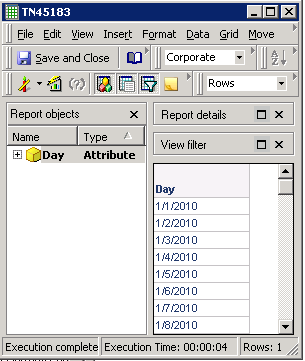
In MicroStrategy Developer 9.x running on Windows 7, the date is displayed with the format MM/DD/YYYY instead of DD/MM/YYYY:
SYMPTOM:
In Strategy Developer 9.x running on Windows 7, the date is displayed with the format MM/DD/YYYY instead of DD/MM/YYYY:

ka04W000001Ir4SQAS_0EM440000002Cb2.png

 
CAUSE:
This is not an issue. Strategy Developer uses the date format configured in the Region and Language configuration of Windows 7.
 
ACTION:
In order to change the date format, go to Control Panel >> Clock, Language and Region >> Change the date, time or number format:

ka04W000001Ir4SQAS_0EM440000002Caz.png

 
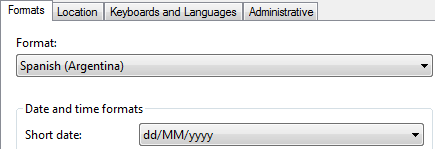
Then, define the desired date format in the Short date drop-down list, as shown:
ka04W000001Ir4SQAS_0EM440000002Cb0.png


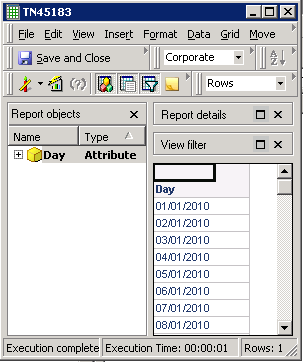
Close and launch  Strategy Developer to confirm this adjustment:
ka04W000001Ir4SQAS_0EM440000002CbE.png

 
NOTE:
For additional information about this subject in Windows XP, refer to the Strategy Knowledge Base Article:

  • KB8439: How to format a date in MicroStrategy Developer?

 
Third Party Software Installation Warning:
The third-party product(s) discussed in this Knowledge Base Article is manufactured by vendors independent of Strategy. Strategy makes no warranty, express, implied or otherwise, regarding this product, including its performance or reliability.


Comment

0 comments

Details

Knowledge Article

Published:

May 27, 2017

Last Updated:

May 27, 2017