EducationSoftwareStrategy.com
StrategyCommunity

Knowledge Base

Product

Community

Knowledge Base

TopicsBrowse ArticlesDeveloper Zone

Product

Download SoftwareProduct DocumentationSecurity Hub

Education

Tutorial VideosSolution GalleryEducation courses

Community

GuidelinesGrandmastersEvents
x_social-icon_white.svglinkedin_social-icon_white.svg
Strategy logoCommunity

© Strategy Inc. All Rights Reserved.

LegalTerms of UsePrivacy Policy
  1. Home
  2. Topics

KB45313: "Your search could not be completed. The search index is missing, unusable or not accessible. Please try again or contact the Administrator." error appears when performing quick search or using metric editor in MicroStrategy Web 9.4.x or newer


Stefan Zepeda

Salesforce Solutions Architect • Strategy


This article discusses an issue seen with the search index which requires the recreation of the search index to fix the issue.

SYMPTOM:
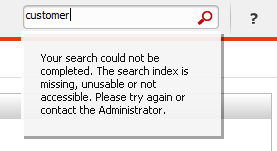
In Strategy Web 9.4.x or newer, when doing quick search or using metric editor, user gets the error "Your search could not be completed. The search index is missing, unusable or not accessible. Please try again or contact the Administrator.", as shown below:
 

ka04W000001IqrHQAS_0EM440000002Caf.png

 
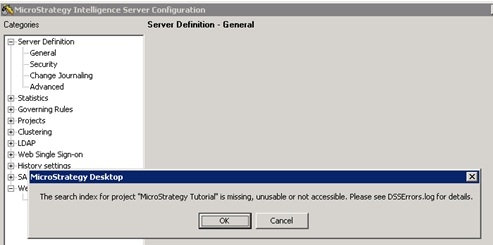
When user tries to modify quick search options through Strategy Developer: Right mouse click on project source ->Configure Intelligence Server -> Web Quick Search, the error below is shown:
ka04W000001IqrHQAS_0EM440000002Cae.jpeg


"The search index for project: <Project Name> is missing, unusable or not accessible. Please see DSSErrors.log for details.",

 
CAUSE:
One possible cause is that the previously created search index is corrupted.
In DSSErrors.log, errors similar as below are logged:

2013-11-15 16:24:23.649+08:00 Index is corrupted: Command SESearcherNumDoc; threw BaseException: A Java Exception: org.apache.lucene.index.CorruptIndexException: Index is corrupted.
 at com.Strategy.search.Searcher.getSearcher(Unknown Source)
 at com.Strategy.search.Searcher.numDoc(Unknown Source)
Caused by: java.io.FileNotFoundException: C:\Program Files (x86)\MicroStrategy\Intelligence Server\SearchData\index\xxxxxxxxx\_16.cfs (The system cannot find the file specified)
        ...
2013-11-15 16:24:23.727+08:00 Search Index is corrupted

 
ACTION:
Follow below steps to regenerate the search index:

  1. Follow part 2 in KB40303: How to disable Quick Search in MicroStrategy Web , set quick search to OFF to disable quick search function;
  2. Stop the Strategy Intelligence Server;
  3. Refer to the DSSErrors.log for location of corrupted index, delete the folders. (The default index directory should be C:\Program Files (x86)\MicroStrategy\Intelligence Server\SearchData\index\);
  4. Start the Strategy Intelligence Server;
  5. Enable and re-create search index per KB41443: How to enable the quick search for MicroStrategy Web .


Comment

0 comments

Details

Knowledge Article

Published:

May 18, 2017

Last Updated:

October 20, 2020