SYMPTOM:
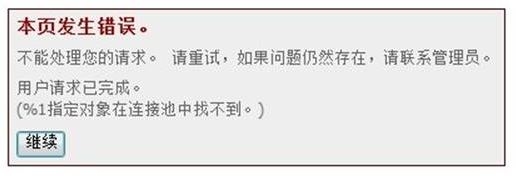
When running a report service document on Strategy Web 9x, an error is thrown as below:
Sample Code/Error
Could not process your request. Please try again. If the error persists, please contact administrator.
User request is finished.
(%1 referred object is not found in connectivity pool)
MsiWorkingSet::GetDocMsgRslt(): GetDocRslt() returns error 0x80003F7A.
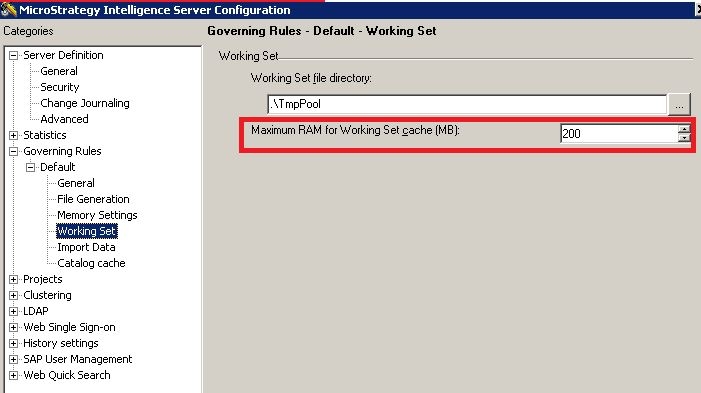
Increase Maximum RAM for Working Set cache(MB) in intelligence server configuration to a value no higher than 65536 MB for both Windows 32 bit and 64 bit.
Note: This is a Strategy Intelligence Server configuration level setting, so it applies to all the projects and all the users and is not specific to a project. If these settings are changed, The Strategy Intelligence Server needs to be restarted.
WARNING:
Increasing the 'Maximum RAM for Working Set cache' setting will increase the possible limit amount of RAM that can be used by the Strategy Intelligence Server. Setting this to a higher limit does not mean the memory will be set aside for immediate use by the Strategy Intelligence Server. However, if needed, that limit is available, in the same way, the Maximum RAM for cache settings behave.
Also that Strategy Intelligence Server may be operating with a higher average memory footprint during its lifecycle, so proper tuning may be needed if memory usage becomes an issue.
RELATED KB ARTICLES
KB8617: What is the 'Working Set' governor setting in MicroStrategy Intelligence Server 9.4.x-10.x?
KB10138: How are the concepts of Working Set, Working Set Result Pool, History List related to each other in MicroStrategy Intelligence Server?
45338
