SUMMARY:
This issue has been classified as a defect by Strategy. The impact is limited to Strategy Office 9.4.x product only while refreshing a report. There are no workarounds for this issue and a solution/code fix for this issue is not yet available in a future Strategy release. There are some troubleshooting steps and additional information in the rest of this technote.
SYMPTOM:
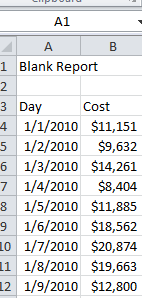
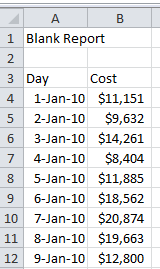
Formatting changes that are made to a report that has been imported into Excel using Strategy Office 9.4.x are not retained when users refresh the report.
STEPS TO REPRODUCE:
CAUSE:
This is a known defect with Strategy Office 9.4.x. KB33900: How to keep the formatting of an existing Excel sheet when updating a report in MicroStrategy Office 9.4.1 and above explains that users should be allowed to make changes to an Excel file and have those changes retained even after refreshing the report /document that it is based off of. This is after unchecking all options that allows the formatting from reports/documents to be retained. This is an issue with Strategy/Microsoft Office.
ACTION:
Please contact Strategy Technical Support for an update on the issue.
ADDITIONAL TROUBLESHOOTING:
TO LEARN MORE:
