SYMPTOM
Users may see the following error while trying to save an object in their profile folder in Strategy Web:
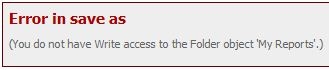
Error in Save as
(You do not have Write access to the Folder object 'My Reports'.)

User does not have browse access this folder
CAUSE
This is usually due to an ACL misconfiguration on the affected object, (in this case profile folders): The user or group is not appropriately included in the object's ACL, or the level of configured permission is incorrect.
The symptoms, as well as the error messages shown after determined actions may vary, as the ACL can restrict the user's actions at different levels. For instance, another common error is:
An error has occurred on this page
You do not have Read access to the Folder object 'My Reports'.)
ACTIONS
In order to access your users profile folders follow the steps described in the Technote below:
KB19828 :How to display hidden and invisible folders/objects in Strategy Desktop 9.2.x - 9.3.x?
After that, enter the "Profiles" folder. Search for the affected user's folder and change the ACL accordingly:
KB42744 :Steps to configure an user or group ACL.
