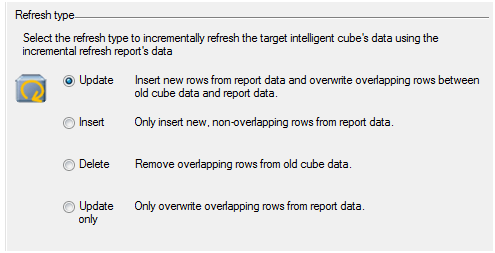
Starting from Strategy 9.4.1, Intelligent Cubes have a new feature to update information without republishing it. This Technical Note shows examples of how each refresh type option of an Incremental Refresh report works.
For the steps to define an incremental refresh report, refer to:
KB37908: How to update the information on an Intelligent Cube without having to republish it in MicroStrategy?
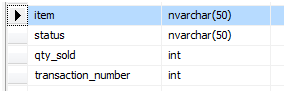
In this example, the following database table is used. This is a transaction table for item, status, quantity sold (qty_sold) and transaction number.
Cube definition:
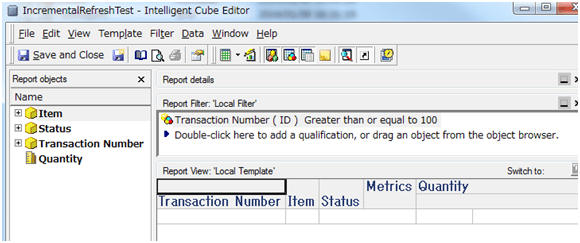
Report Objects:
- Item
- Status
- Transaction Number
- Quantity
Filter: Transaction Number greater than or equal to 100
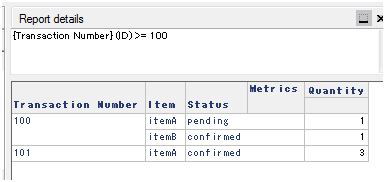
Initial data:
Data is updated as below on the database side:
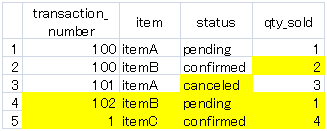
Line 2 qty_sold number is updated
Line 3 status is altered from confirmed to canceled
Line 4 newly added
Line 5 newly added
<UPDATE>
Insert new rows from report data and overwrite overlapping rows between old cube data and report data.
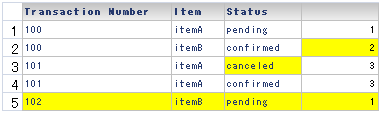
Line 2 - qty_sold number is updated.
Line 3 - Status canceled row is newly inserted, and line 4, the original data is not modified. For any change for any other attribute, a new line is added and the previous line also persists.
Line 5 - Newly added transaction is inserted.
And the new data with transaction_number 1 is not added because it does not meet the filter criteria to have transaction_number >= 100.
<INSERT>
Only insert new, non-overlapping rows from report data.
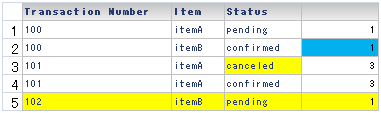
Line 2 qty_sold number is NOT updated.
Line 3 Status canceled row is newly inserted.
Line 5- Newly added transaction is inserted.
And the new data with transaction_number 1 is not added.
<DELETE>
Remove overlapping rows from old cube data.
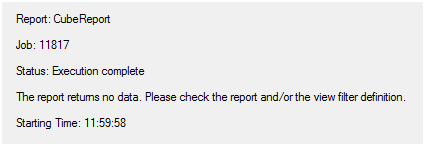
Delete Incremental Refresh report is not executed against the warehouse, and executed for Intelligent Cube with the following query. All the data meeting the criteria is deleted.
Sql
Delete from CUBE IncrementalRefreshTest
where @ >= 100
<UPDATE ONLY>
Only overwrite overlapping rows from report data.
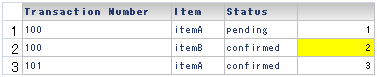
Line 2 qty_sold number is updated.
In summary, when defining an Incremental Refresh report, take the following behavior into consideration.
KB45837
