EducationSoftwareStrategy.com
StrategyCommunity

Knowledge Base

Product

Community

Knowledge Base

TopicsBrowse ArticlesDeveloper Zone

Product

Download SoftwareProduct DocumentationSecurity Hub

Education

Tutorial VideosSolution GalleryEducation courses

Community

GuidelinesGrandmastersEvents
x_social-icon_white.svglinkedin_social-icon_white.svg
Strategy logoCommunity

© Strategy Inc. All Rights Reserved.

LegalTerms of UsePrivacy Policy
  1. Home
  2. Topics

KB45862: Attributes are missing from search results when searching on a string in a Web Quick Search box in MicroStrategy Web 9.x and 10.x


Community Admin

• Strategy


Attributes are missing from search results when searching on a string in a Web Quick Search box in MicroStrategy Web 9.x and 10.x

SYMPTOM:
 
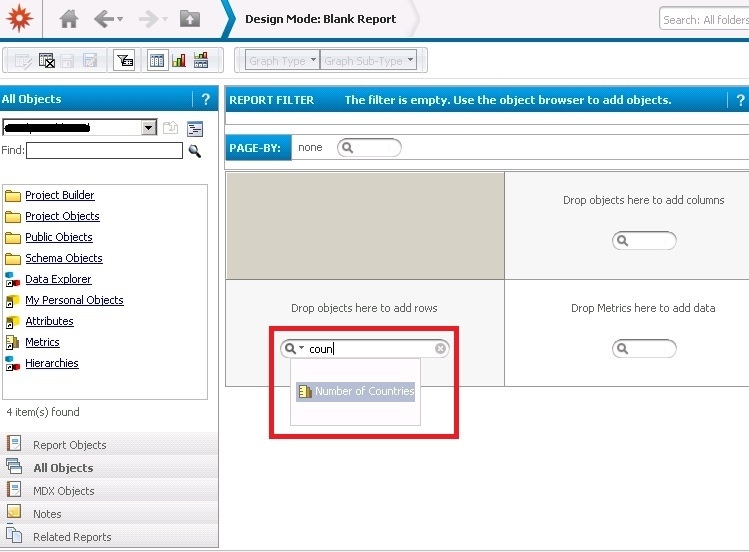
When searching on a string in a search box in Strategy Web 9.x and 10.x (Web Quick Search), only metrics are shown, and attributes are missing, even though they should be included.
 
 
In this example, the string "coun" is used. Both attributes and metrics are available in the metadata that contain this string, however only the metric(s) are shown:


ka04W00000147y5QAA_0EM4400000029Tb.jpeg


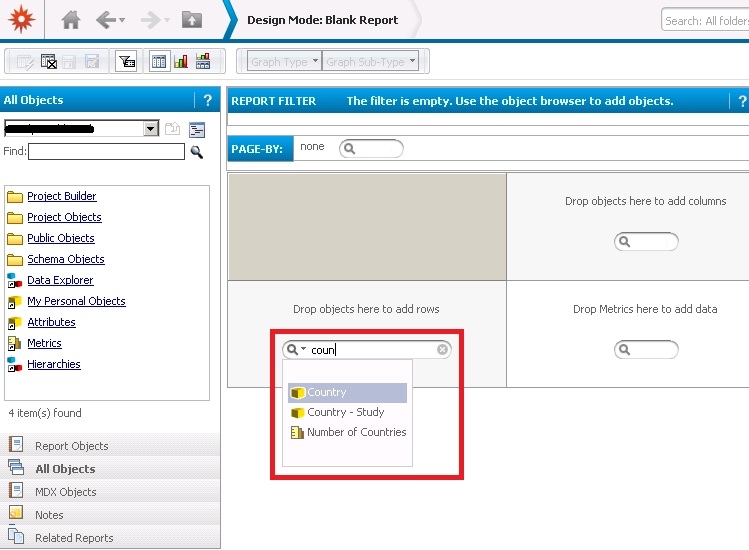
The search results should show both object types:


ka04W00000147y5QAA_0EM4400000029TT.jpeg


CAUSE:
 
This is a known issue in Strategy Web 9.x and 10.x whereby the index files for the Web Quick Search have become corrupted.
 
 
ACTION:
 
The index files for the Web search function need to be recreated. To do so, perform the following steps:

  1. Disable quick search for the affected project as per KB40303-How to disable Quick Search in MicroStrategy 9.x and 10.x Web.
  2. Stop Intelligence Server.
  3. Delete the search index files from the SearchData folder within the Strategy Intelligence Server directory. (The default index directory is C:\Program Files (x86)\MicroStrategy\Intelligence Server\SearchData\Index for Microsoft Windows OS);
  4. Start Intelligence Server;
  5. Enable and re-create search index per KB41443-How to enable quick search in MicroStrategy 9.x and 10.x Web.


Comment

0 comments

Details

Knowledge Article

Published:

June 7, 2017

Last Updated:

March 22, 2018