EducationSoftwareStrategy.com
StrategyCommunity

Knowledge Base

Product

Community

Knowledge Base

TopicsBrowse ArticlesDeveloper Zone

Product

Download SoftwareProduct DocumentationSecurity Hub

Education

Tutorial VideosSolution GalleryEducation courses

Community

GuidelinesGrandmastersEvents
x_social-icon_white.svglinkedin_social-icon_white.svg
Strategy logoCommunity

© Strategy Inc. All Rights Reserved.

LegalTerms of UsePrivacy Policy
  1. Home
  2. Topics

KB45944: Command Manager cannot connect to project source when SSL is configured in MicroStrategy Intelligence Server


Community Admin

• Strategy


SYMPTOM
Using standard authentication, Strategy Command Manager 9.4.x - 10.4.3 cannot connect to a project source when SSL is configured in the Intelligence Server. Users will be able to connect to Developer using the same intelligence server configuration and project source that enables SSL.
 
STEPS TO REPRODUCE

  • Configure the Strategy Intelligence Server with  SSL enabled.
     
ka04W00000148Z1QAI_0EM4400000029TU.png
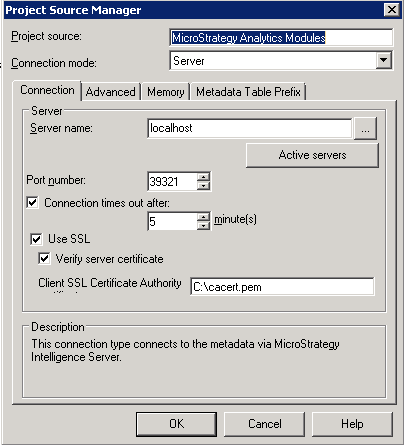
  • In Strategy Developer, modify configuration for project source, include port number and "Use SSL" is enabled.
     
ka04W00000148Z1QAI_0EM4400000029TW.png
  • In Strategy Developer, the project source can be connected while in Command Manager, a connection cannot be created.

ka04W00000148Z1QAI_0EM4400000029TX.png

CAUSE
This is a known issue with Strategy Command Manager 9.4.x - 10.3
 
ACTION
This issue has been addressed in Strategy Command Manager 10.4. Refer to the following Strategy Knowledge Base document for details: 
KB313530: New feature in 10.4 - SSL support for MicroStrategy Command Manager


Comment

0 comments

Details

Knowledge Article

Published:

June 2, 2017

Last Updated:

June 2, 2017