EducationSoftwareStrategy.com
StrategyCommunity

Knowledge Base

Product

Community

Knowledge Base

TopicsBrowse ArticlesDeveloper Zone

Product

Download SoftwareProduct DocumentationSecurity Hub

Education

Tutorial VideosSolution GalleryEducation courses

Community

GuidelinesGrandmastersEvents
x_social-icon_white.svglinkedin_social-icon_white.svg
Strategy logoCommunity

© Strategy Inc. All Rights Reserved.

LegalTerms of UsePrivacy Policy
  1. Home
  2. Topics

KB46505: How to specify a prefix for the intermediate tables created by the MicroStrategy SQL Generation Engine


Stefan Zepeda

Salesforce Solutions Architect • Strategy


This article describes how to specify prefixes for temp tables

Intermediate tables may be created by the Strategy SQL Generation Engine against the warehouse to facilitate multi-pass SQL. For creation of intermediate tables, the VLDB setting 'Intermediate Table Type' has to be either 'Permanent Table' or 'True Temporary Table'. By default, these tables are created in the same location as warehouse tables. However, in Strategy SQL Generation Engine, there is an option to assign a prefix and route the intermediate tables that have been created as permanent tables to a different location.
For detailed information on how to route the tables to a different location in SQL Server databases consult the following article:

  • TN13284 - How to route intermediate tables created in the warehouse to a different location for SQL Server in MicroStrategy SQL Generation Engine

 
To set a prefix for the intermediate tables in the Structured Query Language (SQL) generated by the Strategy Engine, users must follow the steps outlined below:
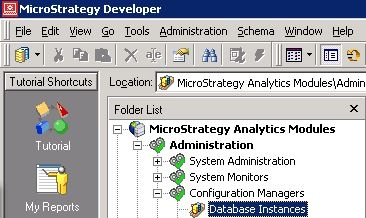
  • In Strategy Developer, log into the Server Project Source as a user with administrative privileges.
  • Expand the 'Administration' Icon, and select the Database Instance Manager.
ka04W000001IsUtQAK_0EM440000002CQ0.jpeg
  • Select the Database Instance used for the project warehouse, right-click and select 'VLDB properties'.
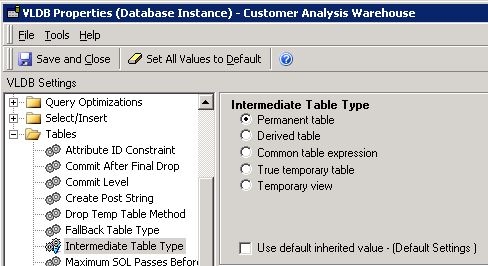
  • In the VLDB Properties window, expand the folder called 'Tables'
  • Select the 'Intermediate Table Type' parameter. Uncheck the 'Use default inherited value' option. Select the 'Permanent Table' option 
ka04W000001IsUtQAK_0EM440000002CQ1.jpeg
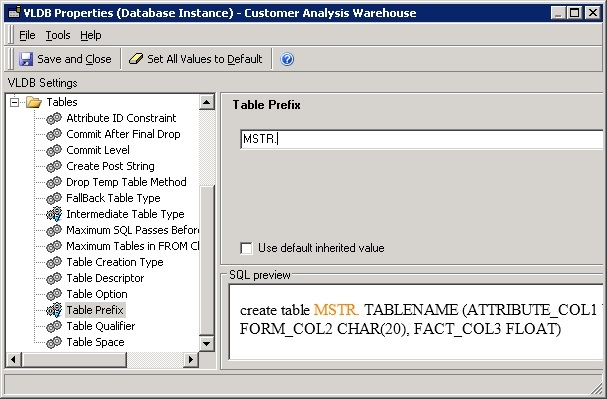
  • Select the 'Table Prefix' setting. Uncheck the 'Use default inherited value' option. Type the desired table prefix on the 'Table Prefix' field. If a period (.) is required between the prefix and the temporary table name, please specify the period with the prefix. (i.e. MSTR.)
ka04W000001IsUtQAK_0EM440000002CPn.jpeg
  • Save these changes in the VLDB editor and restart the Strategy Intelligence Server for the changes to take effect.

NOTE:
The 'Table Prefix' VLDB setting can also be modified at the individual report level.


Comment

0 comments

Details

Knowledge Article

Published:

May 5, 2017

Last Updated:

May 5, 2017