Google Maps API for Flash will no longer be available starting September 2nd, 2014. Strategy documents containing Google Maps will not render the maps in Flash view mode.The following is the official statement from Google:
Note: The Google Maps API for Flash has been officially deprecated as of September 2, 2011. The API will continue to work until September 2, 2014. After that date, the API will no longer be available. We encourage you to migrate your code to version 3of the Google Maps JavaScript API. https://developers.google.com/maps/documentation/flash/
After September 2nd, 2014, Google Maps will be still available in DHTML view modes. Strategy will offer flash based maps only when the maps are configured through ESRI.
To be able to view the existing Google maps , the document designer would need to convert the existing Google maps into ESRI maps. The following are the steps on how to convert the Google Maps to ESRI Maps in a existing document:
Step 1: From the design mode, select the grid and right click .
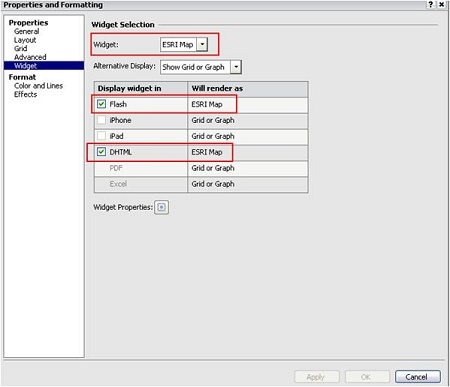
Step 2: Go to Properties and Formatting
Step 3: Under Properties go to Widget .
Step 4: Under Widget Selection , select ESRI Map .
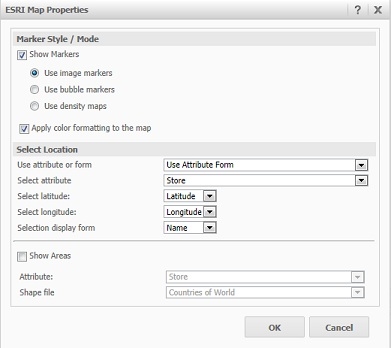
Step 5: Update the ESRI map properties with attribute , latitude , longitude .
Step 6: Save the document.
Note : To take advantage of the ESRI map make sure you have a valid ESRI map cloud key on the esriConfig.xml file. Refer KB45064: " How to activate ESRI for MicroStrategy Analytics Enterprise 9.4.1 ".
