EducationSoftwareStrategy.com
StrategyCommunity

Knowledge Base

Product

Community

Knowledge Base

TopicsBrowse ArticlesDeveloper Zone

Product

Download SoftwareProduct DocumentationSecurity Hub

Education

Tutorial VideosSolution GalleryEducation courses

Community

GuidelinesGrandmastersEvents
x_social-icon_white.svglinkedin_social-icon_white.svg
Strategy logoCommunity

© Strategy Inc. All Rights Reserved.

LegalTerms of UsePrivacy Policy
  1. Home
  2. Topics

KB47232: "Background image not found" message appears on MicroStrategy Mobile App when adding Custom Coordinates File for image layout widget.


Community Admin

• Strategy


"Background image not found" message appears on MicroStrategy Mobile App when adding Custom Coordinates File for image layout widget. This issue is fixed in MicroStrategy Mobile 10 iOS application.

SYMPTOM:
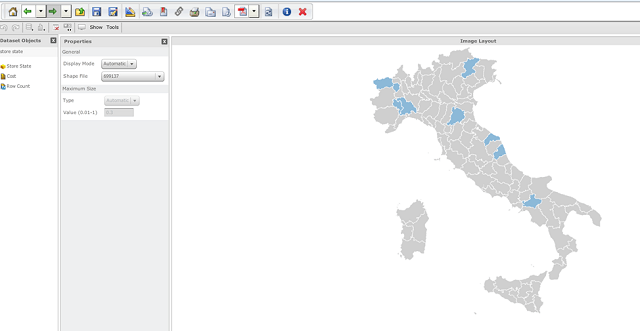
When users follow the technical note KB42338: How to Add a Custom Coordinates File for the Image Layout Widget in MicroStrategy Web SDK 9.3.x-10.x, it works in Strategy Web Visual Insight as expected. The map appears, like in the following example:
 

ka04W000000uG8WQAU_0EM440000002A5X.png

 
However, on Strategy Mobile 9.4.1 App "Background image not found" message appears, as shown below:
 

ka04W000000uG8WQAU_0EM440000002A5S.png

 
CAUSE:
 
This is a known issue in Strategy Mobile 9.4.1.
 
ACTION:
 
This issue is fixed in Strategy Mobile 10 iOS application.  Upgrade to this release to take advantage of the fix. 


Comment

0 comments

Details

Knowledge Article

Published:

April 12, 2017

Last Updated:

April 12, 2017