EducationSoftwareStrategy.com
StrategyCommunity

Knowledge Base

Product

Community

Knowledge Base

TopicsBrowse ArticlesDeveloper Zone

Product

Download SoftwareProduct DocumentationSecurity Hub

Education

Tutorial VideosSolution GalleryEducation courses

Community

GuidelinesGrandmastersEvents
x_social-icon_white.svglinkedin_social-icon_white.svg
Strategy logoCommunity

© Strategy Inc. All Rights Reserved.

LegalTerms of UsePrivacy Policy
  1. Home
  2. Topics

KB48050: "Importing the file failed: Error #2032. Please check if the URL is correct and check MicroStrategy Web Error Log" appears when attempting to import large Excel files to MicroStrategy Web 9.2.1


Community Admin

• Strategy


Users receive the following error message when they try to import a relatively large Excel file using the Data Import functionality available in MicroStrategy Web 9.2.1.

SYMPTOM: 
Users receive the following error message when they try to import a relatively large Excel file using the Data Import functionality available in Strategy Web 9.2.1.


Importing the file failed: Error #2032. Please check if the URL is correct and check Strategy Web Error Log


CAUSE: 
The issue can be caused by any of the following factors:

  1. The excel file exceeds the size limit set by the Web server.
  2. The JVM size limit on the Intelligence Server.
  3. Not enough memory available for the web server.

 
ACTION: 
Users can refer to KB6446  to increase the value of JVM size limit. If the problem persists, users can check the following things:

  1. Clear the web browser cache and restart the web server.
  2. Check the memory usage of the web server and ensure there is enough memory available for the import process. A simple way to test out the issue is to connect to another web server.

 
Best practice to import relative large files: 
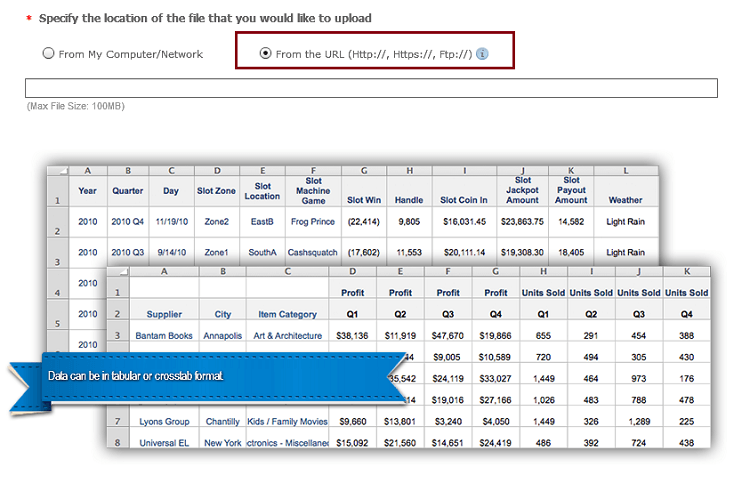
It's always recommended to use the "From the URL" option to import relatively large files. Users can refer to the KB:42621 to enable the option.  
ka04W000001482GQAQ_0EM44000000260e.png


Comment

0 comments

Details

Knowledge Article

Published:

May 30, 2017

Last Updated:

June 28, 2022