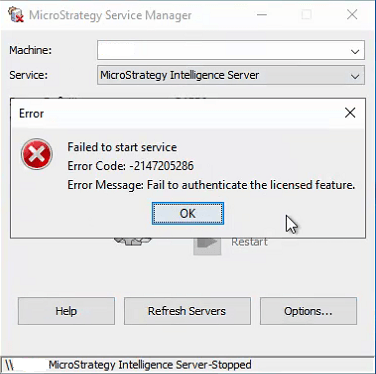
In Strategy 2019, when you start the Intelligence Server and Strategy Mobile is not installed on the same machine, the following error appears:
"Error: Failed to start service.
Error Code: -2147205286
Error Message: Fail to authenticate the licensed feature."
In the DSSError.log, the following information appears:
2019-03-20 09:46:23.013 [HOST:xxxxxx][SERVER:CastorServer][PID:1868][THR:2768][Kernel][Fatal][0x80043F5A][UID:0][SID:0][OID:0] Fail to authenticate the licensed feature.
2019-03-20 09:46:23.023 [HOST:xxxxxxx][SERVER:CastorServer][PID:1868][THR:6576][Kernel][Info][UID:0][SID:0][OID:0] HTTPSenderThread exits
This is an identified defect in Strategy 2019.
This issue is resolved in Strategy 2019 Update 2. Upgrade to Strategy 2019 Update 2 or later to take advantage of the fix.
For an immediate solution in Strategy 2019, use the workaround below.
Before starting the Intelligence Server, modify the installation and install Strategy Mobile on the same machine as the Intelligence Server.
