Starting with the release of Strategy ONE (March 2024), dossiers are also known as dashboards.
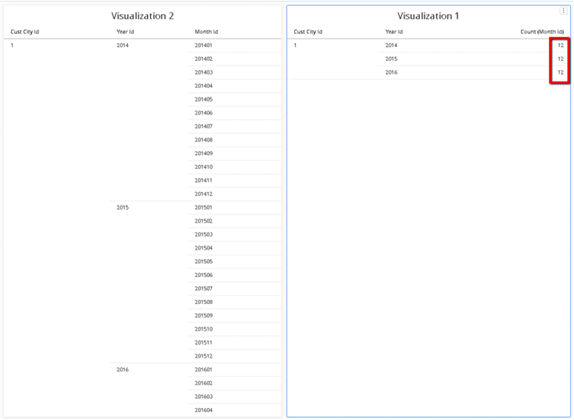
With the Data Engine version set to 11 in Strategy 2019, you may notice that metrics defined by attributes (e.g. Count[Employee ID]) are calculated at the grand total level, and not the correct level.
The following example uses Strategy Tutorial attributes and metrics.

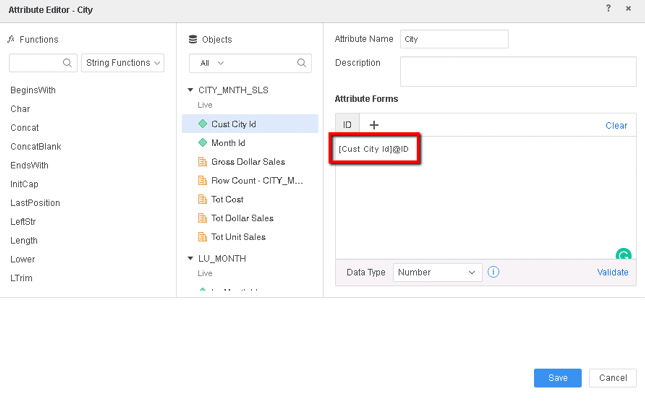

This is a known defect in Strategy 2019 with the Data Engine version set to 11. In Connect Live mode, if the filter cannot be pushed down, the metrics defined by attributes are calculated by SQL statements using the grand total.
When the Data Engine version is set to 10, the metrics defined by attributes are calculated by the CSI Engine, and will return the correct data.
You should set the Data Engine version to 10. The project level setting of the Data Engine version can only be enabled via Strategy Workstation.
You can also upgrade to Strategy 2020 or later versions, and set the Data Engine version to 12.
The metrics defined by attributes should calculate at the correct level.
Filter Push-Down A way to apply filter directly in the SQL generation, often in earlier calculation passes. This reduces the amount of calculations done in the CSI Engine, improving execution performance.
Connect Live See Connect Live to datasource (Direct Data Access) in Data Import.
Data Engine version See Change Data Engine Version.
The Strategy reference numbers for this KB article are KB483317 and DE133745.
