Have you ever had a query fail to execute because of a space or a dot in your new table name? Have you ever migrated your data from Excel to MySQL and then were unable to access it the same way? Have you ever been confused about the different VLDB properties and patterns? Perhaps not knowing how to add a pair of square brackets to your column alias? Different databases have different ways to quote their identifiers. In Strategy 2021, Unified Quoting, that can help in all of the above situations.
Identifiers
Identifier is a term used to refer to a database object name. In our case, it includes, but is not limited to, table names, table aliases, column names, database names, and namespace/schema names.
VLDB Properties
VLDB properties allow you to customize the SQL that Strategy generates. These settings affect how Strategy Intelligence Server generate queries. For more information on VLDB properties, see SQL Generation and Data Processing: VLDB Properties.
Pattern
Pattern is the way we define our query generation behavior. For example, if we want to quote
select colname from t1as
select [colname] from [t1], we would assign the quoting pattern [#0]. The #0 is the identifier that we are quoting.
When working with Structured Query Language, or SQL, you must be precise with your naming and formatting. Even an extra space in your query can cause it to fail. For example, if you create a query that says
select colname from t1, but the column name is actually col name, with a space, the query becomes
select col name from t1. This query could fail because the database interprets the query as “get the column named ‘
col’ and alias it as ‘
name,’” instead of “get the column named ‘
col name.’” If there is no column named
colin t1, the query will fail.
select “col name” from t1, it will generate select “col name” from “t1.”
There are now two new VLDB properties that control quoting behavior.
For example, the chart below illustrate how these two settings work together to control how queries are generated with or without quotations.
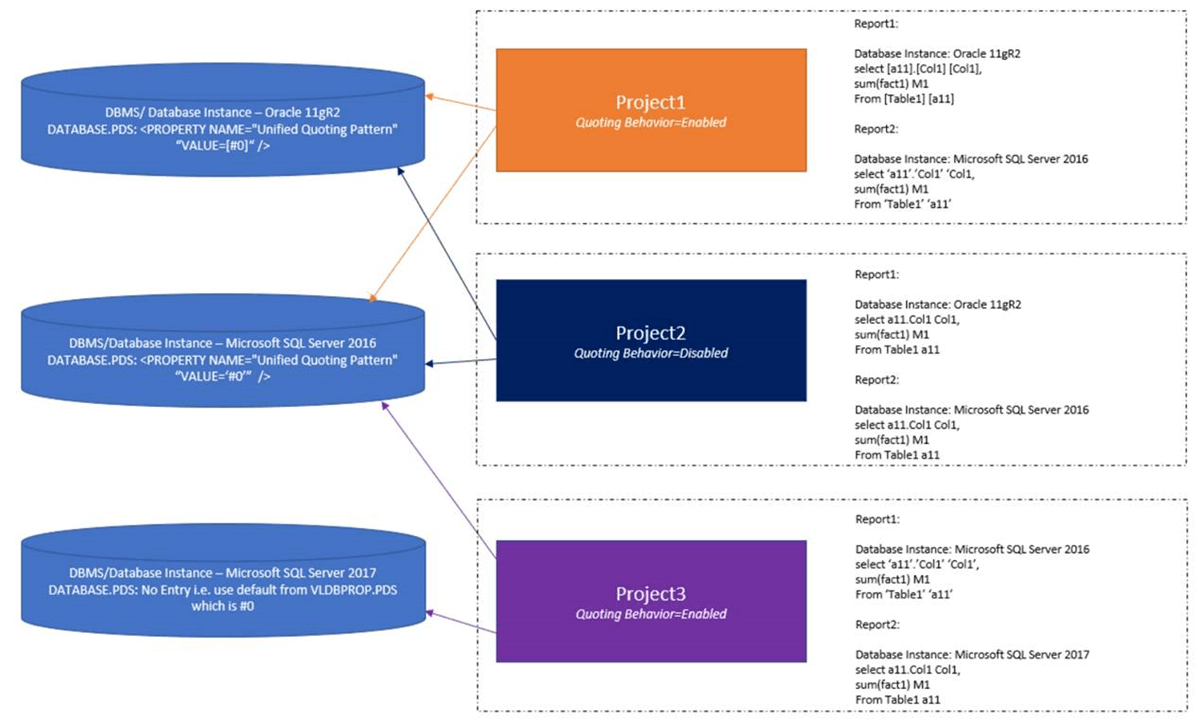
This example assumes the metadata includes three projects that are using three different database instances with different DBMS and using different quoting patterns. The quoting patterns used are [#0], ‘#0’, and default, which is #0.
Project 1 has Quoting Behavior enabled. Project 1 has Report 1 that uses DB instance 1, where the pattern is [#0], therefore, Report 1 will be quoted [#0]. Report 2 uses DB instance 2, where the patterns is ‘#0', therefore, Report 2 will be quoted '#0'.
Project 2 has Quoting Behavior disabled, therefore, no matter what DB instance its reports are using, the queries will not be quoted.
Project 3 has Quoting Behavior enabled. Project 3 has Report 1 that uses DB instance 2, where the pattern is ‘#0', therefore, Report 1 will be quoted '#0'. Report 2 uses DB instance 3, where there is no pattern, therefore, Report 2 will be not be quoted.
There are several ways to manually input the query to suit your own purpose. For example, Type a Query in Web Data Import, Pre/Post Statements, and Logic Table View. In these situations, Strategy will not do perform any modifications on it. If any freeform SQL breaks a query, it’s recommended to update your freeform SQL. An example can be found here .
Any identifiers containing pattern characters, like “, will fail.
Using Integrity Manager to compare SQL with and without Unified Quoting turned on will reorder of columns.
For example:
Before quote:
Select * from ##ZZNB00 pa11
join ##ZZMB01 pa12
on ( pa11. COL _Id = pa12.COL_Id and
pa11.COL_Id0 = pa12.WJXBFS1)
Select * from ##ZZNB00 [pa11] /*Expect unquoted temp table names*/ join ##ZZMB01 [pa12] on ( [pa11].[COL_Id0] = [pa12].[WJXBFS1] and [pa11].[COL_Id] = [pa12].[COL_Id])
During warehouse migration, if the existing warehouse table and column cases are not kept in the destination/new warehouse, user may see errors related to "table or view does not exist" when unified quoting is enabled. Please take a look at this article for potential workaround.
The Strategy Internal Reference Number for the issue discussed is KB483540 and F11007.
