Starting with the release of Strategy ONE (March 2024), dossiers are also known as dashboards.
This issue happens when:
If users examine it in the Query Details, they may noticed inefficient SQL generated.
Here is an example:
1. User creates a dossier and add 4 tables:
a. Table: action_fact (T1)
i. Attribute: Parent Action
ii. Metric: Hit Count
b. Table: transaction_fact (T2)
i. Attributes: Date, Minute, Parent Action
c. Table: lu_minute(T3)
i. Attributes: Hour, Minute
d. Table: lu_hour (T4)
i. Attributes: Hour
e. “Minute” in T2, T3, “Hour” in T3, T4, and “Parent Action” in T1, T2 are mapped together.
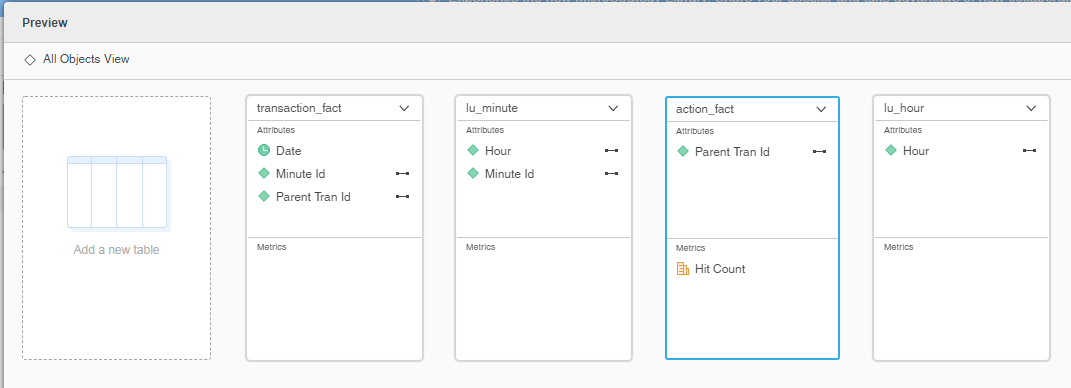
f. Save the dataset in Connect Live mode.
2. Add attributes “Date”, “Hour” and metric “Hit Count” to the visualization. Note that in this case, the fact Hit Count only exists on Parent Action dimension, so the Engine needs to find a join path to extend the fact to Date and Hour dimensions. The table transaction_fact (T2) is the best to be used as the bridge since it contains Date, Minute and Parent Action.
3. Click on the visualization menu and choose “Query Details…” to check CSI.
4. Two temporary tables are generated (SQL has been modified for easy reading):
create table temp1 (
    hour_id    TINYINT(1),
    hour_desc    NVARCHAR(25),
    parent_tran_id    BIGINT(8))

insert into temp1
select    distinct a12.hour_id hour_id,
    a13.hour_desc hour_desc,
    a11.parent_tran_id parent_tran_id
from    `transaction_fact`    a11
    join    `lu_minute`    a12
     on     (a11.minute_id = a12.minute_id)
    join    `lu_hour`    a13
     on     (a12.hour_id = a13.hour_id)

create table temp2 (
    date_id    DATE,
    parent_tran_id    BIGINT(8))

insert into temp2
select    distinct a11.tran_date date_id,
    a11.parent_tran_id parent_tran_id
from    `transaction_fact`    a11

select    pa13.date_id date_id,
    pa12.hour_id hour_id,
    max(pa12.hour_desc) hour_desc,
    sum(a11.hit_count) WJXBFS1
from    `action_fact`    a11
    join    temp1    pa12
     on     (a11.parent_tran_id = pa12.parent_tran_id)
    join    temp2    pa13
     on     (a11.parent_tran_id = pa13.parent_tran_id)
group by    pa13.date_id,
    pa12.hour_id
The performance optimization is released in Strategy 2020.
To resolve this performance issue, please upgrade to Strategy 2020 or above, and set Data Engine Version setting to 12.
The project level setting Data Engine Version can only be enabled through Workstation. For more details on enabling the setting, see Change Data Engine Version .
After enabling this improvement, the Queries will look like:
create table temp1 (
	date_id	DATE,
    hour_id    TINYINT(1),
    hour_desc    NVARCHAR(25),
    parent_tran_id    BIGINT(8))

insert into temp1
select	distinct a11.date_id  date_id,
	a12.hour_id  hour_id,
    a13.hour_desc hour_desc,
    a11.parent_tran_id parent_tran_id
from    `transaction_fact`    a11
    join    `lu_minute`    a12
     on     (a11.minute_id = a12.minute_id)
    join    `lu_hour`    a13
     on     (a12.hour_id = a13.hour_id)

select	pa13.date_id  date_id,
	pa13.hour_id  hour_id,
	max(pa13.hour_desc)  hour_desc,
	sum(a11.hit_count) WJXBFS1
from    `action_fact`    a11
	join	temp1	pa13
     on     (a11.parent_tran_id = pa13.parent_tran_id)
group by	pa13.date_id,
	pa13.hour_id