EducationSoftwareStrategy.com
StrategyCommunity

Knowledge Base

Product

Community

Knowledge Base

TopicsBrowse ArticlesDeveloper Zone

Product

Download SoftwareProduct DocumentationSecurity Hub

Education

Tutorial VideosSolution GalleryEducation courses

Community

GuidelinesGrandmastersEvents
x_social-icon_white.svglinkedin_social-icon_white.svg
Strategy logoCommunity

© Strategy Inc. All Rights Reserved.

LegalTerms of UsePrivacy Policy
  1. Home
  2. Topics

KB483636: Coalesce function unexpectedly ignores parameters’ trailing zeros in Live Connect mode


Qinyi Chen

Quality Engineer, Principal • Strategy


Before MicroStrategy 2020, when Coalesce function is used to create new metrics in Live Connect mode, a parameter with trailing zeros like 0.0 may be treated as 0 during SQL generation, which may cause confusion and impact the performance for database querying.

Starting with the release of Strategy ONE (March 2024), dossiers are also known as dashboards.

Symptoms

  • Coalesce function is defined with parameters with trailing zeros, but the parameter is trimmed in the SQL generated, e.g, 0.0 becomes 0
  • Negative impact on performance
  • Only happens when Data access mode is Live Connect

Glossary

  • Coalesce Function
  • Query Detail – A way to check the SQL and CSI statements.

Steps to Reproduce


The following example uses Strategy Tutorial Project. 
1.    Open Strategy Web. 
2.    Create a new dossier and create a dataset:
a.    Add data, click “New Data” and choose “Databases”.
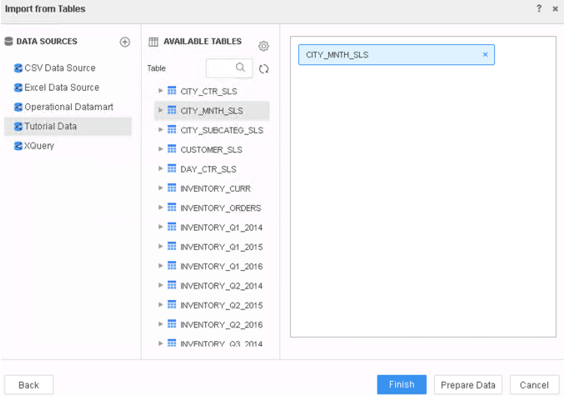
b.    Click “Select Tables” and choose data source “Tutorial Data” and table “CITY_MNTH_SLS”
ka0PW0000001JZhYAM_0EM2R000000m2i7.jpeg

c.    Click “Finish” to save the dataset and choose “Connect Live” mode.
3.    Create a new derived metric based on metric “Tot Cost”.
a.    Right click on “Tot Cost” and choose “Create Metric…”. 
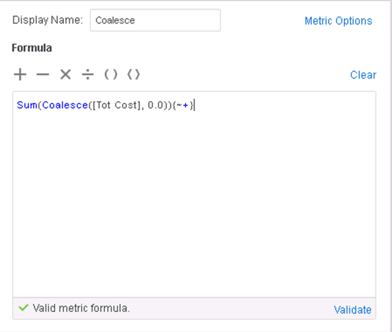
b.    Rename the metric as “Coalesce” and use the formula
Sum(Coalesce([Tot Cost], 0.0)){~+}
ka0PW0000001JZhYAM_0EM2R000000m2iC.jpeg

c.    Validate the formula and save the metric.
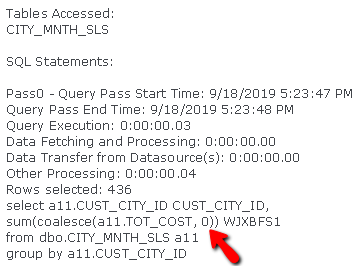
4.    Add attribute “Cust City Id” and metric “Coalesce” into the visualization, and click “Query Details…” in the visualization menu to check the query. In the query, the parameter in the Coalesce function is 0 instead of 0.0.
ka0PW0000001JZhYAM_0EM2R000000m2jU.jpeg

Cause


This is a known defect before Strategy 2020 caused by an inconsistent logic in Live Connect mode which automatically ignores the trailing zeros in parameters.

Solution


To resolve this defect, please upgrade to Strategy 2020 or above, and set Data Engine Version setting to 12.
The project level setting Data Engine Version can only be enabled through Workstation. For more details on enabling the setting, see Change Data Engine Version . 
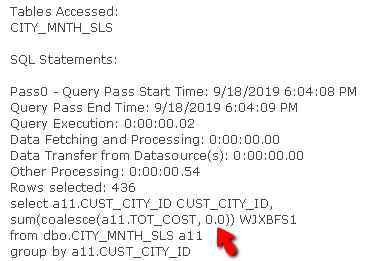
In Strategy 2020, Live Connect mode has correct logic for the Coalesce function, and will not remove the trailing zeros during SQL generation.
ka0PW0000001JZhYAM_0EM2R000000m2lQ.jpeg

Strategy Internal Reference number for this technical note is KB483636 and DE101094.


Comment

0 comments

Details

Knowledge Article

Published:

September 18, 2019

Last Updated:

March 21, 2024