Starting with the release of Strategy ONE (March 2024), dossiers are also known as dashboards.
The following example uses Strategy Tutorial warehouse.
1. Open Strategy Developer.
2. Create a new subtotal with following definition:
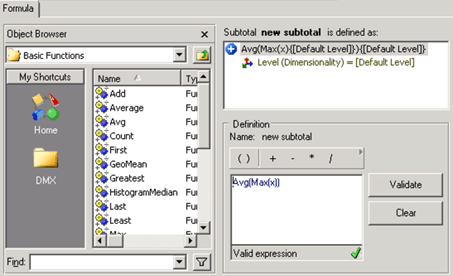
3. Create a new double aggregated metric “M01” with following definition:
a. Right click -> choose “New” -> choose “Metric” and click OK for Empty Metric.
b. Put the formula Avg(Max(Cost){~+}){~+} into the formula section and validate the formula.
Make sure the Cost is the fact and not the metric. This creates a metric that is aggregated twice, both at report level.
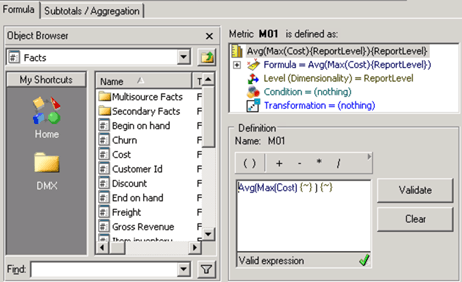
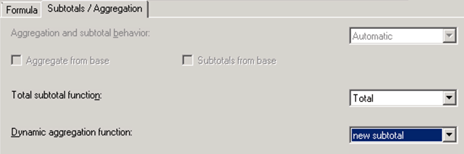
c. Change the panel from “Formula” to “Subtotals/Aggregation”.
d. Choose the newly created subtotal to be the “Dynamic aggregation function”.
e. Save and close the metric.
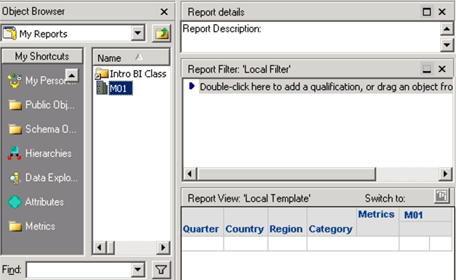
4. Create OLAP cube “DS1” with:
a. Attribute “Quarter”, “Country”, “Region”, “Category”
b. Metric “M01”
5. Open Strategy Web.
6. Create MTDI cube “DS2” with tables:
a. “LU_YEAR”
b. “LU_QUARTER”
7. Create a new dossier with datasets DS1 and DS2.
8. Link attribute “Quarter” in DS1 to attribute “Quarter Id” in DS2.
9. Add Year Id, Quarter and M01 to the Grid, enable Show Total and also Max SubTotal.
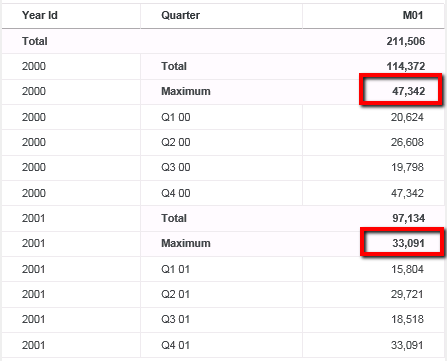
10. Remove attribute “Quarter”. Since the dynamic aggregation is set to Avg(Max(x)), the value should be the Average of the Max M01 of each Quarter, 47,342 and 33,091, respectively. But as shown below, the metric M01 is calculated wrong.
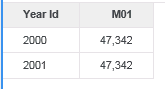
11. Check the CSI in the Query Detail.
...
...
Tables Accessed:
Table4	[F_MAIN_INDEX]:	Country, Category, Quarter, Region, 	M01, 	FACT_TABLE

select	[Category]@[CATEGORY_ID],
	[Quarter]@[QUARTER_ID],
	[Region]@[REGION_ID],
	max([[F_MAIN_INDEX].M01])@{[Category],[Region],[Year Id]} as [M01]
from	DS1
with Table Join Tree: 	[F_MAIN_INDEX]
to	Ex1_tempcube0
...
...
select	[Year Id]@[YEAR_ID],
	avg(max([M01]))@{[Year Id]}
from	Ex1_tempcube1
...
This is a known defect before Strategy 2019 Update 4.
As shown in the CSI above, M01 was aggregated to Year Id level when it was retrieved from DS1 and then the final output is only aggregated to Year once when there are 2 layers of functions, the outcome is wrong.
To resolve this defect, please upgrade to Strategy 2019 Update 4 or above.
The project level setting Data Engine Version can only be enabled through Workstation. For more details on enabling the setting, see Change Data Engine Version .
In Strategy 2019 Update 4 or above, the logic is fixed and correct data will be displayed in the visualization.
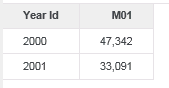
After the fix, the Engine will fetch data at the original level from the OLAP Cube, and correctly aggregate once for each function.
...
...
Table4	[F_MAIN_INDEX]:	Country, Category, Quarter, Region, 	M01, 	FACT_TABLE

select	[Category]@[CATEGORY_ID],
	[Quarter]@[QUARTER_ID],
	[Region]@[REGION_ID],
	[[F_MAIN_INDEX].M01] as [M01]
from	DS1
with Table Join Tree: 	[F_MAIN_INDEX]
to	Ex1_tempcube0
...
...
select	[Year Id]@[YEAR_ID],
	avg(max([M01])@{[Year Id]})@{[Year Id]}
from	Ex1_tempcube1
...