EducationSoftwareStrategy.com
StrategyCommunity

Knowledge Base

Product

Community

Knowledge Base

TopicsBrowse ArticlesDeveloper Zone

Product

Download SoftwareProduct DocumentationSecurity Hub

Education

Tutorial VideosSolution GalleryEducation courses

Community

GuidelinesGrandmastersEvents
x_social-icon_white.svglinkedin_social-icon_white.svg
Strategy logoCommunity

© Strategy Inc. All Rights Reserved.

LegalTerms of UsePrivacy Policy
  1. Home
  2. Topics

KB484037: For data blended dossier, a level metric's dimensionality is ignored


Liheng Ding

Software Engineer, Senior • MicroStrategy


This article explains a scenario where dimensionality of a level metric is ignored in calculating the metric. The error message which is explained in this article is: "In-Memory query execution failed against Intelligent Cube due to duplicate rows found in one of the fact tables."

Starting with the release of Strategy ONE (March 2024), dossiers are also known as dashboards.

Description


Prior to Strategy 2020, if the level of a level metric is not on visualization and there are multiple imported datasets, the level metric's level may not be selected in calculating level metric. In this situation, the following error message may be seen: "In-Memory query execution failed against Intelligent Cube due to duplicate rows found in one of the fact tables."

Steps to Reproduce


The following example uses the Strategy Tutorial attributes and metrics. 
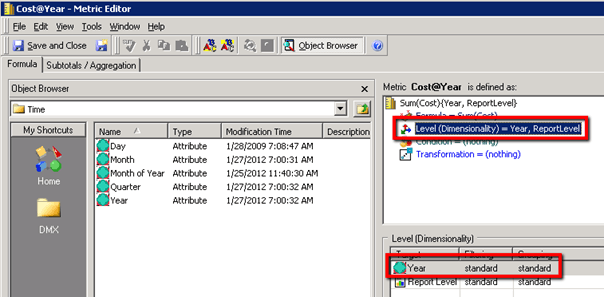
 

  • Create a level metric, "Cost@Year," using Strategy Developer. 
    • Open Strategy Developer.
    • Select the folder you want save the level metric in.
    • Go to File > New > Metric > Empty Metric > OK.  
    • Select the fact, "Cost," and add "Year" to the level.
ka0PW0000001JbTYAU_0EM2R000000np0p.jpeg
    • Save the metric and name it: Cost@Year
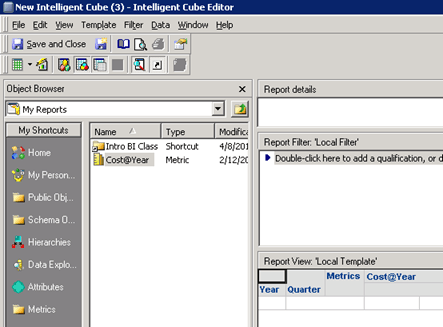
  • Create an Intelligent Cube with "Year," "Quarter," and "Cost@Year."
    • Open Strategy Developer.
    • Select the folder you want to save the Intelligent Cube in. 
    • Click File > New > Intelligent Cube > Empty Intelligent Cube.
    • Add "Year," "Quarter," and "Cost@Year" to the grid. 
ka0PW0000001JbTYAU_0EM2R000000np0u.jpeg
    • Save the cube.
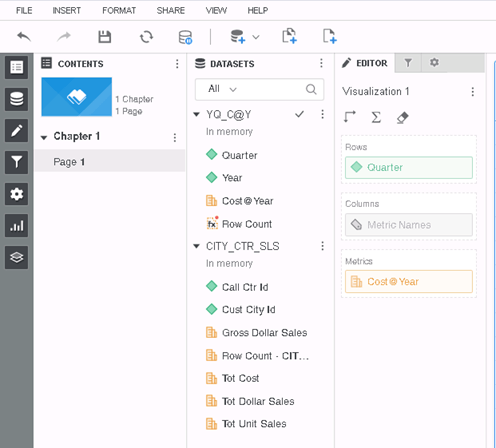
  • Create a dossier and import the Intelligent Cube (created in the step above) and another dataset. 
ka0PW0000001JbTYAU_0EM2R000000np1E.jpeg
  • Add "Quarter" and "Cost@Year" to the grid.
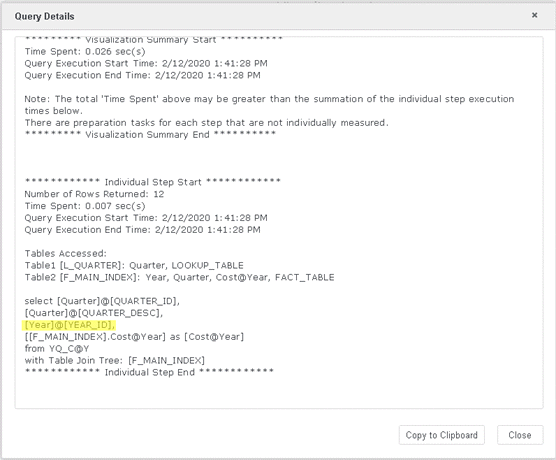
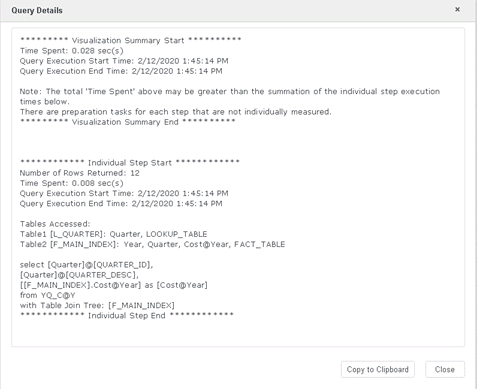
    The Query Detail selected "Year," which is the level of "Cost@Year." (The workflow for multiple datasets is not triggered since the attributes and metrics are from the same dataset.)
ka0PW0000001JbTYAU_0EM2R000000np7v.jpeg
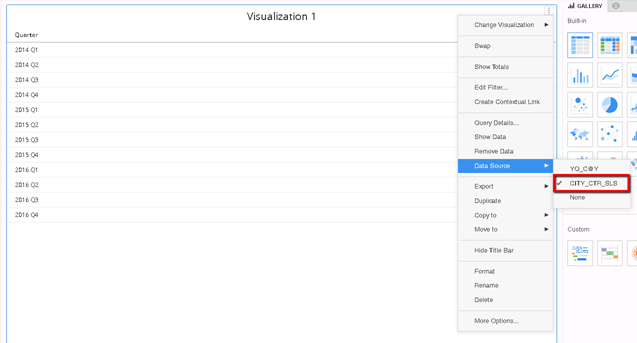
  • Change the Data Source to your other imported dataset.
    This will trigger the workflow for multiple datasets. "Year" will not be selected this time in the Query Detail.
ka0PW0000001JbTYAU_0EM2R000000np85.jpeg
ka0PW0000001JbTYAU_0EM2R000000np8A.jpeg

Upgrading Error When upgrading from Strategy 10.4.8 to Strategy 2019, this error may cause the following error:
In-Memory query execution failed against Intelligent Cube due to duplicate rows found in one of the fact tables.

ka0PW0000001JbTYAU_0EM2R000000npAk.jpeg


Why is this happening?


This is a known defect prior to Strategy 2020. The extra attributes (not on the grid) generated by the CSI Engine will be ignored by the Data Blending Engine.
 

Solution


To resolve this defect, upgrade to Strategy 2020 and set the Data Engine Version to 2019 or above. For details, see KB483804: Accessing "Data Engine Version" setting in MicroStrategy Developer. 
 

Glossary 

Level Metric Metrics that are evaluated at a set level of data, regardless of what is contained on the report they are placed on. 
Query Details A way to check the SQL and CSI statements.


Comment

0 comments

Details

Knowledge Article

Published:

February 12, 2020

Last Updated:

March 21, 2024