EducationSoftwareStrategy.com
StrategyCommunity

Knowledge Base

Product

Community

Knowledge Base

TopicsBrowse ArticlesDeveloper Zone

Product

Download SoftwareProduct DocumentationSecurity Hub

Education

Tutorial VideosSolution GalleryEducation courses

Community

GuidelinesGrandmastersEvents
x_social-icon_white.svglinkedin_social-icon_white.svg
Strategy logoCommunity

© Strategy Inc. All Rights Reserved.

LegalTerms of UsePrivacy Policy
  1. Home
  2. Topics

KB485298: The hidden column text from MicroStrategy Web still displays when open the Dossier from MicroStrategy Mobile App and Library App in 11.x and previous versions.


Yating (Tiffanie) Zhai

Senior Cloud Support Engineer III • MicroStrategy


In MicroStrategy 11.x, the hidden column text from MicroStrategy Web still displays when opening the Dossier from MicroStrategy Mobile App and Library App

Starting with the release of Strategy ONE (March 2024), dossiers are also known as dashboards.
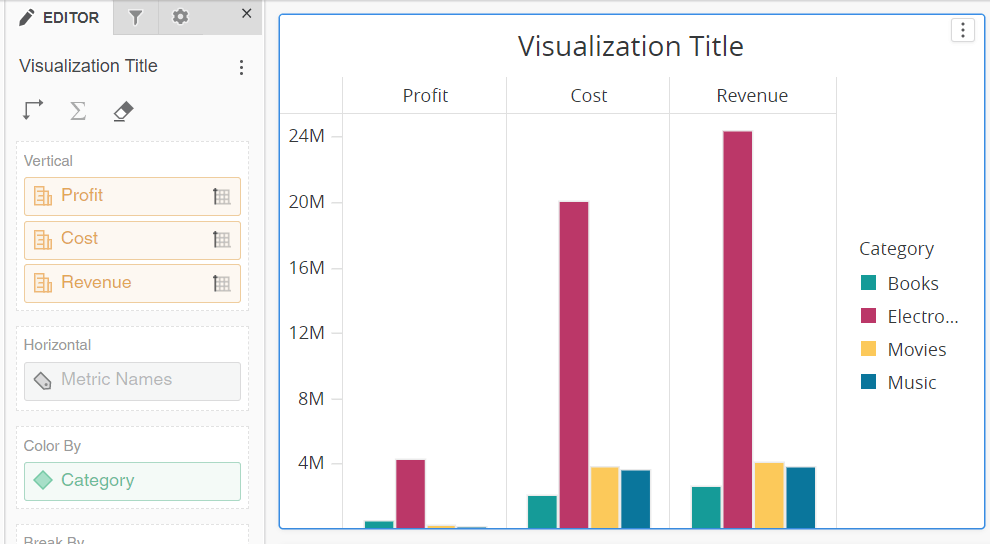
Steps to Reproduce:

  1. Create a test Dossier, make sure to add more than two Metrics and “Metric Names” is in the Horizontal field. Currently, the column text (Profit, Cost, Revenue) is displayed.
ka0PW0000002S6gYAE_0EM4W000004X7wO.png


  1. From Format panel > choose “Rows and Columns” > Column Text > uncheck the “Show Text” box to hide the column text, as below:
ka0PW0000002S6gYAE_0EM4W000004X7wP.png


  1. Open the Dossier from Library Web, the column text is hided as expected.
  2. Open the Dossier from Strategy Mobile App and Library App, the hided column text will display.
ka0PW0000002S6gYAE_0EM4W000004X7wQ.png

Cause:


This has been identified as a defect in Strategy 11.x and previous versions.
 

Action:


This defect has been fixed in Strategy 2021 Update 4 and higher for the Strategy Mobile app and Library app. Please download the latest version from the App Store to take the advantage of the fix.


Comment

0 comments

Details

Knowledge Article

Published:

January 4, 2022

Last Updated:

June 17, 2024