EducationSoftwareStrategy.com
StrategyCommunity

Knowledge Base

Product

Community

Knowledge Base

TopicsBrowse ArticlesDeveloper Zone

Product

Download SoftwareProduct DocumentationSecurity Hub

Education

Tutorial VideosSolution GalleryEducation courses

Community

GuidelinesGrandmastersEvents
x_social-icon_white.svglinkedin_social-icon_white.svg
Strategy logoCommunity

© Strategy Inc. All Rights Reserved.

LegalTerms of UsePrivacy Policy
  1. Home
  2. Topics

KB486423: How to change session idle timeout in MicroStrategy Library


Mateusz Rusinowski

Senior Support Engineer • MicroStrategy


This article describes how to change the Session Idle Timeout in MicroStrategy Library

Symptom


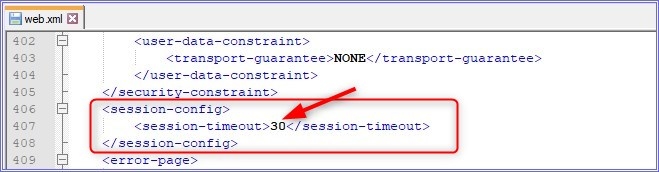
By default, Strategy Library session will expire after a user is idle for 30 minutes. This timeout is controlled by the <session-timeout> parameter in web.xml file located in <tomcatdeployment>/webapps/StrategyLibrary/WEB-INF'.
 

Action

In order to change the idle timeout for Strategy Library following steps need to be taken:
1.    User with adequate privileges should edit the web.xml file
2.    Locate the <session-config> element
3.    Enter a new timeout (in minutes) between <session-timeout> and </session-timeout> tags (as shown below)
ka0PW0000002z93YAA_0EMPW000004REJ7.jpeg

4. Tomcat has to be restarted to apply the change.
Please also refer to following KB articles:
1. KB12966: How to configure the web session timeout set on JSP application servers using MicroStrategy Web JSP
2. KB12867: How timeout settings in MicroStrategy Web and the MicroStrategy Intelligence Server affect users in MicroStrategy Web


Comment

0 comments

Details

Knowledge Article

Published:

April 4, 2024

Last Updated:

August 13, 2024