EducationSoftwareStrategy.com
StrategyCommunity

Knowledge Base

Product

Community

Knowledge Base

TopicsBrowse ArticlesDeveloper Zone

Product

Download SoftwareProduct DocumentationSecurity Hub

Education

Tutorial VideosSolution GalleryEducation courses

Community

GuidelinesGrandmastersEvents
x_social-icon_white.svglinkedin_social-icon_white.svg
Strategy logoCommunity

© Strategy Inc. All Rights Reserved.

LegalTerms of UsePrivacy Policy
  1. Home
  2. Topics
  3. KB486938 How to always show the navigation bar in the dashboard editor in MicroStrategy Web

KB486938 How to always show the navigation bar in the dashboard editor in MicroStrategy Web


Ruiyu Han

Senior Support Engineer • MicroStrategy


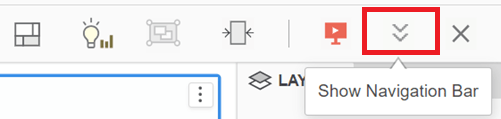
When running a dashboard in MicroStrategy Web, the navigation bar is hidden by default. Users need to click the “Show Navigation Bar” button to show it manually every time, which is not convenient for some users who want to show the navigation bar always.

Introduction

When running a dashboard in Strategy Web, the navigation bar is hidden by default. Users need to click the “Show Navigation Bar” button to show it manually every time, which is not convenient for some users who want to show the navigation bar always.
Button to Show Navigation Bar:
ka0PW000000334bYAA_0EMPW000009oXgL.jpeg

Navigation Bar:

Steps

Since there is no out-of-the-box configuration to show navigation bar by default, users need to implement Strategy Web SDK.Below are the detailed steps:

1. Create a new plugin with Web Customization Editor (Eclipse).
Reference: Creating a New Plug-in (microstrategy.com)
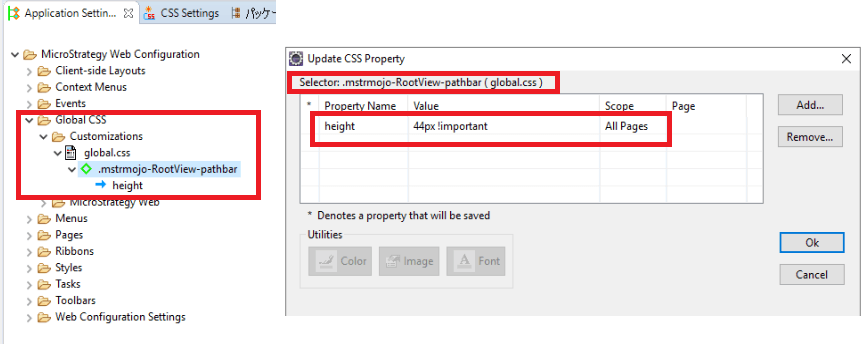
2. Create a new CSS Selector in the new created plugin with the following details
Selector name: mstrmojo-RootView-pathbar
Property Name: height
Property Value: 44px !important
Reference: Implementing a Plugin to Change the Look and Feel of MicroStrategy Web using Web SDK
Below is the image of the CSS and the selector:
ka0PW000000334bYAA_0EMPW000009oXoQ.png

3. Restart Web application service (Tomcat etc.)


Comment

0 comments

Details

Knowledge Article

Published:

November 27, 2024

Last Updated:

November 27, 2024