EducationSoftwareStrategy.com
StrategyCommunity

Knowledge Base

Product

Community

Knowledge Base

TopicsBrowse ArticlesDeveloper Zone

Product

Download SoftwareProduct DocumentationSecurity Hub

Education

Tutorial VideosSolution GalleryEducation courses

Community

GuidelinesGrandmastersEvents
x_social-icon_white.svglinkedin_social-icon_white.svg
Strategy logoCommunity

© Strategy Inc. All Rights Reserved.

LegalTerms of UsePrivacy Policy
  1. Home
  2. Topics

Implementing a Plugin to Change the Look and Feel of MicroStrategy Web using Web SDK


David Dechent

Senior Product Specialist • Strategy


The purpose of this tutorial is to assist a developer with identifying how to implement CSS Selector and CSS Selector value changes with the Web Customization Editor, which is an Eclipse Plugin designed and provided by MicroStrategy.

Starting with the release of Strategy ONE (March 2024), dossiers are also known as dashboards.
This Tutorial assumes that the CSS Selector and CSS Selector values have been identified and tested, and the developer is ready to implement a plugin using the Web Customization Editor using this information
 

Required Reading:

  • Web Customization Editor
  • CSS & MicroStrategy Web


Recommended Reading

  • Finding-CSS-to-Change-the-Look-and-Feel-of-Microstrategy-Web-Using-the-Web-SDK
  • How to Modify a Specific Selector in Chrome Developer Tools to Change the Look and Feel of MicroStrategy using the Web SDK

Making CSS permanent using the Web Customization Editor


Once the desired CSS rules have been found, they can be made permanent by creating a customization using the Web Customization Editor.

Applying Custom CSS to all pages in Strategy Web


Custom CSS rules can be applied to all pages in Strategy Web by leveraging the Global CSS in your customization:

  1. ​Open the Strategy Web Customization Editor.
  2. If appropriate, create a new plugin and give it a meaningful name.
  3. Navigate through the following in the interface of the Web Customization Editor:
    • Application Settings
    • Strategy Web Configuration
    • Global CSS
    • Customizations
    • global.css
  4. Right-click on global.css and click "New Selector".
  5. Enter the CSS selector found in the previous steps
    • for example ".mstrmojo-VIDocLayout"
  6. Right-click the newly added selector in the list and click "New Property".
  7. Enter the first property you wish to affect in the "property" field
    • for example "top"
  8. Enter the value you wish to apply to this CSS property in the "value" field
    • for example "100px !important"
  9. Repeat steps 4-8 for any other CSS selectors.
  10. Repeat steps 5-8 for any other properties on existing selectors.
  11. Restart Strategy Web to ensure the file changes are registered.
  12. Clear browser caches and test to confirm the changes applied successfully.

Applying Custom CSS to only one page in Strategy Web


Different parts of Strategy Web are architecturally organized into pages using the <page> node .
In the Web Customization Editor, most pages can be seen as a list in the "Pages" category:
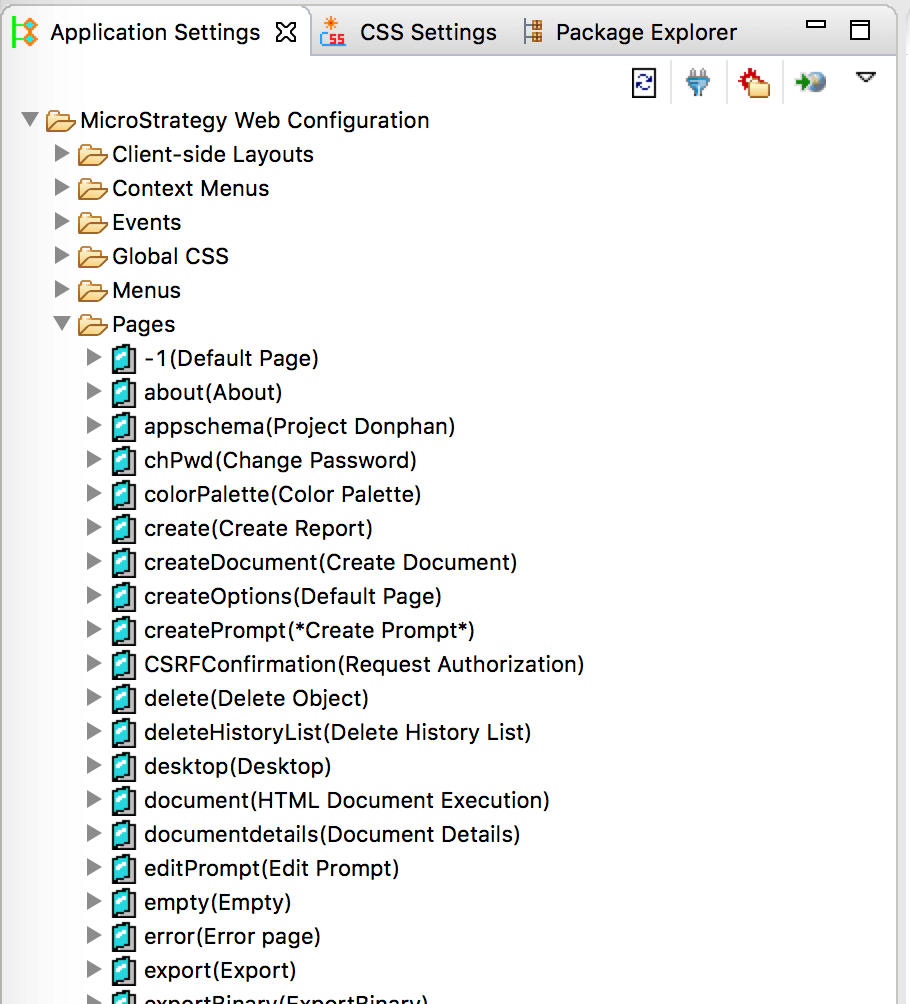
ka0PW0000001JmQYAU_0EM44000000WdYA.png

For this specific example, the dossier is called "HTML5Vi".
You can use your browser developer tools to find the current page name for a specific part of MicroStrategy Web.
The following steps demonstrate how to apply this customization only for Dossiers in Strategy Web:

  1. ​Open the Strategy Web Customization Editor.
  2. If appropriate, create a new plugin and give it a meaningful name.
  3. Navigate through the following in the interface of the Web Customization Editor:
    • Application Settings
    • Strategy Web Configuration
    • Pages
    • Find the page name in this list
      • for example "Html5Vi" for the Dossier / VI page
    • CSS
    • Customizations
    • xxxxxxPage.css
      • for example "Html5ViPage.css"
  4. Right-click on the xxxxxxPage.css and click "New Selector"
    • for example, right-click on the "Html5ViPage.css"
  5. Enter the CSS selector found in the previous steps
    • for example ".mstrmojo-VIDocLayout"
  6. Right-click the newly added selector in the list and click "New Property".
  7. Enter the first property you wish to affect in the "property" field
    • for example "top"
  8. Enter the value you wish to apply to this CSS property in the "value" field
    • for example "100px !important"
  9. Repeat steps 4-8 for any other CSS selectors.
  10. Repeat steps 5-8 for any other properties on existing selectors.
  11. Restart Strategy Web to ensure the file changes are registered.
  12. Clear browser caches and test to confirm the changes applied successfully.

Comment

0 comments

Details

Knowledge Article

Published:

December 1, 2018

Last Updated:

March 21, 2024