EducationSoftwareStrategy.com
StrategyCommunity

Knowledge Base

Product

Community

Knowledge Base

TopicsBrowse ArticlesDeveloper Zone

Product

Download SoftwareProduct DocumentationSecurity Hub

Education

Tutorial VideosSolution GalleryEducation courses

Community

GuidelinesGrandmastersEvents
x_social-icon_white.svglinkedin_social-icon_white.svg
Strategy logoCommunity

© Strategy Inc. All Rights Reserved.

LegalTerms of UsePrivacy Policy
  1. Home
  2. Topics

KB487020: "[Integrity Manager user-defined answer] failed: Date or Time value required" error during checking the date prompt report in Korean date locale


Sung-Kyu Hong

Senior Cloud Support Engineer II • MicroStrategy


"[Integrity Manager user-defined answer] failed: Date or Time value required" error during checking the date prompt report in Korean date locale

Symptom

When a report including the date prompt with personal answer like 01/12/2015, the Customize Prompt Answers for Date prompt (like 31/12/2019) is not applied during the IM testing.
(Please review KB16781: Prompt resolution in MicroStrategy Integrity Manager  for more details on Prompt resolution in Strategy Integrity Manager )
In a report including the date prompt without personal answer in Korean date locale, the IM user-defined answer (Customize prompt answer) for date prompt is not applied  and following error is shown with  "Not supported" in Execution Status:

Error message - "[Integrity Manager user-defined answer] failed: Date or Time value required" 
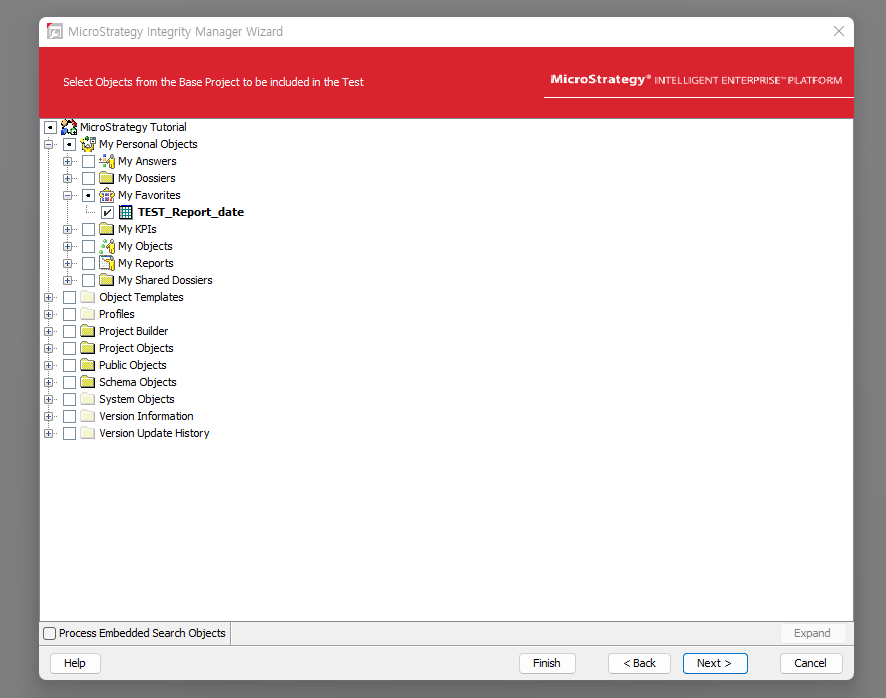
The issue is reproduced in Korean OS (Korean display language) + Korea/English date format, and English OS (English Display language) + Korea date format in Strategy Integrity Manager 2021/ ONE 
In English display (English OS) + English date format, the issue is not observed.
1. English OS display language + ENG date format = NO issue
2. KOREA OS display language + English date format = Not support error
3. KOREA OS display language + Korea date format = type date (15. 1. 1), Not support error.
: Success with English OS language + English date format. otherwise, Not support error.
Steps to Reproduce
1. In Integrity manager wizard, Single project -> Choose and Enter Base project information -> Select the prompt report without personal answers

ka0PW0000003rKjYAI_0EMPW00000BDgsj.png

2. Input Date prompts. Order the method as 1st Integrity Manager user-defined answers.

ka0PW0000003rKjYAI_0EMPW00000BDgsk.png

3. The below error is shown in DetailsExecution Status:Not supported
Execution Details:
(Cycle #1) [Integrity Manager user-defined answer] failed: 날짜 또는 시간 값이 필요합니다.  // Date or time value are required.
[Integrity Manager internal answer] failed: 날짜 또는 시간 값이 필요합니다. // Date or time value are required.

ka0PW0000003rKjYAI_0EMPW00000BDgsl.jpeg

Cause

This is a known issue in Strategy Strategy Integrity Manager 2021 All version, Strategy ONE March/June/September 2024.

Action

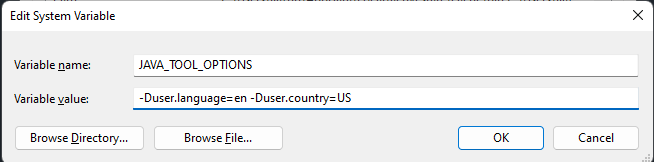
Suggest to use the workaround by forcing Integrity Manager to work in English locale. 
Add a environment variable: JAVA_TOOL_OPTIONS
With value: -Duser.language=en -Duser.country=US
ka0PW0000003rKjYAI_0EMPW00000BDgsm.png
  • It will override the default JVM locale. The user will use English locale on Integrity Manager no matter what the OS language is set.
  • In this way, the custom prompt answer should also use the English pattern "MM/dd/yyyy"


Comment

0 comments

Details

Knowledge Article

Published:

November 26, 2024

Last Updated:

November 26, 2024