INTRODUCTION
Pass-through expressions, also called Apply functions, provide access to special functions or syntactic constructs that are not standard in Strategy, but can be obtained through the relational database. They act as containers for non-standard SQL expressions that Strategy does not support.
The Apply functions are not meant to take the place of the standard Strategy functions. Instead, they are intended to enhance the Strategy product by taking advantage of what the RDBMS platforms can offer. There are five predefined Apply functions, each belonging to a different function type - ApplySimple, ApplyAgg, ApplyOLAP, ApplyComparison, ApplyLogical. In this article we will discuss the ApplySimple function.
ApplyComparison
The ApplyComparison function is similar to the ApplySimple function KB3905: How to use pass-through expression- ApplySimple in MicroStrategy SQL Generation Engine which allows users to send direct input to the warehouse in filtering expressions. This function can only be used in the filter editor.
SYNTAX:
ApplyComparison ("expression_with_placeholders", parameter_1, …, parameter_n)
Where: 'expression_with_placeholders' is a valid SQL expression for the DBMS using placeholders with the format '#n'. '#' is a reserved character for Strategy and 'n' is the number of the parameters (arguments) outside the quotes, starting with '0' and increasing in steps of '1'.
'parameter_1, …, parameter_n' is the list of parameters that will replace the placeholders inside the quotes. The parameters can be attribute forms, value prompts or constants. An attribute form parameter must follow the following syntax:
attribute_name@form_name
Example:
This example shows how a dynamic date filter with a prompt can be created against a SQL Server database, the objects needed are:
Metric:
[M1]: Sum([Dollar Sales]) {~+}
Value prompt:
[P1]: Numeric value prompt.
Custom expression filter with apply comparison expression:
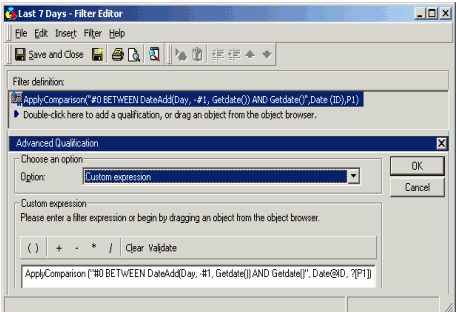
Filter:
[Last 7 Days]:
[Custom expression]:
ApplyComparison ("#0 BETWEEN DateAdd(Day, -#1, Getdate()) AND Getdate()", Date@ID, ?[P1])
In SQL Server:
This filter will prompt on a value, and generate a WHERE clause that returns a range of days between the database server's date and the same date minus the number of days entered at run time in the prompt.
A report with [Date], [M1] and [Last 7 Days] returns:
Setting | Setting |
|
|
