EducationSoftwareStrategy.com
StrategyCommunity

Knowledge Base

Product

Community

Knowledge Base

TopicsBrowse ArticlesDeveloper Zone

Product

Download SoftwareProduct DocumentationSecurity Hub

Education

Tutorial VideosSolution GalleryEducation courses

Community

GuidelinesGrandmastersEvents
x_social-icon_white.svglinkedin_social-icon_white.svg
Strategy logoCommunity

© Strategy Inc. All Rights Reserved.

LegalTerms of UsePrivacy Policy
  1. Home
  2. Topics

KB6731: 'The generated SQL string (X bytes) is longer than limitation of this ODBC driver (65336 bytes)' error message appears when running a report in MicroStrategy Developer 9.x


Stefan Zepeda

Salesforce Solutions Architect • Strategy


'The generated SQL string (X bytes) is longer than limitation of this ODBC driver (65336 bytes)' when trying to run a report in 9.x

 
SYMPTOM:
In Strategy Desktop 9.x, when users try to run a report, they see the following error message:
'The QueryEngine encountered an error: The generated SQL string (X bytes) is longer than limitation of this ODBC driver (65336 bytes)'
 
NOTE: The value X is greater than 65536.
 
CAUSE:
The default value set for the Very Large Database (VLDB) Governing parameter, Maximum SQL Size, at the Database Management System (DBMS) object level is 65536 bytes. This value is inherited when the 'Use default inherited value' option is set for Maximum SQL Size parameter at database instance level.
 
Refer to the Strategy Knowledge Base document KB3632 for further information on inheritance of VLDB properties.
 
ACTION:
To resolve this issue, follow the steps outlined below:
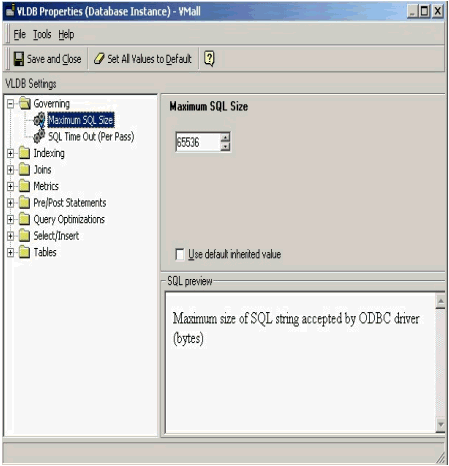
  • Launch Strategy Developer 9.x.
  • Log into the Server project source as Administrator.
  • Go to Database Instance Manager under Administration.
  • Right-click on the warehouse Database Instance and select 'VLDB Properties... '.
  • Expand the Governing folder in the VLDB Editor and select 'Maximum SQL Size'.
  • Uncheck the 'Use default inherited value' parameter.
ka04W000001IqhMQAS_0EM440000002GB8.gif
  • Increase 65536 to a higher value. As an example, doubling this number to 131072 is a good start.
  • Click the on 'Save and close' button.
  • Logout of the Project Source.
  • Stop and restart the Strategy Intelligence Server service.

Comment

0 comments

Details

Knowledge Article

Published:

June 8, 2017

Last Updated:

June 8, 2017