SUMMARY:
This technical note discusses how the licensing schemes for software capacity and product packaging will be enforced at installation and run time for the Strategy 9.4 and newer.
Note: The information in this document adds to the existing information presented in the following technical note:
The main licensing schemes for software capacity and product packaging are:
NOTE:
Customers may purchase additional products from Strategy at any time so License Keys may not reflect the status of the current contractual licensing obligations that the customer has with Strategy.
The governance and notifications of the above licensing schemes are handled as follows:
1. Out-of-compliance notification for number of CPUs used by the Strategy Intelligence Server(s):
This will notify administrators about non-compliance if the number of Central Processing Units (CPU) used by the existing Strategy Intelligence Server(s) at run time exceeds the number of CPUs for which the user is licensed. The number of CPUs licensed is encrypted into the License Key. This requires the system administrators to update the License Key for all existing Strategy Intelligence Servers included in that licensing scheme. This should be done using Strategy License Manager, each time additional capacity is added or whenever the Strategy Intelligence Server is upgraded.
NOTE:
2. Out-of-compliance notification for Named Users:
In the Strategy 9.x product family, the metadata used by the Strategy Intelligence Server(s) will be periodically scanned for the total number of named users assigned for each Strategy component based upon the user privileges assigned in the metadata repository. The number of users assigned will be compared against the number of named users licensed for each component, encrypted into the License Key. In case of an out-of-compliance situation, any user who tries to access the administration capabilities will see a notification indicating the out-of-compliance situation. This message will also be displayed if a user connects using Strategy Administrator - Command Manager or Strategy License Manager.
Should an out-of-compliance notification with respect to named users be generated, run Strategy License Manager to identify the users that resulted in exceeding licensed capacity and determine the privileges that result in the non-compliance.
NOTES:
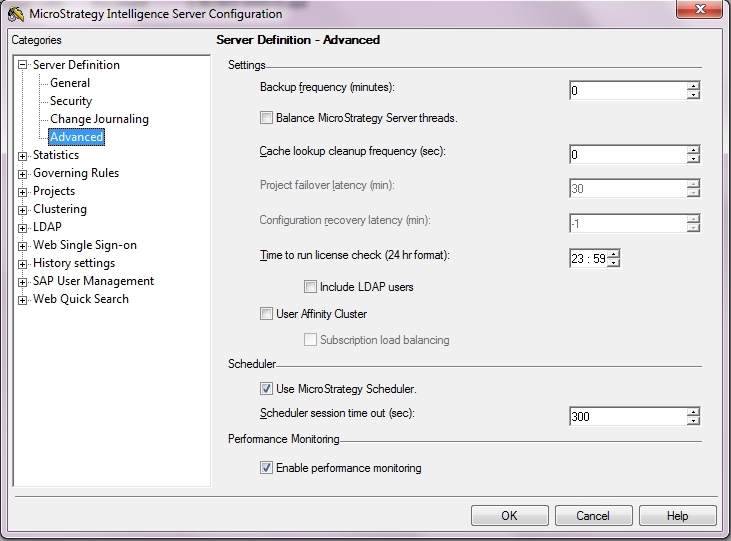
ALTER SERVER CONFIGURATION LICENSECHECKTIME 23:00;
LIST ALL PROPERTIES FOR SERVER CONFIGURATION;
3. Governance of CPU clock speed when installing Strategy Intelligence Server, Strategy Web and Strategy Narrowcast Server.
In Strategy 9.4.x and newer, it is not possible to install Strategy products on machines that are faster than the CPU/clock speed that has been licensed. In order to perform a successful installation, the System Administrator will need to limit the resources to the licensed resources by configuring the processor affinity. For additional information on this installation behavior, refer to Strategy Knowledge Base document KB7496.
4. Disabling any component or feature that has not been purchased. Installation will not be possible without the proper licenses.
Users need to purchase the specific Strategy component/feature in order to get the functionality. This behavior is enforced through the license key. If an installation has more components than the ones supported by a license, that specific license will not be allowed to be updated unless the non-licensed components are removed. In the other hand, it is not possible to install any component which is not included in the License Key.
Auditing using Strategy License Manager:
Strategy License Manager should be used to audit the Strategy products installed on any machine and to determine the number of named users by inspecting the local Strategy Intelligence Server(s) connected to the metadata repository. This can be done in the Audit Tab and it allows to see the audit information directly on the License Manager screen or to generate an HTML file with all the details of the audit.
Upgrading Licenses using Strategy License Manager:
The License Key may be upgraded using License Manager as follows:
For more details on upgrading license key using License Manager, please consult the Administrator, Intelligence Server and Web Administrator guide.
Note: The licensing information may also be obtained by Strategy Command Manager 9.x using the following command:
LIST PROPERTIES FOR SERVER 'SERVERNAME';
