SYMPTOM:
Users may receive the following possible errors when using Strategy Web:
Some possible errors in the Strategy Web error log:
Some possible errors in the DSSErrors log:
CAUSE:
These errors occur because the working set Random Access Memory (RAM) has been exceeded and can no longer be accessed in order to operate with working set reports.
These errors can occur under two circumstances:
If there are many users requesting reports at the same time (or a few users requesting large reports), then the WS Result Pool may be filled with RIs that cannot be swapped. At this time, users who request a RI may receive one of the errors above because RIs cannot be swapped to disk to make room for the new RI.
ACTION:
Increase the "Maximum RAM for Working set cache" in the Strategy Intelligence Server Configuration as shown below:
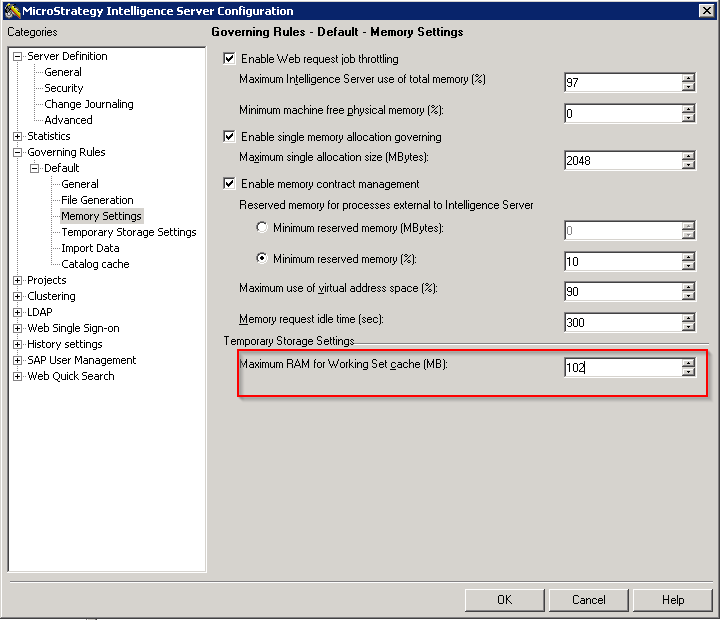
WARNING:
Increasing the 'Maximum RAM for Working Set cache' setting will increase the possible limit amount of RAM that can be used by the Strategy Intelligence Server. Setting this to a higher limit does not mean the memory will be set aside for immediate use by the Strategy Intelligence Server. However, if needed, that limit is available, in the same way the Maximum RAM for cache settings behave.
RELATED KB ARTICLES
KB8617: What is the 'Working Set' governor setting in Strategy Intelligence Server 2021?
KB10138: How are the concepts of Working Set, Working Set Result Pool, History List related to each other in Strategy Intelligence Server?
KB8621
