EducationSoftwareStrategy.com
StrategyCommunity

Knowledge Base

Product

Community

Knowledge Base

TopicsBrowse ArticlesDeveloper Zone

Product

Download SoftwareProduct DocumentationSecurity Hub

Education

Tutorial VideosSolution GalleryEducation courses

Community

GuidelinesGrandmastersEvents
x_social-icon_white.svglinkedin_social-icon_white.svg
Strategy logoCommunity

© Strategy Inc. All Rights Reserved.

LegalTerms of UsePrivacy Policy
  1. Home
  2. Topics

KB484561: Launching the Warehouse Catalog results in the unexpected GSSAPI error, "Unspecified GSS failure. Minor code may provide more information (ticket expired)," in MicroStrategy 2019


Danfeng Zhan

Principal Product Specialist • Strategy


This article addresses the “Unspecified GSS failure” error that occurs when launching the Warehouse Catalog in MicroStrategy 2019.

Description 


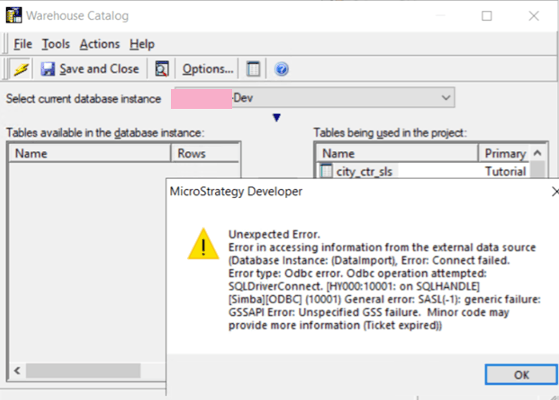
In Strategy 2019, the following ticket expired” error occurs when launching the Warehouse Catalog. The targeting warehouse database instance has been setup Kerberos authentication.
[Simba][odbc] (10001) General error: SASL(-1): generic failure: GSSAPI Error: Unspecified GSS failure. Minor code may provide more information (ticket expired)
ka04W000000V3G7QAK_0EM4W000001IblX.jpeg


Why is this happening? 


This error is occurring because the Kerberos ticket is expired. 

Solution 


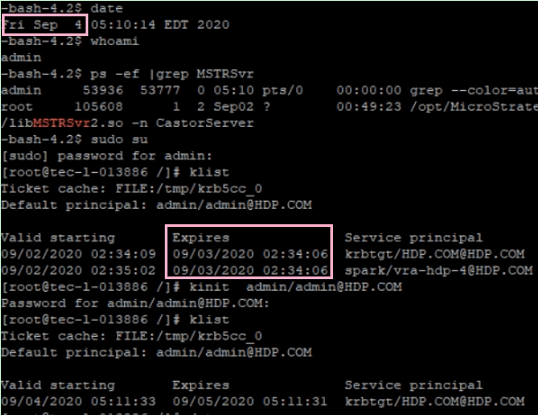
Use klist to verify if a ticket is created for the kbrtgt service and confirm it is expired by comparing the current timestamp. Use kinit to renew the ticket.
ka04W000000V3G7QAK_0EM4W000001Iblh.jpeg


Refer to Knowledge Base article below for the Kerberos configuration and check points.

  • KB19110: How to configure Strategy Intelligence Server for Integrated Authentication (Kerberos) on Unix / Linux
  • KB484114: Additional check points for Kerberos from the Intelligence Server perspective

Comment

0 comments

Details

Knowledge Article

Published:

September 8, 2020

Last Updated:

September 8, 2020