EducationSoftwareStrategy.com
StrategyCommunity

Knowledge Base

Product

Community

Knowledge Base

TopicsBrowse ArticlesDeveloper Zone

Product

Download SoftwareProduct DocumentationSecurity Hub

Education

Tutorial VideosSolution GalleryEducation courses

Community

GuidelinesGrandmastersEvents
x_social-icon_white.svglinkedin_social-icon_white.svg
Strategy logoCommunity

© Strategy Inc. All Rights Reserved.

LegalTerms of UsePrivacy Policy
  1. Home
  2. Topics

MicroLearning: Improve Tables and Columns of Data during Data Import


Stefan Zepeda

Salesforce Solutions Architect • Strategy


Wrangle, or smooth, your data for best analysis results when importing it into MicroStrategy Desktop or MicroStrategy Web.

Descriprion


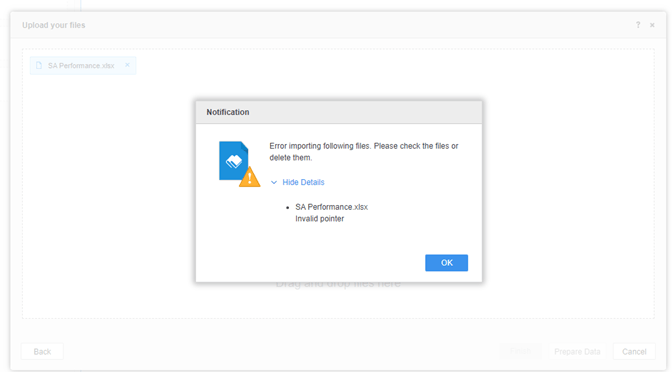
When logging in to a Strategy Linux Intelligence Server with integrated Kerberos authentication and importing files from disk or URL, you may receive the following error:
Error importing following files. Please check the files or delete them. 
Invalid pointer
ka02R000000g6XZQAY_0EM2R000000o1iF.jpeg

Why is this happening?

This error is occurring due to the expiration of the ticket cache for Linux Intelligence Server. 
Generally, you do not need to use

kinit
on the Intelligence Server to generate the cache file, because the Intelligence Server auto generates the cache file if it does not exist. 
However, If the Kerberos constrained delegate feature is enabled, and no 'KRB5_CLIENT_KTNAME' environment variable is set, then the Intelligence Server cannot generate the ticket cache automatically. In this case, even if you perform  
kinit 
manually, the ticket cache will not be auto renewed by the Intelligence Server. You would still experience the issue after the ticket expires.
 

Solution


There are two workarounds to address this issue:

Workaround

  • Create the 'KRB5_CLIENT_KTNAME' environment variable and and set the value to the correct keytab file. This environment variable is important to the KCD feature. For details, see KB440503 .
    Restart the Intelligence Server.
  • If your Intelligence Server can NOT be restarted, create the scheduled scripts to refresh the ticket cache periodically. The following is a sample command:
     kinit -kt /etc/krb5.keytab

Comment

0 comments

Details

Knowledge Article

Published:

June 12, 2017

Last Updated:

June 12, 2017