The Strategy Cloud Platform deploys a best-in-class Strategy architecture into the customers AWS environment. Over years of work and collaboration with AWS as a partner, Strategy has developed an optimized architecture for the cloud.
The attached document will describe in detail the architecture, configuration, deployment and requirements for the Strategy Cloud Platform. The information below summarizes sections from the PDF.
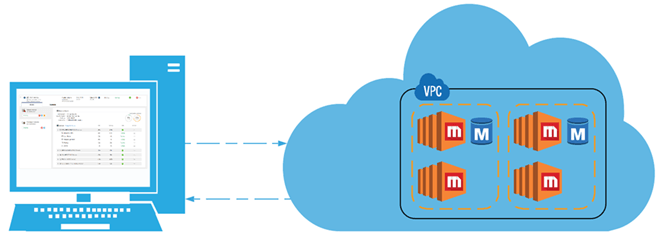
The Strategy Cloud Platform provides three architectures. Team, Department, and Enterprise, each one increasing in scalability from one user to hundreds of thousands of users. These Architectures are deployed into the customers AWS account via the Strategy Cloud Console. This console will deploy a fully configured, production ready Strategy architecture into the customers AWS account. It will also manage, monitor and schedule the resources that are deployed.
Customers have the option to deploy into either a new VPC (the cloud console will create it) or an existing VPC (the customer will specify the appropriate VPC and subnets).
The Cloud Console places an orchestration engine inside the customers AWS account. It communicates with this engine to initiate deployments, monitoring and management of the Strategy infrastructure. This orchestration engine is composed of a series of step functions, lambda functions, cloud formation templates and code deploy scripts that create the infrastructure, wire the components together, configure the Strategy application and test it for proper configuration.
This deployment engine will execute when a user triggers certain actions in the Strategy Cloud Console. If a user were to create an environment in the cloud console, it would trigger the orchestration engine via an AWS API request, passing a payload to the step function, orchestrating a series of lambda functions and cloud formation templates and finally producing a fully configured production ready Strategy application.
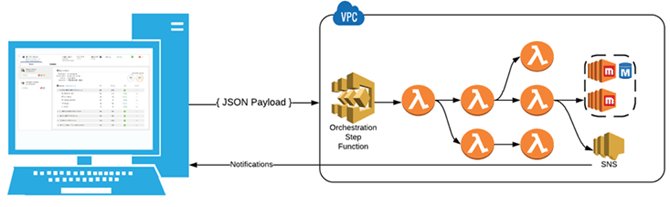
The Strategy architecture is deployed with a fully configured production ready Strategy application. The orchestration engine has a robust set of Code Deploy scripts that are executed on the EC2 instances to properly configure the Strategy application. These scripts have been developed and iterated over for years providing customers with the most optimized and fully featured Strategy application configuration possible. These scripts consist of tens of thousands of lines of code that configure and optimize the I-Server, Web, Mobile, Platform Analytics, Usher, Library, Collaboration, HyperIntelligence, and many more components. Other valuable operations conducted include:
Strategy Cloud Platform will provide customers with the most optimized and functional Strategy application possible.
The Strategy Cloud Platform needs to be configured to work with a customer’s AWS account so that it can deploy, monitor, manage and schedule the Strategy application. For steps to configure your AWS environment, see the Cloud Help.
When complete, the customer will return to the Strategy Cloud Console and click the validate link. This will trigger another step function (residing in Strategy account) that will validate the successful deployment of the orchestration Cloud Formation stack and successful creation of the orchestration engine. This step will also deploy a trial SSL certificate into the customer’s account that will later be used by the load balancers. Once the verification has finished, the customer can deploy environments into their AWS account.
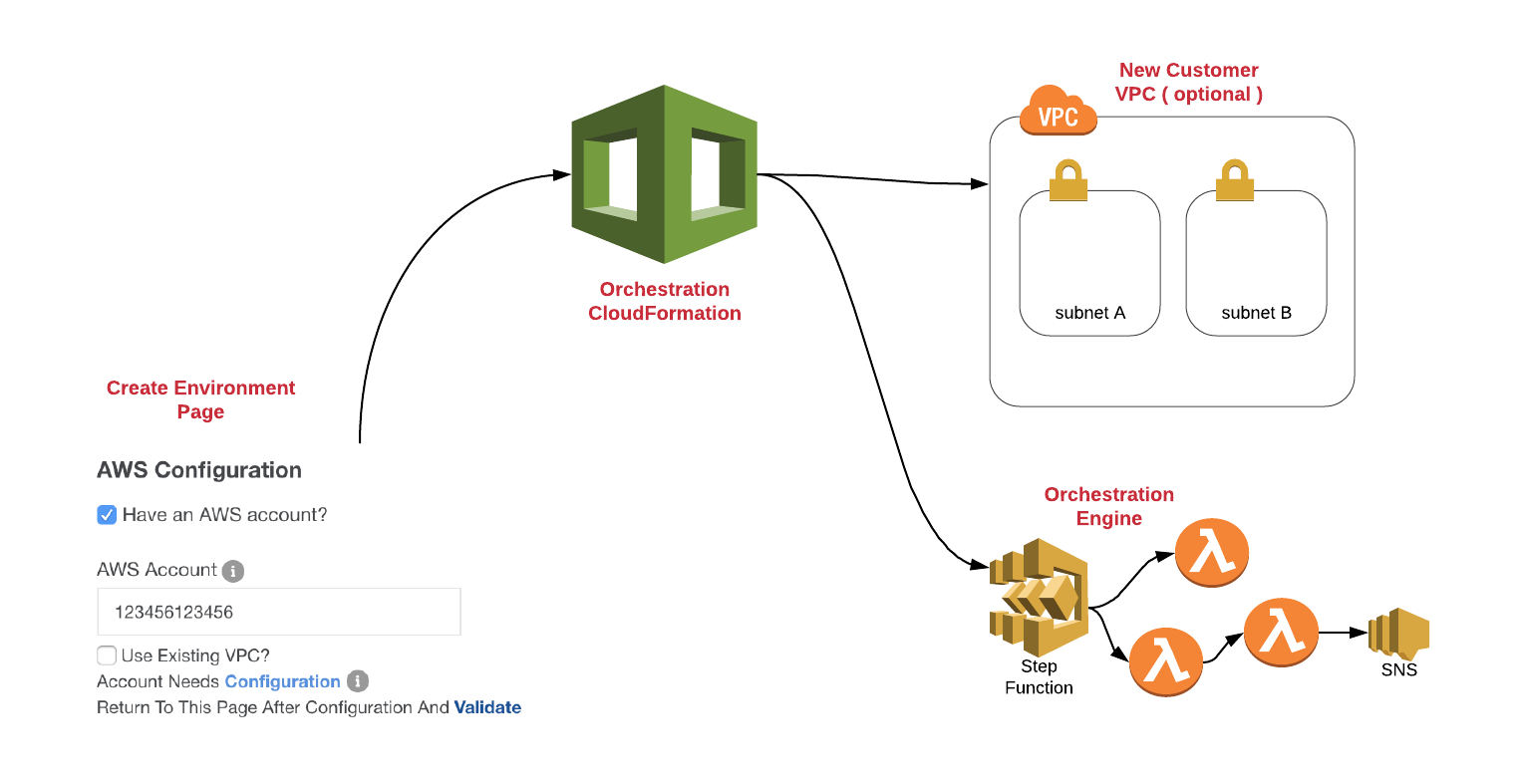
Once the orchestration engine has been deployed into the customer’s AWS account, it can now be used to deploy environments. The orchestration engine is composed of step functions, lambda functions, code deploy scripts, cloud formation templates and several other AWS technologies that all work in conjunction to deploy and configure the Strategy application.
See the attached document to dive into the mechanics of the deployments.
The Strategy Cloud Platform provides an optimized operating system for running Strategy on the cloud. There are many moving parts and complex operations that get executed to provide for the best possible cloud architecture.
See the attached document for the bird's eye view of the entire Strategy Cloud Platform solution.
There are several things that need to be considered before a Strategy Cloud Platform Deployment on AWS.
Someone with administrative access to the AWS account must conduct the deployment. Their permissions should equal the AdministrativeAccess policy. They will need to log into the AWS console. They will also need to provide the Strategy console with the AWS account id.
Someone with administrative access to the AWS account must create an account on our provisioning console to conduct the deployment. Login via this link.
All the proper cloud infrastructure for Strategy will be automatically deployed with this option. There is no need to worry about subnets/route tables/internet gateways etc. With this option you will need to setup VPN's or VPC peering to connect with data sources that are not public accessible (i.e data sources in a corporate private network).
When deploying into an existing VPC, the VPC must follow the standard AWS VPC reference architecture. Here is a link to a diagram of the VPC specifications. If the VPC is not architected this way the cloud deployment will likely fail. With this option you can deploy Strategy into an existing VPC with resources such as databases or already setup vpn/peering connections. This reduces the work needed to connect Strategy to your data sources.
You will need to know what the IP address range for the new VPC should be as well as the IP address ranges for the 4 subnets that are required. Please verify these CIDR ranges with your network administrator to avoid network clashing issues. If you were to connect this VPC with other networks via VPN that have the same IP address ranges, clashes would occur. Please view the VPC architecture diagram below for a visual indication of what the VPC should look like. (Note: This is only necessary when deploying a new VPC. If deploying into an existing VPC, your CIDR ranges will have already been determined.)
See the attached document for details on the specific requirements needed for a successful deployment when deploying into an existing VPC. The VPC must conform to this structure for the deployment to be successful.
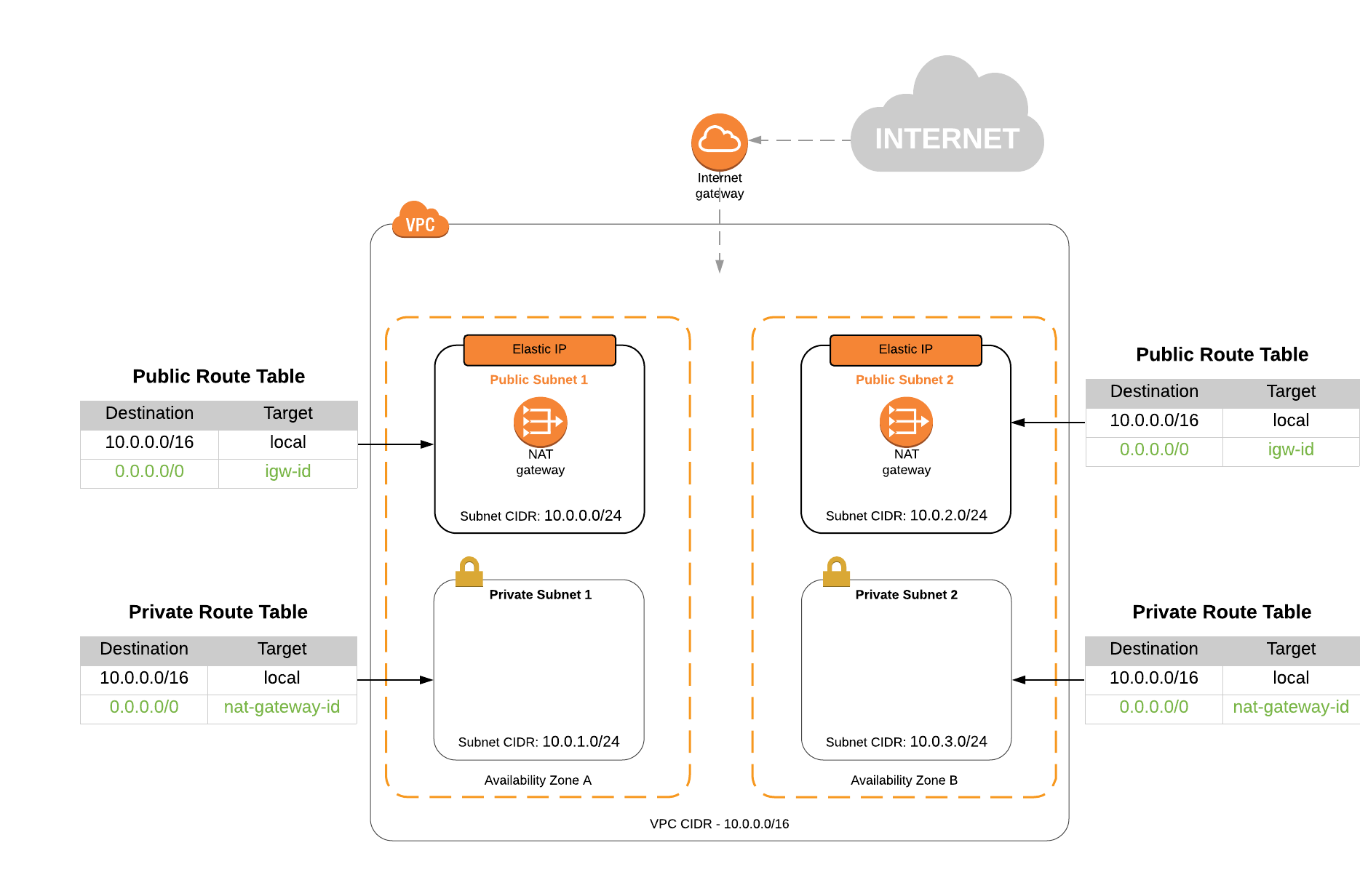
For details, see the attached document.
Strategy On AWS provides an option to enable secure access via HTTPS (port 443). You will get a Trial certificate which is trial cert and the customers are supposed to change the certificate after deployment.
After the environment is provisioned the customers get a welcome email with credentials and customers are supposed to change the password which is generated. Documentation for changing the password can be found here.
Customer data that may reside in an EBS (Team/Department) or EFS (Enterprise) volume is encrypted at rest and in transit (see Encryption section above). Caches and cubes can also be encrypted at the application level as seen here.
A set of AWS Identity and Access Management (IAM) Roles are created within the customers AWS account, which allows the Strategy Cloud Provisioning Console to create the Strategy application infrastructure.
Roles are created in every region where the Cloud Platform is configured and deployed. IAM Roles are available for examination by request.
MCP for AWS offers One-Click Updates. See here for instructions.
Strategy Backup and Restore offers automated Platform Upgrades when creating a parallel environment to use for Platform Upgrades. See here for instructions. Comprehensive documentation to plan and execute an upgrade can be found here.
For information about AWS cost, server size, and storage and database size, see the attached document.
