EducationSoftwareStrategy.com
StrategyCommunity

Knowledge Base

Product

Community

Knowledge Base

TopicsBrowse ArticlesDeveloper Zone

Product

Download SoftwareProduct DocumentationSecurity Hub

Education

Tutorial VideosSolution GalleryEducation courses

Community

GuidelinesGrandmastersEvents
x_social-icon_white.svglinkedin_social-icon_white.svg
Strategy logoCommunity

© Strategy Inc. All Rights Reserved.

LegalTerms of UsePrivacy Policy
  1. Home
  2. Topics

KB441271: Project Duplication in MicroStrategy10.x fails with an error "ErrorAutomation error No more threads can be created in the system"


Community Admin

• Strategy


This Knowledge Base article describes why an error: "ErrorAutomation error. No more threads can be created in the system" appears when duplicationg a project in MicroStrategy Developer 10.x.

SYMPTOM
In Strategy 10.x, during a Project Duplication process the following error message pops up:


ErrorAutomation error
No more threads can be created in the system

The error message in the Project Duplication GUI:

ka04W000000OfGLQA0_0EM44000000WW1i.png

CAUSE
This issue is caused by too many unused managed object. The unused managed objects are objects that were needed at some point and became unused once their dependencies were deleted (for example, a prompt created within a report; when the report is deleted the prompt becomes an unused managed object). To avoid managed objects creation, it is recommended to create standalone objects that can be reused instead of objects that only exist inside a report or document: this applies to prompts, derived metrics, derived elements, filters, etc.
ACTION
An administrator can delete unused managed object in Strategy Developer:
1. Log in to a Strategy project.
2. Click on Administration tab.
3. Go to Projects, select Delete unused managed objects.
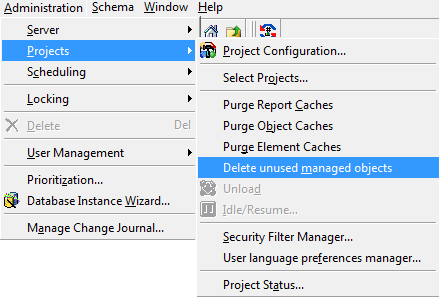
ka04W000000OfGLQA0_0EM44000000WW1s.png

 
For more information, refer to KB13230: What is Delete Unused Managed Objects in Strategy Developer 9.4.x - 10.x? 
Article Reference Number KB441271


Comment

0 comments

Details

Knowledge Article

Published:

June 29, 2018

Last Updated:

December 24, 2018