In Strategy 2020, when the report requests to create temporary tables within the SQL, it will fail with below error. If there is no temporary table is created, no error occurs.
Your request could not be processed due to a server error. Please try again. If the problem persists, contact the server Administrator.
(QueryEngine encountered error: Execute Query failed.
Error type: Odbc error. Odbc operation attempted: SQLExecDirect. [42000:102: on SQLHANDLE] [Microsoft][ODBC Driver 17 for SQL Server][SQL Server]Incorrect syntax near 'DISTRIBUTION'.. Error in Process method of Component: QueryEngineServer, Project Finance Analytics - Next Gen, Job 9074, Error Code= -2147212544.)
The affected SQL is:
CREATE TABLE #ZZMD00
WITH (DISTRIBUTION = ROUND_ROBIN,HEAP) AS
select distinct [a12].[Contract Number] [Contract Number],
[a11].[Month Year] [Month Year]
from [ENTERPRISE].[V_RPT_InfaCalendarMonth] [a11]
cross join [FIN_ENT].[V_RPT_ContractAssetLiability] [a12]
where ([a11].[Month Year] in ('Apr-01')
and [a12].[PSFT Accounting Month] <= [a11].[Month ID]
and [a12].[Contract Debook Flag] in ('Y')) OPTION (LABEL = 'MSTR Report:Contract Asset and Liability_Validation Report, MSTR Project:FinanceAnalytics-NextGen')
After checked the DATABASE.PDS file, it is found the SQL above is a “Azure Synapse Analytics” SQL syntax when use distributed tables, not a “Azure SQL Database” SQL syntax. And “Azure Synapse Analytics” is formerly named as “Azure SQL Data Warehouse” which is selected as the Database Connection Type from Database Instance (as below), that’s why a Azure Synapse Analytics SQL is generated and got failed to executed from Azure SQL Database.
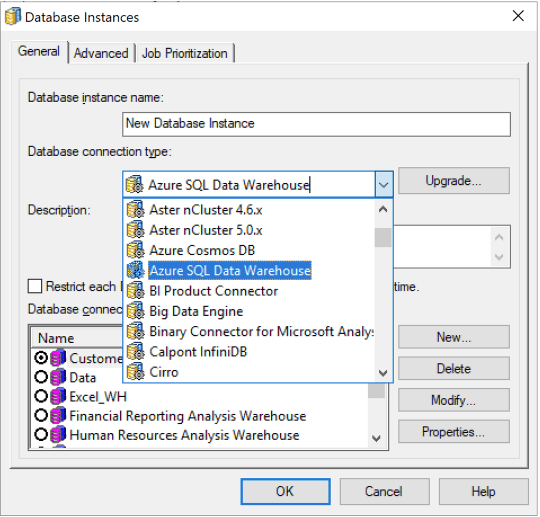
Upgrade the database connection type to have “Azure SQL Database”, and select it for the current Database Instance.


