When using the ReportDataService task to retrieve data with the Task API in Strategy Web 10.x, only subset of the rows is returned. This can bee seen in the rows XML tag in the task response highlighted below:
.....
<rows cn="2000">
<r fr="1">
<v id="BB:8D679D3C11D3E4981000E787EC6DE8A4:1:1:0:2:7796">Aaby</v>
<v>Alen</v>
<v id="BB:8D679D4611D3E4981000E787EC6DE8A4:1:1:0:2:25177">25177</v>
<v stid="c13">1</v>
<v stid="c17">1</v>
<v stid="c21">1</v>
<v stid="c24">1</v>
<v stid="c26">1</v>
<v stid="c28">8</v>
<v stid="c32">1</v>
<v stid="c36">100.00%</v>
<v stid="c40">1</v>
<v stid="c44">1</v>
<v stid="c46">0%</v>
<v stid="c48">0%</v>
</r>
.....
.......
<taskResponse statusCode="200">
<object-info>
<object-id>1C16CFCD4AAEEC29B1BB799C96C8EE4A</object-id>
<msg-id>504E9D024E8CB9EF02C07FA8F58E307A</msg-id>
<is-prompted>false</is-prompted>
<last-update-time>1529968148000</last-update-time>
<total-rows>140037</total-rows>
<total-columns>12</total-columns>
</object-info>
</taskResponse>
This is an expected behavior. By default, the ReportDataService task will comply to the governing settings set on the report, project, or Intelligence server level with regard to the number of rows it can retrieve. In this specific example, the 2000 number represents the Incremental Fetch rows per page setting:
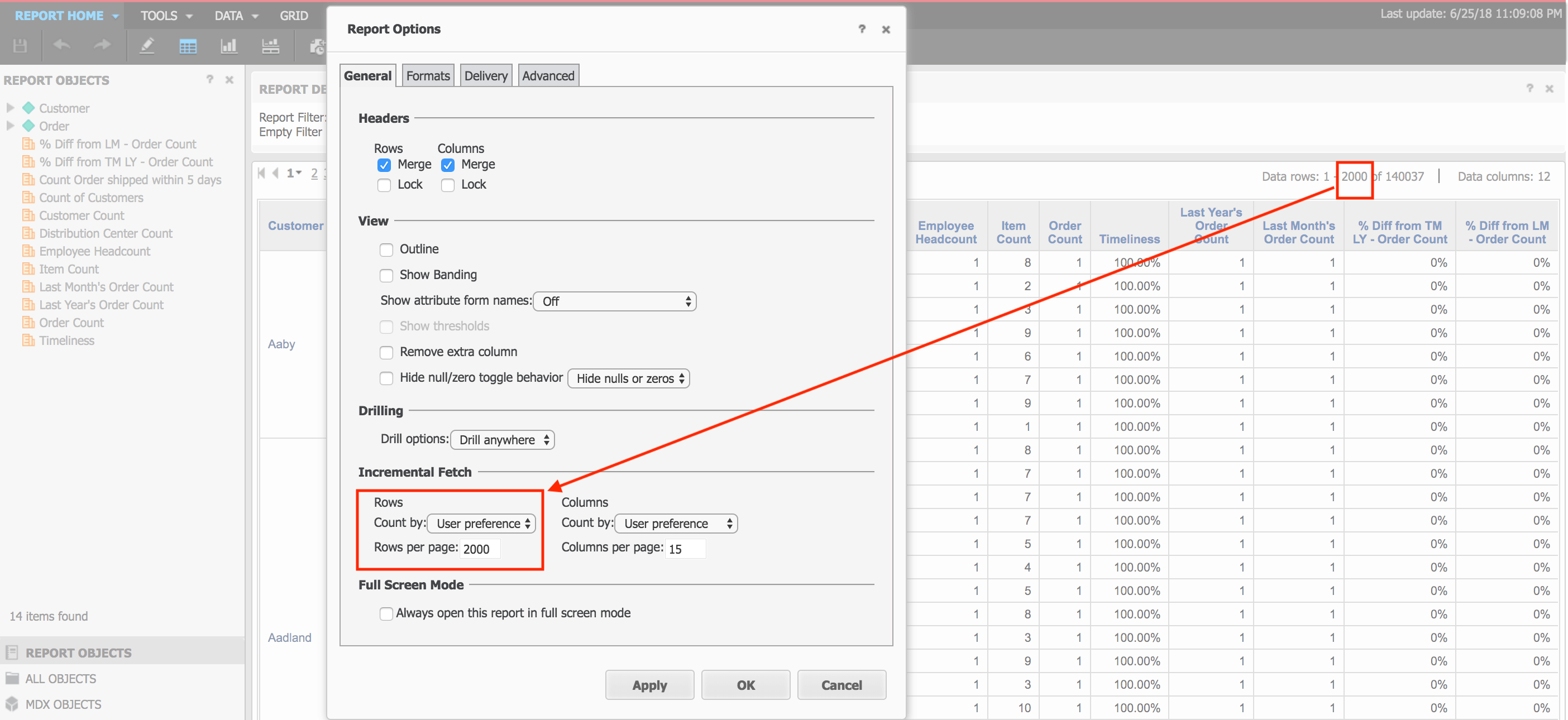
In this scenario, the setting is set to use the default value defined in the user preference level:
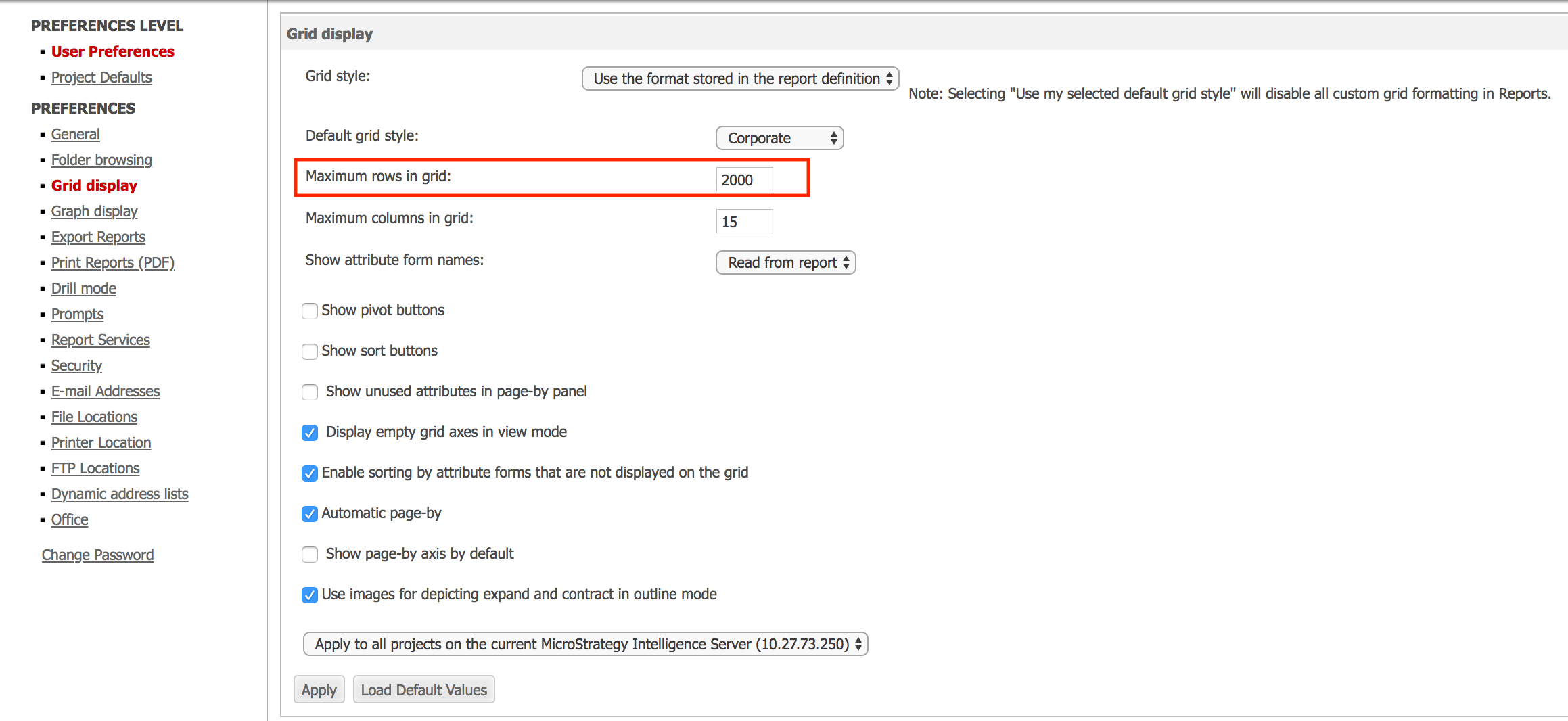
There are a couple of options that can be taken to retrieve all row data:
For more details on how to use this parameter refer to:
https://community.strategy.com/article/KB221858-How-to-return-last-5-rows-of-a-grid-in-report-with-URL
The example provided in this document is provided “as-is” and user has read the following customization warning:
ADDITIONAL INFORMATION:
The Strategy SDK allows syou to customize several Strategy products and extend and integrate the Strategy business intelligence functionality into other applications. However, before changing the way Strategy products look or behave, it is helpful to understand how the application is built. For more information regarding the Strategy products or the process of customizing Strategy products, please refer to Strategy Developer Zone (https://developer.microstrategy.com).
To access the Strategy Developer Zone, you must have access to the Strategy Knowledge Base, you must have purchased the Strategy SDK, and you must be current on your Strategy maintenance agreement. If you are a US-based business and believe that you satisfy all three of these conditions but you do not have access to the Strategy Developer Zone, please contact Strategy Technical Support at support@microstrategy.com or at (703) 848-8700. If you are an international business, please contact Strategy Technical Support at the appropriate email address or phone number found at https://www.microstrategy.com/us/services/support/contact.
CUSTOMIZATION WARNING:
This customization is provided as a convenience to Strategy users and is only directly applicable to the version stated. While this code may apply to other releases directly, Strategy Technical Support makes no guarantees that the code provided will apply to any future or previous builds. In the event of a code change in future builds, Strategy Technical Support makes no guarantee that an updated version of this particular customization will be provided. In the event of a code change in future builds, Strategy may not be able to provide additional code on this matter even though this customization is provided at this time for this specific build. For enhancements to this customization or to incorporate similar functionality into other versions, contact your Account Executive to inquire about Strategy Consulting assistance.
