If you do not enlarge the kernel.sem file, you will receive the following warning upon starting the Intelligence Server:
mstr_check_max_semaphore: WARNING: maximum number of semaphore arrays 1024 is low; please increase to 2048 or greater to use high performance share memory IPC.
For more details, please see the KB34895: How to set SEMMNI in Rehat Enterprise Linux.
Strategy recommends that the Linux kernel setting vm.max_map_count be defined as 5,242,880 bytes. This allows the Intelligence Server to utilize the system memory resources. If a lower value is used, the Intelligence Server may not able to use all available system resources. The lack of system resources can cause some Intelligence Server actions to fail. By increasing the value for this kernel setting, additional system resources will be available for the Intelligence Server to successfully execute actions.
If the vm.max_map_count is not large enough, no core would be generated if the Intelligence Server crashed during concurrency testing.
You can check the ulimit parameters by running ulimit-a in the terminal. Before starting the Intelligence Server, you need to check the following two parameters:
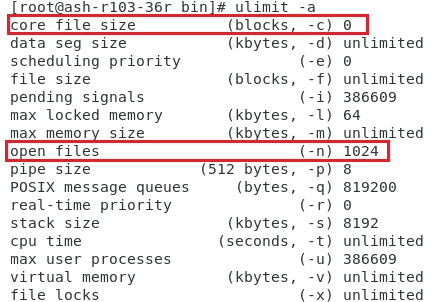
The default value is the following:

You can find the core dump file under the installation directory of the Intelligence Server.
Some directories used by the Intelligence Server, such as directories to store cube, cache, and inbox message, might be configured to a network path. Make sure they are accessible before starting the Intelligence Server. Otherwise, as expected, it may cause the Intelligence Server to hang.
For more details, please see:
