EducationSoftwareStrategy.com
StrategyCommunity

Knowledge Base

Product

Community

Knowledge Base

TopicsBrowse ArticlesDeveloper Zone

Product

Download SoftwareProduct DocumentationSecurity Hub

Education

Tutorial VideosSolution GalleryEducation courses

Community

GuidelinesGrandmastersEvents
x_social-icon_white.svglinkedin_social-icon_white.svg
Strategy logoCommunity

© Strategy Inc. All Rights Reserved.

LegalTerms of UsePrivacy Policy
  1. Home
  2. Topics

KB485053: Snowflake Transaction Services error with bind variable ? not set when updating or deleting more than one record


Sergio Sainz Palacios

Software Architect • MicroStrategy


This article addresses the Snowflake defect where an error is returned when updating or deleting more than one row using parameterized queries. This article also provides a workaround to avoid this error.

Description 

NOTE: This defect is fixed in Strategy 2021 Update 3 that ships Snowflake ODBC driver version 2.24.0.
In Strategy 2021 Update 2, secure parameterized queries are enabled in transaction services documents for improved user information and data warehouse security. 
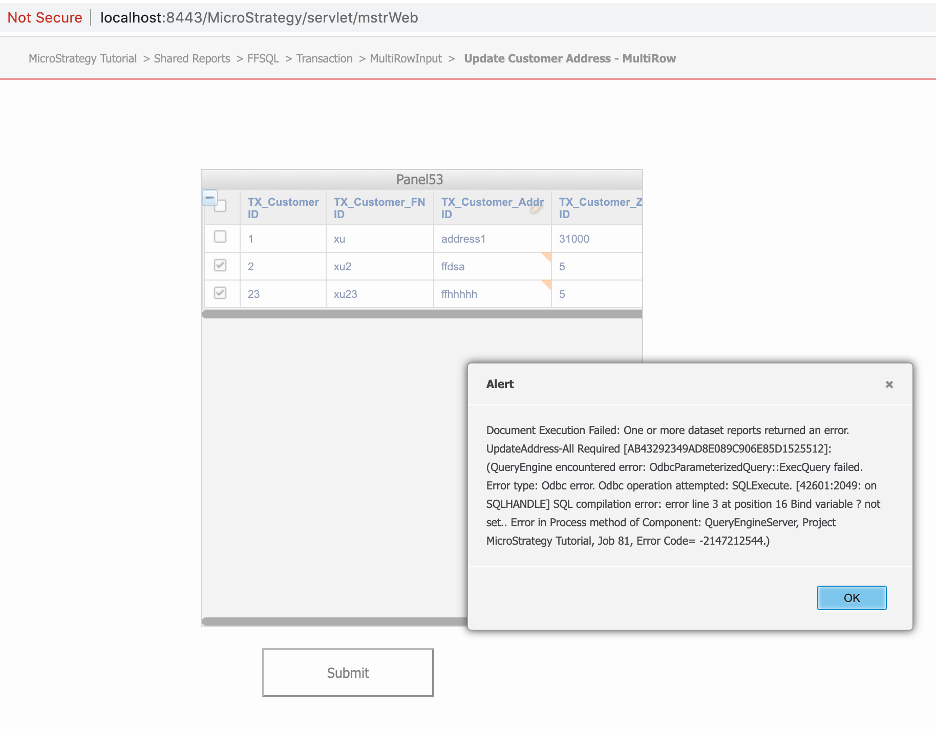
The Snowflake ODBC driver version 2.23.1 has a defect when updating or deleting more than one row using parameterized queries. In this case, the follow error is returned. 
ka04W000001It1vQAC_0EM4W0000028OgW.jpeg

In the

DSSErrors.log
, you can see the error:

QueryEngine encountered error: OdbcParameterizedQuery::ExecQuery failed. 
Error type: Odbc error. Odbc operation attempted: SQLExecute. [42601:2049: on SQLHANDLE] SQL compilation error: error line 3 at position 16
Bind variable ? not set..

Why is this happening?


This is a defect with the Snowflake ODBC driver being addressed by Snowflake.e

Workaround


Disable parameterized queries in Strategy 2021 Update 1 for the Snowflake database.

  1. Edit the
    DATABASE.PDS
    file.
    • In Windows:
      C:\Program Files (x86)\Common Files\MicroStrategy\DATABASE.PDS
    • In Linux:
      /opt/mstr/MicroStrategy/install/DATABASE.PDS
  2. Find the entry for Snowflake that starts with
    <DSSOBJECET TYPE="DBMS" NAME="Snowflake" ID="@dbms233">.
  3. Inside this XML tag, find children tag
    <PROPERTYSET NAMEE="VLDB Select">.
  4. As children of
    “VLDB Select”
    XML tag, add the following PROPERTY tag: 
    
    <PROPERTY NAME="Disable Parameterized Query for Transaction Report" VALUE="1" />

  5. Save the file.
  6. Apply the change for the Snowflake database type through Strategy Developer. Please follow the steps in KB5779.
  7. Restart the Intelligence Server.


After applying the change, transaction services documents will not use parameterized queries, allowing you to work around the Snowflake driver defect. 


Comment

0 comments

Details

Knowledge Article

Published:

June 4, 2021

Last Updated:

August 31, 2021