EducationSoftwareStrategy.com
StrategyCommunity

Knowledge Base

Product

Community

Knowledge Base

TopicsBrowse ArticlesDeveloper Zone

Product

Download SoftwareProduct DocumentationSecurity Hub

Education

Tutorial VideosSolution GalleryEducation courses

Community

GuidelinesGrandmastersEvents
x_social-icon_white.svglinkedin_social-icon_white.svg
Strategy logoCommunity

© Strategy Inc. All Rights Reserved.

LegalTerms of UsePrivacy Policy
  1. Home
  2. Topics

Solving the "connect timed out" error when creating, editing, or saving Cards


Community Admin

• Strategy


We've had a few instances where an issue related to firewall was reported while setting up MicroStrategy HyperIntelligence Chrome extension on their systems. This article explains the symptom, cause, and solution of the problem.

Starting with the release of Strategy ONE (March 2024), dossiers are also known as dashboards.
Troubleshooting:

Solving the "Connect Timed Out" Error when Creating, Editing, or Saving HyperIntelligence Cards

This article outlines a scenario where setting up Strategy HyperIntelligence Chrome extension results in receiving a "connect timed out" error when working with Cards.


Steps to Reproduce

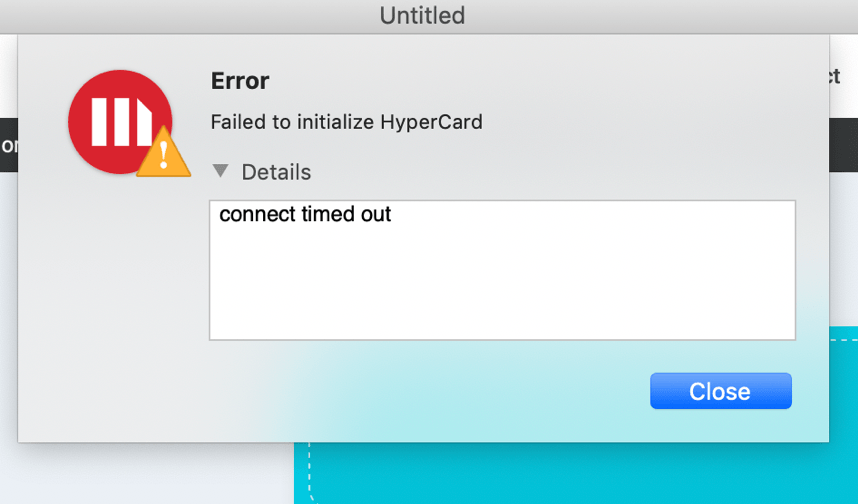
When interacting with Cards in Strategy Workstation, a "Failed to initialize Card" error appears with the details saying, "connect timed out".
ka0PW0000001JWWYA2_0EM4W000003AozN.png

This does not occur when interacting with Dossiers or working with Datasets.
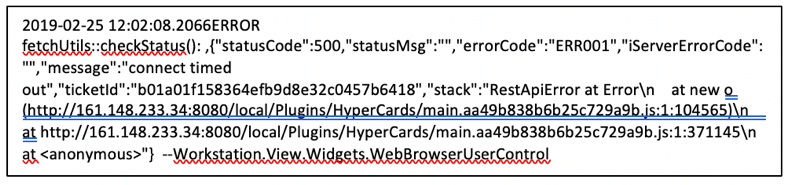
Check the Workstation logs for an error that is showing a 500 status code and that also mentions a RestApiError. The error should look similar to below:
ka0PW0000001JWWYA2_0EM4W000003AozO.png

On Windows, Workstation logs can be found at


C:\Users\<UserName>\AppData\Local\Strategy_Inc\log\Workstation.log


Take note of the ticketId in this error.
On Mac, Workstation logs can be found at


~/Library/Application Support/com.Strategy.Workstation/Strategy Workstation.log
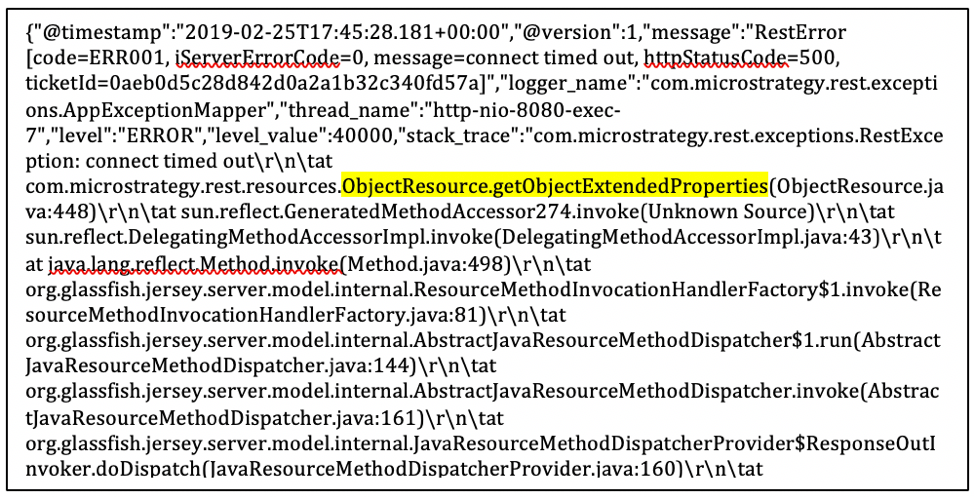

Next, check the Library server logs and find an error with a ticketId that matches the ticketId found in the above Workstation logs. You should find an error similar to below:

ka0PW0000001JWWYA2_0EM4W000003AozP.png

Library server logs can be found in


StrategyLibrary/WEB-INF/classes/logback.xml

on the machine hosting the Library server. Upon opening this file, there is a line formatted like this:


<property name="LOG_HOME" value="logs" />

"logs" next to "value=" will be the path for where the Library server logs can be found.
Under the error with the matching ticketId in the Library logs, you should find a method call (highlighted above) "ObjectResource.getObjectExtendedProperties(…)", which indicates that the Library server is attempting to connect to a REST Server that is running on the same machine as the Intelligence Server. This is a new REST Server separate from the one running on the Library Server.
You can also check if the Bookmark feature in Library is functioning correctly. The Bookmark feature also connects to the REST Server that runs in tandem with the Intelligence Server. This feature should give the same error ("connect timed out") as the Card editor.
 

Why Is This Happening?

For the HyperIntelligence browser extension, the Library Server connects to the REST Server running on the same machine as the Intelligence Server. This REST Server uses a different port than the Intelligence Server to communicate with the Library Server. Another port must also be opened to allow the Library Server and REST Server to communicate.

Next Steps

Open port 34962 in addition to port 34952 on the machine running the Intelligence Server. This will allow the Library Server to connect to the REST Server on the Intelligence Server machine. Bear in mind that both those ports are the default port values. If they were changed during the Intelligence Server configuration then a different port needs to be opened. The port 34962 only needs to allow the Library Server machine to connect to it.
 
Note: Please also ensure the host is added to the hosts file as you may see other errors without that configuration. See this article for more information: Solving Errors like "Failed to initialize Card" While Connecting to the Host Environment. 


Comment

0 comments

Details

Knowledge Article

Published:

March 7, 2019

Last Updated:

March 21, 2024