EducationSoftwareStrategy.com
StrategyCommunity

Knowledge Base

Product

Community

Knowledge Base

TopicsBrowse ArticlesDeveloper Zone

Product

Download SoftwareProduct DocumentationSecurity Hub

Education

Tutorial VideosSolution GalleryEducation courses

Community

GuidelinesGrandmastersEvents
x_social-icon_white.svglinkedin_social-icon_white.svg
Strategy logoCommunity

© Strategy Inc. All Rights Reserved.

LegalTerms of UsePrivacy Policy
  1. Home
  2. Topics

KB485563: Stream Kafka Data Directly to MicroStrategy Cubes - Advanced Concepts


Kenneth Osmond

Principal Consultant • MicroStrategy


Starting with the release of Strategy ONE (March 2024), dossiers are also known as dashboards.
OVERVIEW
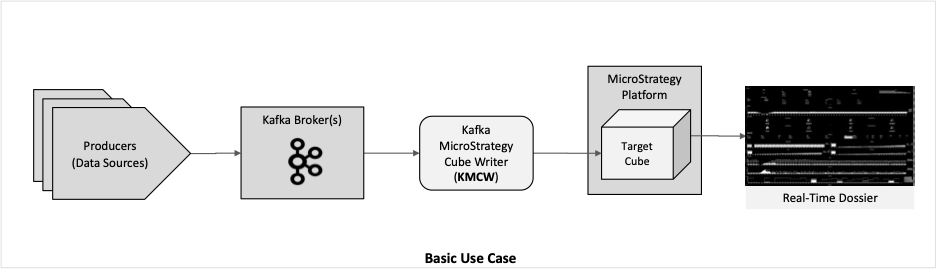
The original article published in Strategy Community in April 2022 entitled “Stream Kafka Data Directly to MicroStrategy Cubes” outlined how to quickly set up the Kafka Strategy Cube Writer (KMCW), a python application built using Strategy’s MSTRIO python library and Strategy REST APIs. The KMCW fetches messages from Kafka Streams and writes the data to Strategy Super Cubes.
This article addresses the advanced capabilities of the KMCW to address more sophisticated use cases.
The basic use cases are streaming a topic into the cube with little or no modification to incoming data other than adding a processing timestamp and date reformat.
ka0PW0000001JiZYAU_0EM4W000005kkwn.jpeg

The advanced use cases may involve one or more of:
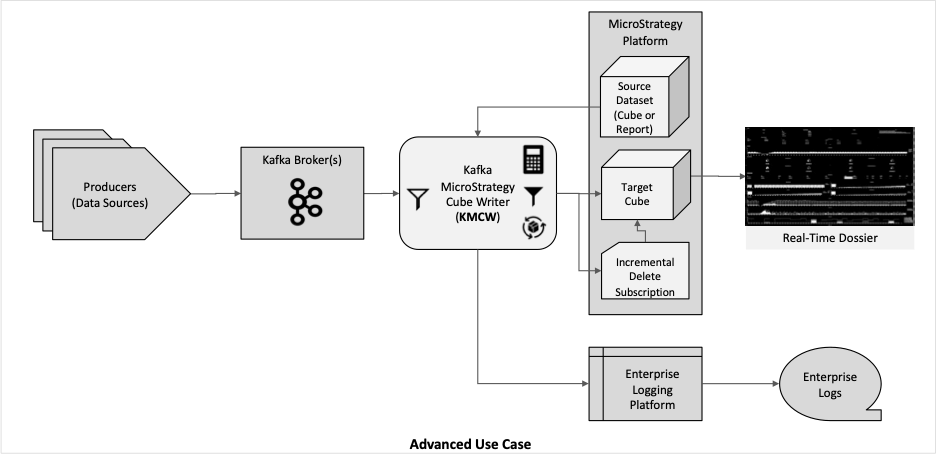
  • Add processing timestamp
  • Data Transformation
  • Summarizing incoming data
  • Blending data from other Strategy datasets with incoming data
  • Dataset filtering before writing to cube (outbound)
  • Incrementally deleting data from the target cube, producing a rolling window of data
  • Enterprise Data Logging
ka0PW0000001JiZYAU_0EM4W000005kkws.jpeg

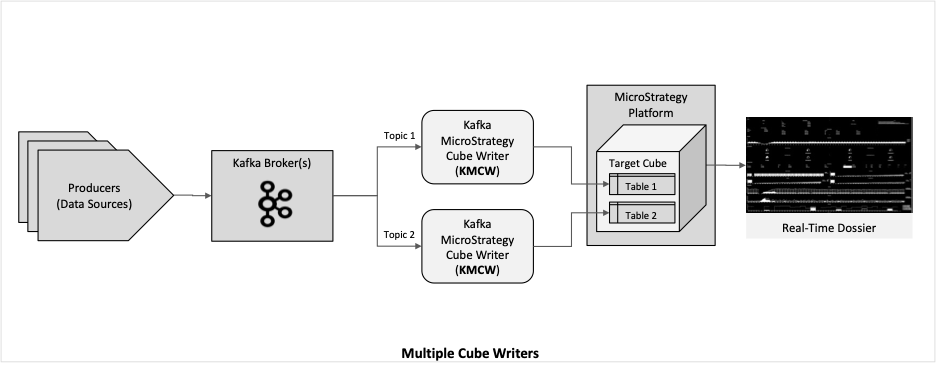
Additionally, multiple cube writers can be synchronized as cohorts to write to one or more tables in a target cube.
ka0PW0000001JiZYAU_0EM4W000005kkwZ.jpeg

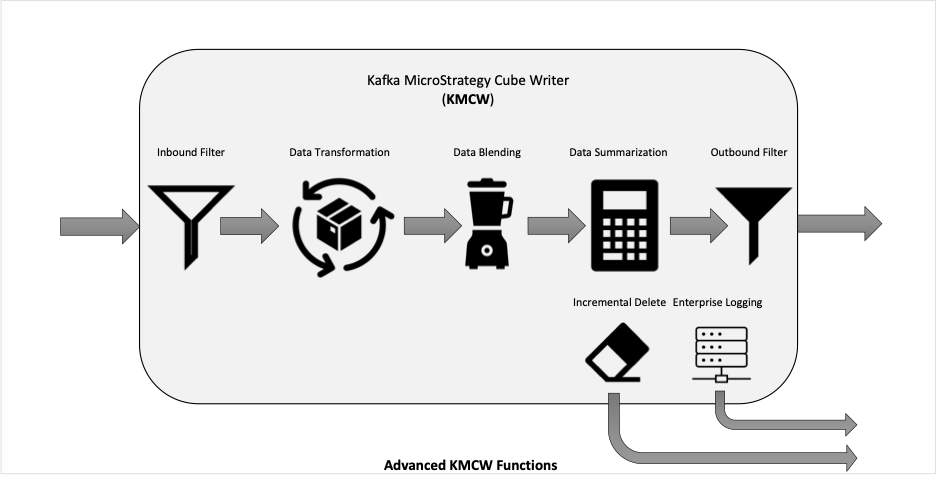
This document explains how to configure the Cube Writer to address the advanced use cases through modifying the configuration properties file and optional custom code implemented as python plug-in modules.  
ADVANCED USE CASES
ka0PW0000001JiZYAU_0EM4W000005kkx7.jpeg

Add Processing Timestamp

  • Purpose: This is a pre-built plug-in that, when enabled, adds 2 timestamp columns to the Kafka data that will be sent to the Strategy cube.

Available now.

Create panel stacks to give your users more ways to explore their data on Library Mobile.
Data Driven Push Notifications


 On our roadmap.

Currently Strategy Mobile allows for admins and end users to create alerts based on data thresholds. End users can create their own alerts if they have privileges to do so in Web. They cannot create subscriptions directly in the app. It is on our roadmap to bring this functionality to Library Mobile.
 Using Mobile URL API and custom logic for URL API event processing

 On our roadmap.

Works with documents in Strategy Mobile; Library Mobile doesn’t support URL API(s). We are working to ensure critical linking workflows are available in the product. In the meantime, we suggest trying out contextual linking with dossier. In fact, with Library Mobile you can link to other dossiers or non-dossier content (URLs, etc.) from textboxes and images. Contextual links also pass filter and prompt context.
 Information Windows


 Available now.

Library Mobile supports Information Windows. Also check out HyperIntelligence to enhance the dossier viewing experience with both Web and the Strategy app.
 Transactions


 It’s on our radar.

So, what’s the deal with transactions? Great question. Library Mobile supports transactions in documents. This means that all of your documents will be working as expected but note that documents don’t have the same performance as dossiers. The offline transaction queue is currently not available for Library iPhone. We’re working to bring transactions to dossier.
 Customizing AuthenticationSupported for Library Mobile.Adding Functionality with a Custom Application DelegateSupported for Library Mobile.Adding Trusted Server SupportSupported for Library Mobile.Pre-Configuring and RebrandingSupported for Library Mobile.Remove the Strategy Navigation BarIt’s on our radar.Mobile Server AdministrationIt’s on our radar.KeyValueenable

Available now.

Create panel stacks to give your users more ways to explore their data on Library Mobile.
Data Driven Push Notifications


 On our roadmap.

Currently Strategy Mobile allows for admins and end users to create alerts based on data thresholds. End users can create their own alerts if they have privileges to do so in Web. They cannot create subscriptions directly in the app. It is on our roadmap to bring this functionality to Library Mobile.
 Using Mobile URL API and custom logic for URL API event processing

 On our roadmap.

Works with documents in Strategy Mobile; Library Mobile doesn’t support URL API(s). We are working to ensure critical linking workflows are available in the product. In the meantime, we suggest trying out contextual linking with dossier. In fact, with Library Mobile you can link to other dossiers or non-dossier content (URLs, etc.) from textboxes and images. Contextual links also pass filter and prompt context.
 Information Windows


 Available now.

Library Mobile supports Information Windows. Also check out HyperIntelligence to enhance the dossier viewing experience with both Web and the Strategy app.
 Transactions


 It’s on our radar.

So, what’s the deal with transactions? Great question. Library Mobile supports transactions in documents. This means that all of your documents will be working as expected but note that documents don’t have the same performance as dossiers. The offline transaction queue is currently not available for Library iPhone. We’re working to bring transactions to dossier.
 Customizing AuthenticationSupported for Library Mobile.Adding Functionality with a Custom Application DelegateSupported for Library Mobile.Adding Trusted Server SupportSupported for Library Mobile.Pre-Configuring and RebrandingSupported for Library Mobile.Remove the Strategy Navigation BarIt’s on our radar.Mobile Server AdministrationIt’s on our radar.KeyValueenable

Available now.

Create panel stacks to give your users more ways to explore their data on Library Mobile.
Data Driven Push Notifications


 On our roadmap.

Currently Strategy Mobile allows for admins and end users to create alerts based on data thresholds. End users can create their own alerts if they have privileges to do so in Web. They cannot create subscriptions directly in the app. It is on our roadmap to bring this functionality to Library Mobile.
 Using Mobile URL API and custom logic for URL API event processing

 On our roadmap.

Works with documents in Strategy Mobile; Library Mobile doesn’t support URL API(s). We are working to ensure critical linking workflows are available in the product. In the meantime, we suggest trying out contextual linking with dossier. In fact, with Library Mobile you can link to other dossiers or non-dossier content (URLs, etc.) from textboxes and images. Contextual links also pass filter and prompt context.
 Information Windows


 Available now.

Library Mobile supports Information Windows. Also check out HyperIntelligence to enhance the dossier viewing experience with both Web and the Strategy app.
 Transactions


 It’s on our radar.

So, what’s the deal with transactions? Great question. Library Mobile supports transactions in documents. This means that all of your documents will be working as expected but note that documents don’t have the same performance as dossiers. The offline transaction queue is currently not available for Library iPhone. We’re working to bring transactions to dossier.
 Customizing AuthenticationSupported for Library Mobile.Adding Functionality with a Custom Application DelegateSupported for Library Mobile.Adding Trusted Server SupportSupported for Library Mobile.Pre-Configuring and RebrandingSupported for Library Mobile.Remove the Strategy Navigation BarIt’s on our radar.Mobile Server AdministrationIt’s on our radar.KeyValueenable


kv_pairs


kv_pairs


timezone


timestamp_column timestamp_minutes_column


timezone


timestamp_column timestamp_minutes_column


modulename of plug-in's python file (without .py suffix)methodsdictionary of optional methods in plug-in's python fileInit
Main
Update


modulename of plug-in's python file (without .py suffix)methodsdictionary of optional methods in plug-in's python fileInit
Main
Update


modulename of plug-in's python file (without .py suffix)methodsdictionary of optional methods in plug-in's python fileInit
Main
Update


modulename of plug-in's python file (without .py suffix)methodsdictionary of optional methods in plug-in's python fileInit
Main
Update


modulename of plug-in's python file (without .py suffix)methodsdictionary of optional methods in plug-in's python fileInit
Main
Update


modulename of plug-in's python file (without .py suffix)methodsdictionary of optional methods in plug-in's python fileInit
Main
Update


KeyValueenable

  • Configuration:


"kmcw_plugin": {
      "enable": "Y",
      "kv_pairs": {
            "timezone": "US/Eastern",
            "timestamp_column": "Cubewriter Timestamp",
            "timestamp_minutes_column": "Cubewriter Timestamp (minute level)"
      },
      "module": "kmcw_standard_plugin",
      "methods": {
            "Init": "initialization",
            "Main": "main_method",
            "Update": ""
      } 
}

Inbound Data Filtering

  • Purpose: Permit or exclude data records from the Kafka stream to be passed to the Strategy cube or to subsequent plug-in processes.


KeyValueenable


KeyValueenable


KeyValueenable


filter_type


filter_type


filter_operator


filter_operator


filters


filters


filter_column
operator


value


filter_column
operator


value


KeyValueenable

  • Configuration:


"stream_filters": {
"enable": "Y",
   "filter_type": "include",
   "filter_operator": "and",
   "filters": [
         {
               "filter_column": "cpu_count",
               "operator": "gt",
               "value": 2
         },
         {
               "filter_column": "cpu_core_1",
               "operator": "gt",
               "value": 0.6
         },
         {
               "filter_column": "random_int_1_to_10",
               "operator": "lt",
               "value": 9
         }
   ]
}


Data Transformation, Data Blending and Data Summarization

  • Purpose: Permits a user-written plugin to transform data, perform data blending and summarizing data in the incoming records using general python code, Strategy APIs and python pandas dataframe functions.


KeyValueenable


KeyValueenable


KeyValueenable


kv_pairs


kv_pairs


timezone
Host Locations Report
Update Host Locations Interval Minutes
Include detail rows
Print Extra Info


timezone
Host Locations Report
Update Host Locations Interval Minutes
Include detail rows
Print Extra Info


module


module


methods


methods


Init
Main
Update
Message


Init
Main
Update
Message


KeyValueenable

  • Configuration:


"user_plugin": {
      "enable": "Y",
"kv_pairs": {
   "timezone": "US/Eastern",
   "Host Locations Report": "5F6F4389D34241E797F8E891169925DE",
   "Update Host Locations Interval Minutes": 5,
   "Include detail rows": "Y",
   "Print Extra Info": "Y"
},
"module": "kmcw_example_user_plugin",
"methods": {
   "Init": "initialization",
   "Main": "lookup_host_locations_and_summarize",
   "Update": "update_host_locations",
   "Message": ""
}
}


  • Python Code Example for User Plug-In:


#######################################################################
# custom transforms to support kafka_mstr_cubewriter.py
# Jan 25, 2022
# Version 5.0
# Ken Osmond
# Strategy Inc.
# www.Strategy.com
#############################################################################

import sys
import os
import pytz
from datetime import datetime
import pandas as pd
from mstrio.connection import Connection
from mstrio.project_objects import Report
from mstrio.project_objects.datasets import SuperCube

#############################################################################

parms = {}
timezone = pytz.timezone('UTC')
host_locations_list = pd.DataFrame()
last_refresh_time = datetime.now()

#############################################################################

def debug_print(*msg_args):
    if parms['Print Extra Info'] == "Y":
        dt_with_tz = datetime.now().astimezone(timezone)
        dt_with_tz = dt_with_tz.replace(microsecond=0)
        msg = [ "Date:" + dt_with_tz.strftime("%Y-%m-%d"), "Time:" + dt_with_tz.strftime("%H.%M.%S"), "PID:"+str(os.getpid()) ]
        msg += msg_args
        print(msg)

#############################################################################

def initialization(*args, kv_pairs=None, mstr_connection=None):
    global parms, timezone
    parms = kv_pairs
    if 'timezone' in parms.keys(): timezone = pytz.timezone(parms['timezone'])
    debug_print(__name__, sys._getframe().f_code.co_name, "kv pairs: ", parms)
    load_host_locations(mstr_connection)
    if 'init_message' in parms.keys():
        return(parms['init_message'])
    return("normal_operation")

#############################################################################

def update_host_locations(*args, kv_pairs=None, mstr_connection=None):
    global last_refresh_time, parms
    elapsed_time = datetime.now() - last_refresh_time
    table_refresh_interval = parms["Update Host Locations Interval Minutes"] * 60
    if elapsed_time.total_seconds() > table_refresh_interval:
        last_refresh_time = datetime.now()
        load_host_locations(mstr_connection)
        debug_print(__name__, sys._getframe().f_code.co_name, "reloaded host locations")

#############################################################################

def load_host_locations(mstr_connection):
    global parms, host_locations_list
    table_preload_start = datetime.now()
    host_locations_list = Report(connection=mstr_connection, id=parms['Host Locations Report'], parallel=False, progress_bar=False).to_dataframe()
    host_locations_list = host_locations_list.astype({ "hostname":"object", "datacenter":"object", "rack":"int64", "slot":"int64" })
    table_preload_duration = datetime.now() - table_preload_start
    debug_print( __name__, sys._getframe().f_code.co_name, "Host Locations Report load duration (sec):", round(table_preload_duration.total_seconds(),1))
    table_preload_start = datetime.now()
    table_preload_duration = datetime.now() - table_preload_start
    debug_print( __name__, sys._getframe().f_code.co_name, "Host Locations Report preparation (sec):", round(table_preload_duration.total_seconds(),1))

#############################################################################

def enrich_data_with_host_locations(*args):
    global host_locations_list
    dataframe = args[0]
    if len(dataframe.index) == 0: return(dataframe)
    dataframe.drop(['datacenter', 'rack', 'slot'], axis=1, inplace=True)
    dataframe = pd.merge(dataframe, host_locations_list, how='left', on=['hostname'])
    return(dataframe)

#############################################################################

def lookup_host_locations_and_summarize(*args, kv_pairs=None, mstr_connection=None):
    dataframe = args[0]
    pd.set_option('display.max_columns', None)
    pd.set_option('display.width', 500)
    if len(dataframe.index) == 0:
        return(dataframe)
    if parms["Include detail rows"] == "Y": detail_df = dataframe
    dataframe = enrich_data_with_host_locations(*args)
    summarize_start = datetime.now()
    input_rows = len(dataframe.index)
    dataframe['Cubewriter Timestamp'] = dataframe['timestamp'] = dataframe['date_time'] = dataframe['rack'] = dataframe['slot'] =None
    groups = ['Cubewriter Timestamp (minute level)', 'Cubewriter Timestamp','date_time', 'timestamp', 'topic', 'datacenter', 'hostname', 'IP ADDR', 'rack', 'slot']
    metrics = { 'CPUs':'sum', 'Cores':'sum', 'cpu_core_1':'mean', 'cpu_core_2':'mean', 'disk_io_read':'sum', 'disk_io_write':'sum', 'net_io_recv':'sum', 'net_io_sent':'sum', 'random_int_1_to_10':'sum', 'swap_memory':'sum', 'vm_avail':'sum', 'vm_used': 'sum' }
    dataframe = dataframe.groupby(groups, dropna=False, as_index=False).aggregate(metrics)
    if parms["Include detail rows"] == "Y": dataframe = pd.concat([ dataframe, detail_df ], ignore_index=True)
    summarize_duration = datetime.now() - summarize_start
    debug_print( __name__, sys._getframe().f_code.co_name, "Summarize Groups Duration (sec):", round(summarize_duration.total_seconds(),1),  "Input Rows:", input_rows, "Summary Rows:", len(dataframe.index))
    return dataframe

#############################################################################


Outbound Data Filtering

  • Purpose: Permit or exclude data records from the Kafka stream to be passed to the Strategy cube after preceding plug-in processes.


KeyValueenable


KeyValueenable


KeyValueenable


filter_type


filter_type


filter_operator


filter_operator


filters


filters


filter_column
operator

value


filter_column
operator

value


  • Configuration:


"dataframe_filters": {
   "enable": "N",
   "filter_type": "include",
   "filter_operator": "and",
   "filters": [
         {
               "filter_column": "topic",
               "operator": "eq",
               "value": "mstr_kafka_demo_app2"
         }
   ]
}


Incremental Delete Data from Target Cube

  • Purpose: This feature enables the Cube Writer to create an incremental delete subscription based on a cube filter that removes aged rows from the cube.


Valueenable


Valueenable


Valueenable


event_name


event_name


schedule_name


schedule_name


subscription_name


subscription_name


filter


filter


filter_column
operator
operand_type
value


filter_column
operator
operand_type
value


frequency_mins


frequency_mins


KeyValueenable

  • Configuration:


"incremental_delete": {
   "enable": "Y",
   "event_name": "MTDI Cube Incremental Delete",
   "schedule_name": "MTDI Cube Incremental Delete",
   "subscription_name": "mstr_kafka_demo_app PPD Cube Incremental Delete",
   "filter": {
         "filter_column": "timestamp",
         "operator": "Less",
         "operand_type": "Time",
         "value": "datetime.now()-timedelta(hours=5)",
   },
   "frequency_mins": 5
}


Enterprise Data Logging

Purpose: This plug-in provides methods to write runtime metrics to an enterprise log service that provide information on Cube Writers rows read, rows written, time to update cube, etc. The provided module is coded to support Prometheus Enterprise Monitor. By using the Prometheus version as a template, new plug-ins can be written for other enterprise loggers.

  • Events logged include:
    • "Startup"
    • "Batches Completed:" <with count>
    • "Delete subscription: Attempt " <with count>
    • "Create subscription: Attempt " <with count>
    • "Incremental Delete Start"
    • "Incremental Delete Finish"
    • "Termination: " <with message>
    • "Exit (normal)"
  • Metrics logged include:
    • "kmcw_startup_unix_timestamp"
    • "kmcw_heartbeat"
    • "kmcw_heartbeat_sec"
    • "kmcw_heartbeat_unix_timestamp"
    • "kmcw_poll_count"
    • "kmcw_rows_received"
    • "kmcw_rows_written"
    • "kmcw_rows_filtered"
    • "kmcw_batches"
    • "kmcw_batch_duration_sec"
    • "kmcw_batch_poll_duration_sec"
    • "kmcw_batch_dataframe_build_sec"
    • "kmcw_batch_dataset_duration_sec"
    • "kmcw_batch_dataset_duration_no_wait_sec"
    • "kmcw_poll_duration_since_last_batch_sec"


KeyValueenable


KeyValueenable


KeyValueenable


kv_pairs


kv_pairs


timezone
application_name service_alias
http_port pod_index monitor_group_name


timezone
application_name service_alias
http_port pod_index monitor_group_name


module


module


methods


methods


Init
Main
Update


Init
Main
Update


  • Configuration:


"enterprise_log_plugin": {
   "enable": "Y",
   "kv_pairs": {
         "timezone": "US/Eastern",
         "application_name": "kafka_mstr_cubewriter",
         "service_name": "mstr_kafka_demo_app",
         "service_alias":"mstr-kafka-demo-app",
         "http_port": 8080,
         "pod_index": 1,
         "monitor_group_name": "MSTR"
   },
   "module": "kmcw_prometheus_enterprise_monitor_plugin",
   "methods": {
         "Init": "initialization",
         "Main": "enterprise_log_write",
         "Update": ""
   }
}


Conclusion:

The plug-in modules extend the capabilities of the Cube Writer by permitting user-defined data processing operations to be done prior to the Strategy consumption layer. This provides benefits of enriching real-time data with transformations, dimension data, pre-aggregation, and custom operations. This can avoid data blending in dossiers that affect dossier performance and avoid building large cubes, thereby avoiding data latency and dossier cycles required for aggregation.
WHAT’S NEXT?
Another article will be published shortly to explain the application tuning operations of the Cube Writer.


Comment

0 comments

Details

Knowledge Article

Published:

June 29, 2022

Last Updated:

March 21, 2024