Starting with the release of Strategy ONE (March 2024), dossiers are also known as dashboards.
Strategy is the leading enterprise business intelligence tool with its mission statement to make every enterprise a more intelligent enterprise.
Learn more about it at MicroStrategy.
Conventional data warehouses weren’t designed to keep up with the exploding demand for data-driven insight at modern organizations. With years of experience building the world most performant databases, Snowflake founders were in a unique position to see this problem, and how cloud could solve it. In 2012, they founded Snowflake with the simple intention of enabling the worlds organizations to be data driven. With a brand-new architecture for a data platform designed to take advantage of cloud elasticity and simplicity, they created Snowflake.
Learn more at Snowflake.
When migrating existing applications to Snowflake, certain Strategy capabilities are leveraged with tight integration of the databases. It is important to understand that certain capabilities powering the user workflows might not be supported in Snowflake.
Below are the common database workflows Strategy customers face when dealing with Snowflake:
FeatureSnowflakeStrategySSOYesYesOAuth 2.0YesYesKerberosNoYesSAMLYesYesParameterized QueriesYesYesData ImportYes YesLive ConnectYesYesArrow FormatYesYesMaterialized ViewsYesYesSearch OptimizationYesYesBinary Data TypeYesYes | FeatureSnowflakeStrategySSOYesYesOAuth 2.0YesYesKerberosNoYesSAMLYesYesParameterized QueriesYesYesData ImportYes YesLive ConnectYesYesArrow FormatYesYesMaterialized ViewsYesYesSearch OptimizationYesYesBinary Data TypeYesYes | FeatureSnowflakeStrategySSOYesYesOAuth 2.0YesYesKerberosNoYesSAMLYesYesParameterized QueriesYesYesData ImportYes YesLive ConnectYesYesArrow FormatYesYesMaterialized ViewsYesYesSearch OptimizationYesYesBinary Data TypeYesYes |
FeatureSnowflakeStrategySSOYesYesOAuth 2.0YesYesKerberosNoYesSAMLYesYesParameterized QueriesYesYesData ImportYes YesLive ConnectYesYesArrow FormatYesYesMaterialized ViewsYesYesSearch OptimizationYesYesBinary Data TypeYesYes | FeatureSnowflakeStrategySSOYesYesOAuth 2.0YesYesKerberosNoYesSAMLYesYesParameterized QueriesYesYesData ImportYes YesLive ConnectYesYesArrow FormatYesYesMaterialized ViewsYesYesSearch OptimizationYesYesBinary Data TypeYesYes | FeatureSnowflakeStrategySSOYesYesOAuth 2.0YesYesKerberosNoYesSAMLYesYesParameterized QueriesYesYesData ImportYes YesLive ConnectYesYesArrow FormatYesYesMaterialized ViewsYesYesSearch OptimizationYesYesBinary Data TypeYesYes |
FeatureSnowflakeStrategySSOYesYesOAuth 2.0YesYesKerberosNoYesSAMLYesYesParameterized QueriesYesYesData ImportYes YesLive ConnectYesYesArrow FormatYesYesMaterialized ViewsYesYesSearch OptimizationYesYesBinary Data TypeYesYes | FeatureSnowflakeStrategySSOYesYesOAuth 2.0YesYesKerberosNoYesSAMLYesYesParameterized QueriesYesYesData ImportYes YesLive ConnectYesYesArrow FormatYesYesMaterialized ViewsYesYesSearch OptimizationYesYesBinary Data TypeYesYes | FeatureSnowflakeStrategySSOYesYesOAuth 2.0YesYesKerberosNoYesSAMLYesYesParameterized QueriesYesYesData ImportYes YesLive ConnectYesYesArrow FormatYesYesMaterialized ViewsYesYesSearch OptimizationYesYesBinary Data TypeYesYes |
FeatureSnowflakeStrategySSOYesYesOAuth 2.0YesYesKerberosNoYesSAMLYesYesParameterized QueriesYesYesData ImportYes YesLive ConnectYesYesArrow FormatYesYesMaterialized ViewsYesYesSearch OptimizationYesYesBinary Data TypeYesYes | FeatureSnowflakeStrategySSOYesYesOAuth 2.0YesYesKerberosNoYesSAMLYesYesParameterized QueriesYesYesData ImportYes YesLive ConnectYesYesArrow FormatYesYesMaterialized ViewsYesYesSearch OptimizationYesYesBinary Data TypeYesYes | FeatureSnowflakeStrategySSOYesYesOAuth 2.0YesYesKerberosNoYesSAMLYesYesParameterized QueriesYesYesData ImportYes YesLive ConnectYesYesArrow FormatYesYesMaterialized ViewsYesYesSearch OptimizationYesYesBinary Data TypeYesYes |
FeatureSnowflakeStrategySSOYesYesOAuth 2.0YesYesKerberosNoYesSAMLYesYesParameterized QueriesYesYesData ImportYes YesLive ConnectYesYesArrow FormatYesYesMaterialized ViewsYesYesSearch OptimizationYesYesBinary Data TypeYesYes | FeatureSnowflakeStrategySSOYesYesOAuth 2.0YesYesKerberosNoYesSAMLYesYesParameterized QueriesYesYesData ImportYes YesLive ConnectYesYesArrow FormatYesYesMaterialized ViewsYesYesSearch OptimizationYesYesBinary Data TypeYesYes | FeatureSnowflakeStrategySSOYesYesOAuth 2.0YesYesKerberosNoYesSAMLYesYesParameterized QueriesYesYesData ImportYes YesLive ConnectYesYesArrow FormatYesYesMaterialized ViewsYesYesSearch OptimizationYesYesBinary Data TypeYesYes |
FeatureSnowflakeStrategySSOYesYesOAuth 2.0YesYesKerberosNoYesSAMLYesYesParameterized QueriesYesYesData ImportYes YesLive ConnectYesYesArrow FormatYesYesMaterialized ViewsYesYesSearch OptimizationYesYesBinary Data TypeYesYes | FeatureSnowflakeStrategySSOYesYesOAuth 2.0YesYesKerberosNoYesSAMLYesYesParameterized QueriesYesYesData ImportYes YesLive ConnectYesYesArrow FormatYesYesMaterialized ViewsYesYesSearch OptimizationYesYesBinary Data TypeYesYes | FeatureSnowflakeStrategySSOYesYesOAuth 2.0YesYesKerberosNoYesSAMLYesYesParameterized QueriesYesYesData ImportYes YesLive ConnectYesYesArrow FormatYesYesMaterialized ViewsYesYesSearch OptimizationYesYesBinary Data TypeYesYes |
FeatureSnowflakeStrategySSOYesYesOAuth 2.0YesYesKerberosNoYesSAMLYesYesParameterized QueriesYesYesData ImportYes YesLive ConnectYesYesArrow FormatYesYesMaterialized ViewsYesYesSearch OptimizationYesYesBinary Data TypeYesYes | FeatureSnowflakeStrategySSOYesYesOAuth 2.0YesYesKerberosNoYesSAMLYesYesParameterized QueriesYesYesData ImportYes YesLive ConnectYesYesArrow FormatYesYesMaterialized ViewsYesYesSearch OptimizationYesYesBinary Data TypeYesYes | FeatureSnowflakeStrategySSOYesYesOAuth 2.0YesYesKerberosNoYesSAMLYesYesParameterized QueriesYesYesData ImportYes YesLive ConnectYesYesArrow FormatYesYesMaterialized ViewsYesYesSearch OptimizationYesYesBinary Data TypeYesYes |
FeatureSnowflakeStrategySSOYesYesOAuth 2.0YesYesKerberosNoYesSAMLYesYesParameterized QueriesYesYesData ImportYes YesLive ConnectYesYesArrow FormatYesYesMaterialized ViewsYesYesSearch OptimizationYesYesBinary Data TypeYesYes | FeatureSnowflakeStrategySSOYesYesOAuth 2.0YesYesKerberosNoYesSAMLYesYesParameterized QueriesYesYesData ImportYes YesLive ConnectYesYesArrow FormatYesYesMaterialized ViewsYesYesSearch OptimizationYesYesBinary Data TypeYesYes | FeatureSnowflakeStrategySSOYesYesOAuth 2.0YesYesKerberosNoYesSAMLYesYesParameterized QueriesYesYesData ImportYes YesLive ConnectYesYesArrow FormatYesYesMaterialized ViewsYesYesSearch OptimizationYesYesBinary Data TypeYesYes |
FeatureSnowflakeStrategySSOYesYesOAuth 2.0YesYesKerberosNoYesSAMLYesYesParameterized QueriesYesYesData ImportYes YesLive ConnectYesYesArrow FormatYesYesMaterialized ViewsYesYesSearch OptimizationYesYesBinary Data TypeYesYes | FeatureSnowflakeStrategySSOYesYesOAuth 2.0YesYesKerberosNoYesSAMLYesYesParameterized QueriesYesYesData ImportYes YesLive ConnectYesYesArrow FormatYesYesMaterialized ViewsYesYesSearch OptimizationYesYesBinary Data TypeYesYes | FeatureSnowflakeStrategySSOYesYesOAuth 2.0YesYesKerberosNoYesSAMLYesYesParameterized QueriesYesYesData ImportYes YesLive ConnectYesYesArrow FormatYesYesMaterialized ViewsYesYesSearch OptimizationYesYesBinary Data TypeYesYes |
FeatureSnowflakeStrategySSOYesYesOAuth 2.0YesYesKerberosNoYesSAMLYesYesParameterized QueriesYesYesData ImportYes YesLive ConnectYesYesArrow FormatYesYesMaterialized ViewsYesYesSearch OptimizationYesYesBinary Data TypeYesYes | FeatureSnowflakeStrategySSOYesYesOAuth 2.0YesYesKerberosNoYesSAMLYesYesParameterized QueriesYesYesData ImportYes YesLive ConnectYesYesArrow FormatYesYesMaterialized ViewsYesYesSearch OptimizationYesYesBinary Data TypeYesYes | FeatureSnowflakeStrategySSOYesYesOAuth 2.0YesYesKerberosNoYesSAMLYesYesParameterized QueriesYesYesData ImportYes YesLive ConnectYesYesArrow FormatYesYesMaterialized ViewsYesYesSearch OptimizationYesYesBinary Data TypeYesYes |
FeatureSnowflakeStrategySSOYesYesOAuth 2.0YesYesKerberosNoYesSAMLYesYesParameterized QueriesYesYesData ImportYes YesLive ConnectYesYesArrow FormatYesYesMaterialized ViewsYesYesSearch OptimizationYesYesBinary Data TypeYesYes | FeatureSnowflakeStrategySSOYesYesOAuth 2.0YesYesKerberosNoYesSAMLYesYesParameterized QueriesYesYesData ImportYes YesLive ConnectYesYesArrow FormatYesYesMaterialized ViewsYesYesSearch OptimizationYesYesBinary Data TypeYesYes | FeatureSnowflakeStrategySSOYesYesOAuth 2.0YesYesKerberosNoYesSAMLYesYesParameterized QueriesYesYesData ImportYes YesLive ConnectYesYesArrow FormatYesYesMaterialized ViewsYesYesSearch OptimizationYesYesBinary Data TypeYesYes |
Single Sign-On allows for one-time login for both Strategy and Snowflake.
Impact: Authentication
Motivation: One-time login
Details: Strategy currently supports SSO with Azure AD and Okta. After the administrator sets up SSO, they only have to log in once to take advantage of both Strategy and Snowflake from the same credentials.
To learn more about this functionality, please take advantage of the Integrating MicroStrategy with Snowflake for Single Sign-On using Azure AD and Integrating MicroStrategy with Snowflake for Single Sign-On Using Okta documentation.
Impact: Authentication
Motivation: Use non-native authentication
Details: Strategy supports both Azure AD and Okta Authentication with Snowflake. Once the administrator sets it up, the end user has to just log in with their Okta or Azure AD email credentials to start using Strategy with Snowflake.
The Strategy OAuth 2.0 workflow with Okta can be seen here. Please follow this product guide to implement OAuth 2.0 with Strategy.
Impact: Authentication
Motivation: Customers want to leverage Kerberos authentication for their infrastructure
Details: Snowflake doesn’t support Kerberos and Snowflake customers are directed to use SAML authentication instead.
SAML helps with authentication.
Impact: Authentication
Motivation: Customers want to leverage SAML authentication for their infrastructure
Details: Snowflake supports SAML authentication. Please refer to this documentation to take advantage of SAML authentication.
Strategy's support for parameterized queries can improve performance in scenarios that require the insertion of information into a database.
Impact: Performance, security
Motivation: Customers can write data into tables faster
Details: Parameterized queries are SQL queries that can use placeholders for data. Using placeholders allows these queries to be re-used. A common application of this re-usability is to combine multiple inserts of data into a database as a single query. The following is an example of a parameterized query:
INSERT INTO DMTABLE (Customer_ID, Customer_Name) VALUES (?, ?)
Strategy supports importing data with Snowflake.
Impact: Capability
Motivation: Customers can bring in data as a cache so they can save on costs using Snowflake
Details: With the Data Import functionality, Strategy imports data from Snowflake into our fast in-memory cubes and can constantly send queries to the data in the memory saving on compute costs. Unlike most traditional warehouses, result fetching is optimized in Snowflake for cubes, so no additional tooling is required for bulk imports. Although Snowflake caches query results for up to 24 hours on their side, Strategy has the capability of storing the data for much longer depending on the refresh interval.
Example: Update cache once a month, use aggregated data, and save on cost by not querying data frequently in Snowflake. Use a cube with Strategy if you're only concerned with last month’s aggregated data. The cube can answer most daily questions instead of going back to Snowflake.
Strategy supports live-connect with Snowflake.
Impact: Capability
Motivation: Customers can create ad-hoc visualizations
Details: With the live-connect functionality, customers can create ad-hoc visualization with Snowflake without importing the data back into Strategy. Most customers take advantage of the quick response time offered by dossiers or reports by querying a direct and concise slice of data utilizing the power of Snowflake.
Example: Use live connect if you're trying to look at certain transaction details, such as transactions between 11:20AM UTC – 11:25AM UTC that originated from Virginia, and the product category Electronics.
Performance is an important consideration with Strategy and Snowflake. Strategy creates optimized SQL for Snowflake and it is always recommended to be on the latest Strategy release to take advantage of the most optimal performance. Below are some performance considerations which will help you achieve better performance with Strategy.
Queries can have a significant increase in the fetch time when there are tables containing VARCHAR without specifying a size in Snowflake. Performance degradation occurs because the Strategy Intelligence Server uses an ODBC call (SQLDescribeCol) to determine the proper resources to allocate for the query results of VARCHAR columns. In anticipation of resources, a large memory will be allocated for a small amount of data (even if the string is only a few hundred characters maximum). VARCHAR (16777216) sets the limit for more size and affects performance while fetching. Even if the tables are created, you can alter the VARCHAR size. Please refer to KB441548 to learn more about it.
Always use similar hardware in Snowflake to your old DBMS solution if you're doing performance comparisons. For best performance analysis, make sure you're performing apple-to-apple comparisons when comparing your old DBMS to Snowflake.
For example, queries tend to run faster in a powerful on-premise warehouse compared to a small instance of Snowflake. To match performance, please increase the instance size of Snowflake.
Please refer to this Snowflake blog to learn about comparing on-premise to cloud data platform. Learn more about different Snowflake warehouse considerations from the Snowflake documentation.
Fetch Size Optimization
Strategy only recommends this setting for cases when customers are having performance issues during ingestion of Strategy cubes. Strategy performed some internal testing on the fetch size and published KB484894.
You can enable this setting by modifying the connection string used in the Intelligence Server Database Connections tab under the Additional parameters field. The following is an example connection string:
JDBC;DRIVER={net.snowflake.client.jdbc.SnowflakeDriver};URL={jdbc:snowflake://sit.west-europe.azure.snowflakecomputing.com/?warehouse=YOUR_WAREHOUSE&useProxy=true&proxyHost=YOUR_HOST&proxyPort=8080};FETCHSIZE=1000;get Tables (null, null, …), by default returns all tables in all databases and schemas. Luckily, there is a setting on the Snowflake server side:
CLIENT_METADATA_REQUEST_USE_CONNECTION_CTX.
In Strategy, there is a setting to keep the cache of the database connection. With this option enabled, Strategy will cache the connection for the Snowflake warehouse. This will in return save couple of seconds every time a report is run as Strategy and Snowflake doesn’t have to create the connection again. This option is set by default for Strategy customers.
Snowflake on the other hand also has a setting to keep the client connection alive. It is recommended to have it enabled to save on the time for connection creation.
To learn more about keeping your connection active, please read the FAQs for the ODBC/JDBC drivers. To learn more about the session parameters, please refer to the Snowflake documentation.
Strategy constantly optimizes the queries and sets new defaults for the VLDB properties so customers can take advantage of the best performance possible. It is recommended to always stay on the latest Strategy release so you can always have the best Snowflake experience out of the box.
Based on our customer insights, we have seen some performance improvements after tweaking some VLDB settings. There is no such thing as a “One Size fits all” recommendation, so please modify these settings responsibly. With the below VLDB settings, some customers achieved a 22%-36% performance improvements on pure Snowflake SQL Execution. However, users should be aware of the fact that every implementation is different, and we give an idea where to look to increase performance.
Lookup Cube Caching
Every customer can take advantage of the lookup caching cube to improve report and cube performance by up to 30% against the data warehouse. Please refer to Improving Report and Cube Performance to learn more about it.
Snowflake provides a query profile page which you can use to investigate your queries. For general tuning of Snowflake, please take advantage of the Snowflake Tuning page.
Connectivity is typically the biggest concern among customers. To better assist Strategy customers, Strategy has created documentation with the latest information.
View the Strategy documentation, How to Connect to Snowflake with MicroStrategy.
The following Snowflake documents provide other relevant configuration and usage information that pertain to each driver:
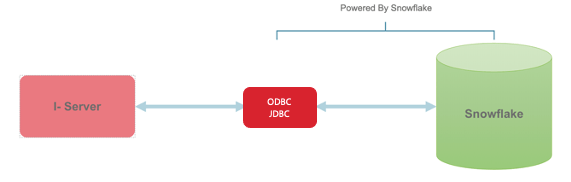
Starting in Strategy 2020 Update 2, the Snowflake ODBC driver is shipped to simplify the connectivity workflow. In Strategy 2021, Strategy ships Snowflake JDBC out of the box.
Always be aware of the latest driver version. For reference, refer to the Snowflake release notes.
This usually arises when you install drivers directly from the Snowflake website instead of the Strategy-provided drivers.
Issue: Strategy displays partial catalog names (e.g., database, schema, table)
Solution:
Note: If the customer is using the Strategy Intelligence Server on Linux/Unix, they should do the opposite of the above recommendation. That is, choose non-UTF8 for Unix.
When working with Snowflake (which might be like other Cloud databases), we found an additional delta time of up to 2 seconds to establish a JDBC database connection compared to on-prem installations. This time is required for spawning the JDBC wrapper and driver thread, completing the Cloud OSCP Certification check, and establishing proxy connection.
If you have additional questions, please reach out to the MicroStrategy or Snowflake community site.
For any Strategy Enhancement Requests, please log a case.
